Mobile menu
  • Solutions
    • Octopart Discover Go beyond part search to discover viable solutions, evaluate tradeoffs, and make better decisions earlier
    • Altium Develop Design advanced PCBs in Altium Designer, working independently or connecting reviewers, sourcing data, and release coordination when needed
    • Altium Agile Teams Bring structure to multidisciplinary electronics development and collaboration without sacrificing speed
    • Altium Agile Enterprise Connect context from intent through release with an intelligent, governed, extensible platform
  • Resources & Support
    Free Altium 365 Tools
    • Gerber Compare
    • Online PCB Viewer
    Resources & Support
    • Learning Hub
    • Support Center
    • Documentation
    • Webinars
    Altium Community
    • Forum
    • Bug Crunch
    • Ideas
  • Education & Training
    • Student Lab Free access to professional PCB design software, training, and learning resources for students
    • Educator Center A comprehensive education platform providing curriculum, software, training, and classroom resources for educators
    • Altium Education Curriculum Free college- and university-level PCB design curriculum designed to prepare students for real-world engineering careers
    • Altium Professional Training Flexible on-demand and instructor-led training courses that help engineers build and advance their PCB design skills
  • Search Open
    Search Close
Sign In
Webinars

Main menu

  • Home
  • PCB Design
    • Collaboration
    • Component Creation
    • Data Management
    • Design Outputs
    • ECAD/MCAD
    • HDI Design
    • High Speed Design
    • Multi-Board
    • PCB Layout
    • PCB Routing
    • PCB Supply Chain
    • Power Integrity
    • RF Design
    • Rigid Flex
    • Schematic Capture
    • Signal Integrity
    • Simulation
  • Software
    • Discover
    • Develop
    • Agile Teams
    • Agile Enterprise
    • Altium 365
    • Altium Designer
  • Education
    • Programs
    • Altium Academy
    • Engineering News
    • Guide Books
    • Newsletters
    • Podcasts
    • Projects
    • Training Courses
    • Webinars
    • Whitepapers
Learning Hub Webinars Beyond Length Matching: From Controlled Impedance to DDR4/DDR5 Signal Integrity Verification

Beyond Length Matching: From Controlled Impedance to DDR4/DDR5 Signal Integrity Verification

Length matching is only one part of a successful DDR interface. Controlled impedance, discontinuities, loss, and other layout effects can influence signal behavior. The correct electrical design target, including controlled impedance, is not always obvious from the standard or routing rules alone. 

In this practical session, we will work through a DDR4/DDR5 design and show how to approach SI verification directly within the PCB design workflow. 

Rather than focusing on individual features, the session follows the engineer's actual problem-solving process: identify what needs to be checked, prepare the design for analysis, examine the results, understand what they mean, and determine what should change in the PCB. 

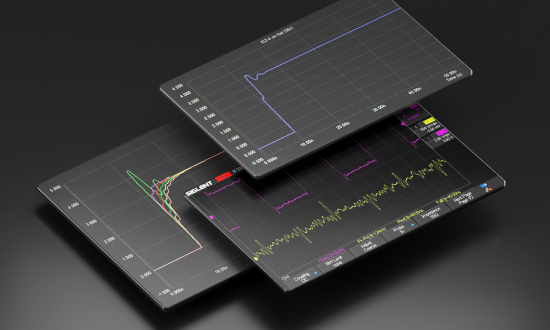
Using Signal Analyzer by Keysight within Altium Designer, we will demonstrate how integrated analysis can provide additional insight into high-speed signals before the design reaches prototype or physical validation.

What You'll Learn

  • Identify what matters in a DDR4/DDR5 design: Understand which signal integrity questions should be investigated beyond basic routing and length constraints. 
  • Prepare the design for meaningful analysis: See how stackup, nets and other design data affect the quality of the analysis. 
  • Evaluate critical signal behavior: Use Signal Analyzer to examine impedance and other relevant characteristics such as delay, insertion loss, and return loss on routed DDR signals. 
  • Turn results into design decisions: Learn how to interpret analysis results, identify potential root causes of SI problems, and determine what PCB changes should be considered. 
  • Understand when deeper analysis is needed: See where integrated design-stage analysis can support engineering decisions and when a more specialized verification approach may be appropriate. 

Why Attend?

  • Follow a real engineering workflow rather than a product feature walkthrough 
  • See signal integrity analysis applied to a practical DDR4/DDR5 design 
  • Learn how to move from an electrical analysis result to an actionable PCB decision 
  • Understand what design information is needed before electrical analysis becomes meaningful 
  • See how Signal Analyzer fits naturally into the Altium Designer workflow 
  • Ask questions directly during the live Q&A 

Who Should Attend?

  • PCB Designers working with  high-speed digital interfaces like DDR4/DDR5 
  • Hardware Engineers responsible for board-level signal and power integrity 
  • Technical Leads and Principal Engineers looking to introduce earlier electrical verification into the design process 
  • Engineers using Altium Designer who want a practical understanding of Signal Analyzer  
  • Engineering teams looking to reduce reliance on late-stage troubleshooting and better understand design behavior before prototype 

Reserve Your Spot

Join us for a practical walkthrough of DDR4/DDR5 signal integrity analysis and see how to move from design data to electrical analysis, interpretation, and an informed PCB design decision. 

Author

Author

Alexsander joined Altium as a Technical Marketing Engineer and brings years of engineering expertise to the team. His passion for electronics design combined with his practical business experience provides a unique perspective to the marketing team at Altium. Alexsander graduated from one of the top 20 universities in the world at UCSD where he earned a Bachelor’s degree in Electrical Engineering.

More content by Alexsander Tamari

Author

Author

Martin Malenica has a masters in electronic and computer engineering at the University of Zagreb. His previous experience consists of multiple embedded systems positions at robotics start-ups (Gideon with USD 35m in Seed and Series-A funding) and SMEs. His engineering strengths lie in system architecture, PCB design and embedded programming. Aside from engineering, Martin has spent the last 1.5 years working at a leading European management consulting firm, where he focused on strategies to support large OEMs and Tier-1s regarding the current semiconductor shortage across the whole EMEA region. Martin has practical experience within AD, but also a good understanding of competitor tools, especially on the procurement and supply chain side, like Everstream, Resilinc, Silicon Expert, Z2Data etc. Martin Joined Altium in 2023 as part of the Technical Sales team in Germany.

 

More content by Martin Malenica

Author

Author

Francesco holds a Master's degree in Electrical Engineering from EPFL, Switzerland. He is currently part of the Field Applications Engineering team at Altium. During his studies, his primary focus was on bioelectronics and the microfabrication of biomedical implants. After graduating, Francesco transitioned into a technical sales role with a global supplier and manufacturer of custom magnetics, where he was responsible for both technical and sales discussions, serving as the liaison between design engineers, manufacturing engineers, and customers.

More content by Francesco Cecchetti

Author

Author

Aiden은 대학에서 전자공학을 전공하였으며 PCB 설계 분야의 R&D로 7년 이상의 경험을 가지고 있습니다. 그는 전자 제품을 위한 SMPS, 인버터, 컨버터 설계 경험이 있습니다. 제품 프로젝트를 이끌었으며 설계, 관리, 인증 제품 테스트와 같은 모든 작업을 경험했습니다. 그리고 한국 리셀러(Hancom Intelligence) 팀에서 4년 이상 Altium Designer 사용자들을 위한 기술 지원 및 교육을 제공했습니다. Concord Pro와 Altium 365를 사용하여 PLM 요구 사항에 대한 컨설팅 및 지원을 했습니다. 또한 Altium Designer에 대한 수십 차례의 교육 및 웨비나를 경험했습니다.
Aiden은 2022년 11월부터 Altium에서 기술 영업 엔지니어로 근무하고 있으며 현재 한국 사무소에 근무하고 있습니다.

More content by Aiden Oh

Author

Author

Daniel joined Altium in 2019 as an Application engineer and moved into the Technical Sales role in the same year. Daniel provides technical assistance for sales, third party distributors, and customers in the Asia Pacific region (APAC) and is based in the Altium Tokyo, Japan office. Daniel has experience with PCB,  FPGA, and ASIC design in telecommunication and Information industries. 

 

More content by Daniel Cho

Author

Author

After completing his master’s degree on the power system of a microsatellite in South Africa, he worked in the biomedical and automotive sport industries in the UK and the telecoms industry in Germany and Finland. Back in South Africa he worked in the mining, military and aerospace industries, finally finding his niche in the agricultural sector. With 30+ years experience, he loves the design and development of power supplies and battery 
More content by Rean Bootsma
Signal Analyzer Webinar
JUN
CET
No result.
View All Dates

Registration has recently closed. Check back soon for on-demand webinar.

Related Resources

Building Safer Hardware: Connecting Electronic Design with Automated Safety Analysis How can engineering teams identify potential failures and build safer, more reliable hardware?
November 17, 2026 11:00 AM Register
Streamline Requests, Reviews, Approvals, and Releases with Workflow Automation Engineering teams often rely on emails, spreadsheets, and manual follow-ups to manage requests, reviews, approvals, and release processes. November 19, 2026 3:00 PM Register
Beyond ECAD: How Altium Agile Teams optimizes your engineering process Altium Agile Teams, a product platform, helps optimize the entire development lifecycle across departments. Multiple Dates and Times November 19, 2026 10:00 AM Register
00:38:06 Altium Agile Teams: Solution Overview Get an overview of this new Electronic Product Development Platform. Watch Video
00:56:06 Collaboration Lessons from a Hardware Design CEO A CEO’s Story About How a Design Service Bureau Puts Collaboration First Watch Video
Core Altium Designer Basics: Getting Started with PCB Design Every Great PCB Design Starts With the Basics. Learn the Tools to Get There. Watch Video
00:36:16 Transform BOM Reviews with Real-Time Supply Chain Intelligence and Collaboration A Bill of Materials (BOM) is more than a list of components. It is the foundation for sourcing, procurement, manufacturing, and product delivery.
Watch Video
00:39:52 Sustainability & Energy Efficiency in Electronic Product Development Watch Video
00:44:59 Streamline your customer relation with Altium 365 Enterprise Join our webinar designed for engineers and users in EMS companies Watch Video
00:33:23 Eliminate the Design-to-Production Gap with Agile Teams + Duro See how Agile Teams and Duro PLM unify design and production workflows with a connected, system-driven approach. Watch Video

Related Technical Documentation

Altium 365 Platform Interface Altium 365 Platform Interface

Get familiar with the Altium 365 browser-based interface, from registering an Altium Account and signing in to accessing your Personal Space and available Workspaces. This article introduces the interface’s main navigation areas, account controls, and ways to switch between Workspaces, with details on supported sign-in methods and administrator-controlled authentication. Keep reading to navigate…

Read Documentation
Managing Workspace Membership Managing Workspace Membership

Learn how administrators manage Altium 365 Workspace membership through the browser’s Team and Admin areas, from inviting users to updating their group memberships and removing access, as well as handling 'guest' access. This article also explains how to review a member’s accessible projects and transfer ownership of Workspace items when removing a member. Keep reading to manage your Workspace…

Read Documentation
QuickNav - Platform Key Capabilities QuickNav - Platform Key Capabilities

Explore the key capabilities of the Altium Platform (Altium 365), from managing design content and reviewing BOMs to integrating parts data and supporting board assembly. This quick-reference guide groups capabilities into portals, extensions, and core features, with links to detailed documentation so you can find the information you need. Availability depends on your subscribed Altium solution…

Read Documentation
Self-service Upgrade to the Altium Develop Platform Solution Self-service Upgrade to the Altium Develop Platform Solution

Eligible Group Administrators can upgrade their organization’s Altium account to Altium Develop through a self-service process. This article explains the eligibility requirements, what happens to existing Workspace data, users, and licenses, and the steps to complete the upgrade, including when no Workspace exists. Read on to see whether your organization qualifies and understand how to get…

Read Documentation
Rehosting Customer Workspace Data to Altium 365 GovCloud Rehosting Customer Workspace Data to Altium 365 GovCloud

Moving your on-premise Workspace data to Altium 365 GovCloud involves coordinated backups, data validation, and a planned blackout period. This guide walks you through the six stages of rehosting, explains how you and your Customer Success Manager work together, and outlines a process in which data is handled only by US Persons on US Soil. Read on to prepare for each stage and approach your…

Read Documentation
Rehosting Your Self-managed Workspace Data to the Altium 365 Platform Rehosting Your Self-managed Workspace Data to the Altium 365 Platform

Moving your self-managed Altium Workspace data to Altium 365 can reduce local infrastructure burdens and help your team work from anywhere. This article outlines the guided rehosting process, typically taking 3–5 days depending on data volume and complexity, from preparing backups and verifying data to planning a blackout period and accessing your new Workspace. Read on to understand what’s…

Read Documentation
Altium 365 Onboarding Process Altium 365 Onboarding Process

Discover how personalized Altium 365 onboarding helps your team integrate the platform into everyday design workflows. For customers whose purchased software level includes access to a Customer Success Manager (CSM), this article outlines the process from defining goals and setting milestones to initial training, follow-up sessions, and technical assistance. Keep reading to understand what to…

Read Documentation
FAQs FAQs

Find answers to common Altium 365 questions, from Workspace activation and connectivity to data protection, offline access, and component management. This FAQ also explains how to share manufacturing packages and points you to documentation and support resources for more detail. Keep reading to get practical guidance and move forward with greater confidence in your Altium 365 workflow. - Learn…

Read Documentation
Viewers Troubleshooting Guide Viewers Troubleshooting Guide

Having trouble viewing designs in Altium 365 Viewer or the platform’s Web Viewer? This guide walks you through checking WebGL support, enabling browser hardware acceleration, and using your dedicated graphics card to support smoother 3D viewing. Keep reading to identify the settings that could improve your viewing experience. - Learn how to check WebGL status and hardware acceleration settings in…

Read Documentation
Standalone Gerber Compare Standalone Gerber Compare

Compare PCB fabrication outputs between releases or before sending your board data to manufacture with the free, browser-based Altium 365 Gerber Compare viewer. This article explains how to upload two Gerber datasets, explore color-coded differences by layer, and measure distances in the comparison or individual source views, without downloads, installation, or registration. Keep reading to learn…

Read Documentation

Beyond Length Matching: From Controlled Impedance to DDR4/DDR5 Signal Integrity Verification

Created: October 20, 2026
At a Glance
See how to investigate signal integrity on a real DDR4/DDR5 design and turn electrical analysis results into practical PCB design decisions.
Go Deeper with AI:
ChatGPT Perplexity Claude Gemini Grok
1 video
  • Hosted by Alexsander Tamari - Technical Marketing Engineer
    00:28:12 • Nov 3, 2026
    Hosted by Alexsander Tamari - Technical Marketing Engineer
    00:28:12 • Nov 3, 2026
Product: Webinars Altium Agile Teams Simulation and Analysis Signal Integrity PCB Design Engineers Simulation Engineers

Length matching is only one part of a successful DDR interface. Controlled impedance, discontinuities, loss, and other layout effects can influence signal behavior. The correct electrical design target, including controlled impedance, is not always obvious from the standard or routing rules alone. 

In this practical session, we will work through a DDR4/DDR5 design and show how to approach SI verification directly within the PCB design workflow. 

Rather than focusing on individual features, the session follows the engineer's actual problem-solving process: identify what needs to be checked, prepare the design for analysis, examine the results, understand what they mean, and determine what should change in the PCB. 

Using Signal Analyzer by Keysight within Altium Designer, we will demonstrate how integrated analysis can provide additional insight into high-speed signals before the design reaches prototype or physical validation.

What You'll Learn

  • Identify what matters in a DDR4/DDR5 design: Understand which signal integrity questions should be investigated beyond basic routing and length constraints. 
  • Prepare the design for meaningful analysis: See how stackup, nets and other design data affect the quality of the analysis. 
  • Evaluate critical signal behavior: Use Signal Analyzer to examine impedance and other relevant characteristics such as delay, insertion loss, and return loss on routed DDR signals. 
  • Turn results into design decisions: Learn how to interpret analysis results, identify potential root causes of SI problems, and determine what PCB changes should be considered. 
  • Understand when deeper analysis is needed: See where integrated design-stage analysis can support engineering decisions and when a more specialized verification approach may be appropriate. 

Why Attend?

  • Follow a real engineering workflow rather than a product feature walkthrough 
  • See signal integrity analysis applied to a practical DDR4/DDR5 design 
  • Learn how to move from an electrical analysis result to an actionable PCB decision 
  • Understand what design information is needed before electrical analysis becomes meaningful 
  • See how Signal Analyzer fits naturally into the Altium Designer workflow 

Who Should Attend?

  • PCB Designers working with  high-speed digital interfaces like DDR4/DDR5 
  • Hardware Engineers responsible for board-level signal and power integrity 
  • Technical Leads and Principal Engineers looking to introduce earlier electrical verification into the design process 
  • Engineers using Altium Designer who want a practical understanding of Signal Analyzer  
  • Engineering teams looking to reduce reliance on late-stage troubleshooting and better understand design behavior before prototype 

Author

Author

Alexsander joined Altium as a Technical Marketing Engineer and brings years of engineering expertise to the team. His passion for electronics design combined with his practical business experience provides a unique perspective to the marketing team at Altium. Alexsander graduated from one of the top 20 universities in the world at UCSD where he earned a Bachelor’s degree in Electrical Engineering.

More content by Alexsander Tamari

Related Resources

Building Safer Hardware: Connecting Electronic Design with Automated Safety Analysis How can engineering teams identify potential failures and build safer, more reliable hardware?
November 17, 2026 11:00 AM Register
Streamline Requests, Reviews, Approvals, and Releases with Workflow Automation Engineering teams often rely on emails, spreadsheets, and manual follow-ups to manage requests, reviews, approvals, and release processes. November 19, 2026 3:00 PM Register
Beyond ECAD: How Altium Agile Teams optimizes your engineering process Altium Agile Teams, a product platform, helps optimize the entire development lifecycle across departments. Multiple Dates and Times November 19, 2026 10:00 AM Register
00:38:06 Altium Agile Teams: Solution Overview Get an overview of this new Electronic Product Development Platform. Watch Video
00:56:06 Collaboration Lessons from a Hardware Design CEO A CEO’s Story About How a Design Service Bureau Puts Collaboration First Watch Video
Core Altium Designer Basics: Getting Started with PCB Design Every Great PCB Design Starts With the Basics. Learn the Tools to Get There. Watch Video
00:36:16 Transform BOM Reviews with Real-Time Supply Chain Intelligence and Collaboration A Bill of Materials (BOM) is more than a list of components. It is the foundation for sourcing, procurement, manufacturing, and product delivery.
Watch Video
00:39:52 Sustainability & Energy Efficiency in Electronic Product Development Watch Video
00:44:59 Streamline your customer relation with Altium 365 Enterprise Join our webinar designed for engineers and users in EMS companies Watch Video
00:33:23 Eliminate the Design-to-Production Gap with Agile Teams + Duro See how Agile Teams and Duro PLM unify design and production workflows with a connected, system-driven approach. Watch Video

Related Technical Documentation

Altium 365 Platform Interface Altium 365 Platform Interface

Get familiar with the Altium 365 browser-based interface, from registering an Altium Account and signing in to accessing your Personal Space and available Workspaces. This article introduces the interface’s main navigation areas, account controls, and ways to switch between Workspaces, with details on supported sign-in methods and administrator-controlled authentication. Keep reading to navigate…

Read Documentation
Managing Workspace Membership Managing Workspace Membership

Learn how administrators manage Altium 365 Workspace membership through the browser’s Team and Admin areas, from inviting users to updating their group memberships and removing access, as well as handling 'guest' access. This article also explains how to review a member’s accessible projects and transfer ownership of Workspace items when removing a member. Keep reading to manage your Workspace…

Read Documentation
QuickNav - Platform Key Capabilities QuickNav - Platform Key Capabilities

Explore the key capabilities of the Altium Platform (Altium 365), from managing design content and reviewing BOMs to integrating parts data and supporting board assembly. This quick-reference guide groups capabilities into portals, extensions, and core features, with links to detailed documentation so you can find the information you need. Availability depends on your subscribed Altium solution…

Read Documentation
Self-service Upgrade to the Altium Develop Platform Solution Self-service Upgrade to the Altium Develop Platform Solution

Eligible Group Administrators can upgrade their organization’s Altium account to Altium Develop through a self-service process. This article explains the eligibility requirements, what happens to existing Workspace data, users, and licenses, and the steps to complete the upgrade, including when no Workspace exists. Read on to see whether your organization qualifies and understand how to get…

Read Documentation
Rehosting Customer Workspace Data to Altium 365 GovCloud Rehosting Customer Workspace Data to Altium 365 GovCloud

Moving your on-premise Workspace data to Altium 365 GovCloud involves coordinated backups, data validation, and a planned blackout period. This guide walks you through the six stages of rehosting, explains how you and your Customer Success Manager work together, and outlines a process in which data is handled only by US Persons on US Soil. Read on to prepare for each stage and approach your…

Read Documentation
Rehosting Your Self-managed Workspace Data to the Altium 365 Platform Rehosting Your Self-managed Workspace Data to the Altium 365 Platform

Moving your self-managed Altium Workspace data to Altium 365 can reduce local infrastructure burdens and help your team work from anywhere. This article outlines the guided rehosting process, typically taking 3–5 days depending on data volume and complexity, from preparing backups and verifying data to planning a blackout period and accessing your new Workspace. Read on to understand what’s…

Read Documentation
Altium 365 Onboarding Process Altium 365 Onboarding Process

Discover how personalized Altium 365 onboarding helps your team integrate the platform into everyday design workflows. For customers whose purchased software level includes access to a Customer Success Manager (CSM), this article outlines the process from defining goals and setting milestones to initial training, follow-up sessions, and technical assistance. Keep reading to understand what to…

Read Documentation
FAQs FAQs

Find answers to common Altium 365 questions, from Workspace activation and connectivity to data protection, offline access, and component management. This FAQ also explains how to share manufacturing packages and points you to documentation and support resources for more detail. Keep reading to get practical guidance and move forward with greater confidence in your Altium 365 workflow. - Learn…

Read Documentation
Viewers Troubleshooting Guide Viewers Troubleshooting Guide

Having trouble viewing designs in Altium 365 Viewer or the platform’s Web Viewer? This guide walks you through checking WebGL support, enabling browser hardware acceleration, and using your dedicated graphics card to support smoother 3D viewing. Keep reading to identify the settings that could improve your viewing experience. - Learn how to check WebGL status and hardware acceleration settings in…

Read Documentation
Standalone Gerber Compare Standalone Gerber Compare

Compare PCB fabrication outputs between releases or before sending your board data to manufacture with the free, browser-based Altium 365 Gerber Compare viewer. This article explains how to upload two Gerber datasets, explore color-coded differences by layer, and measure distances in the comparison or individual source views, without downloads, installation, or registration. Keep reading to learn…

Read Documentation
Back to Home
Altium logo

Solutions for Every Role and Team

  • Discover and evaluate design options earlier
  • Develop in one shared workspace
  • Scale with control and compliance
  • Connect every stage of hardware development

Learn More
Altium Agile Teams
Speed at Scale. Structured Repeatability. Secure Flexibility.

 A unified platform for advanced multidisciplinary collaboration

Learn More
Platform-based Solutions
  • Octopart Discover
  • Altium Develop
  • Altium Agile Teams
  • Altium Agile Enterprise
Tools
  • Altium Designer
  • Octopart
Platform
  • Altium 365
Company
  • Our Customers
  • Trust Center
  • Newsroom
Software Capabilities
  • PCB Layout and Design
  • Requirements Management
  • Electronics Data Management
  • IT Security
  • Electronics Manufacturing
  • Electronics Supply Chain
  • Engineering Management
Resources & Support
  • Status
  • Downloads
  • Learning Hub
  • Support Center
  • Bug Crunch
  • Forum
  • Documentation
  • Ideas
  • Education
  • Professional Training / Certification
  • Webinars
  • Beta Program
Education
  • Student Lab
  • Educator Center
  • Altium Education Curriculum
Careers
  • Career at Altium
  • Copyrights & Trademark
  • Privacy policy
  • Cookie policy
  • Terms of Service
  • Legal
© 2026 Altium LLC.
