








Find Supply Risks Before They Cost You a Board Respin

At a Glance
In this article, readers will learn how to proactively identify and address sourcing risks in hardware design before they escalate into costly production issues. By integrating effective BOM management techniques and tools, engineers can ensure that parts are available in the necessary quantities, verify alternatives before finalizing designs, and avoid the pitfalls of component shortages that can lead to costly design revisions or board respins.
Key Takeaways:
- Check sourcing early in the design process to avoid costly changes later on
- Use a BOM management tool to keep track of part availability and to ensure current data at every design review
- Collaborate with procurement to confirm that parts meet production demands and to evaluate alternatives proactively
Stay informed and empowered by continuing to read, because mastering these techniques can lead to smoother project execution and significant cost savings in your hardware designs.


Midway through schematic capture, a hardware engineer settles on a board-edge connector that meets the electrical and mechanical requirements, and she orders 10 for the prototype build. Three weeks later, with layout set to start in two weeks, procurement prices the first production run. The build needs 2,000 units, the preferred distributor shows 600 in stock, and both candidate alternates have footprints that differ from the original part.
The sourcing work was recorded in a static spreadsheet and relied on data from a dozen browser tabs, so each time someone picked it back up, they had to look up current distributor offers for every part before they could continue.
When every pass through the BOM starts with that kind of manual lookup, sourcing checks tend to wait until procurement prices the build, and that’s when problematic shortfalls (like the one our hardware engineer is facing) surface. In contrast, catching a shortfall early gives you time to evaluate alternates before the design is frozen and the layout depends on the original footprint.
A BOM management tool makes that check much easier to repeat at every design review.
Key Takeaways
- Check sourcing before layout. Changing a component afterward can mean rerouting, an engineering change order (ECO), or even a board respin.
- Vet each part before you commit to its footprint. Review lifecycle status, stock at planned build quantities, MOQs, and alternate-part compatibility.
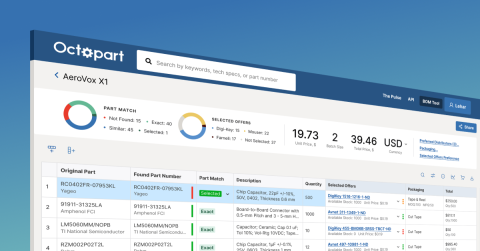
- Save your BOM and reopen it at every design review. With a free Octopart account, the BOM Tool keeps your BOM and shows current parts data each time you reopen it.
- Export a dated copy before each new upload. The BOM Tool holds one saved BOM, and a new upload replaces it, so your dated exports are the record of what you reviewed.
How to Catch Shortfalls Before Layout
Changing a component is usually cheapest before layout. At that point, swapping a connector involves evaluating the alternate and updating the part number and footprint. After layout, the same swap can require new placement, rerouted traces, another engineering review, an ECO, and a fresh round of prototypes, each with its own cost and schedule impact. Two habits help you find sourcing problems while a swap stays at the schematic stage.
Price the Production Run Early
A prototype buy covers the small quantities you need right away. A production run involves a larger quantity, a delivery date, and often different purchasing terms, so a connector that was easy to buy at 10 units may require a different source at 2,000 units.
Checking current stock at your production quantity during schematic capture finds a shortfall like the connector’s weeks earlier.
Vet Alternates While the Footprint Can Change
Many teams start looking for alternates only after the primary part goes out of stock. By then, an alternate with a different footprint can require a design change, a BOM update, and another round of sourcing. A board-edge connector is a good example because its footprint ties into the board outline, the mating cable or card, and the enclosure opening.
In our scenario, an early review gives time to check each alternate’s electrical compatibility, mating hardware, enclosure fit, and qualification requirements while the footprint is still open to change. Once placement and routing are built around the original part, those checks compete with the production schedule.
What to Check in Your BOM Before Freeze
A pre-freeze BOM review involves both teams. Engineering confirms that each part and its alternates fit the design, while procurement confirms that the part can be bought at production volume. Before you start, agree on the planned build quantity, and include extra units for assembly losses and spares. (For the broader part-selection process, see how to choose the right components for your BOM.)
Engineering verifies:
- Lifecycle status (Active, NRND, EOL)
- Candidate alternates: footprint, electrical, and mechanical compatibility, plus qualification requirements
- RoHS and REACH compliance
Procurement owns:
- Stock depth across multiple distributors at planned build quantities
- MOQ, packaging, and price breaks at prototype and production quantities
- Lead times and confirmed delivery dates for any quantity not available from stock
- Preferred-distributor coverage
The production-quantity check shows the connector’s 1,400-unit shortfall at the preferred distributor while the team still has time to find another source or qualify a different part. For any line that comes back NRND, EOL, or short at volume, the guide to identifying and replacing at-risk components covers how to find and evaluate alternates before the footprint is final.
Save Your BOM for the Next Design Review
Spreadsheets remain the default tool many teams use to track their sourcing data. In a 2024 internal Altium survey of 120 procurement professionals, 74% said they rely solely on email and Excel to manage RFQs with their contract manufacturer or EMS provider.
Stock and pricing in a spreadsheet quickly go stale, and by the next design review those numbers can be weeks old. A BOM management tool solves this problem by populating a reopened BOM with current distributor offers for every line.
Upload Once and Reopen Later
With a free Octopart account, you can upload your working BOM to the Octopart BOM Tool, save it, and reopen it whenever the design changes. The tool accepts XLSX, CSV, or JSON files up to 5 MB, and your BOM can hold up to 500 unique parts. Our guide to getting started with the BOM Tool covers the upload steps.
The saved BOM provides data for both checklists. Each line shows a part’s lifecycle status, and the Analytics view summarizes lifecycle, RoHS, and REACH across the full BOM. The BOM Tool can suggest alternates for a line, while engineering decides which to evaluate and use. For comparing offers across build quantities, see how to get the best component pricing with the tool.
Keep Dated Exports as a Revision Record
The tool keeps one saved BOM, and a new upload replaces it. To keep a history, use Export to save a dated copy before you upload a new version. The exported file preserves your original columns and adds offer links, so each dated copy records which parts the team reviewed on that date. Make the export a standing step at every design milestone.
Share Your BOM With Procurement Before Freeze
When procurement needs to weigh in, share a link so both teams work from the same parts list. The link expires after 48 hours, so share it close to the meeting. In the message with the link, include the build quantity, target delivery date, and any parts that need attention so procurement knows where to focus.
Lock In Your BOM Before You Lock In Your Layout
Back to the connector: before layout starts, the engineer reopens the saved BOM and shares it with procurement, who finds a second distributor carrying the same MPN in enough volume to cover the remaining 1,400 units. The footprint stays, and the connector is ready for layout. If no distributor could have covered the shortfall, engineering would have qualified an alternate and updated the footprint before layout began. The team would then add the new part to the saved BOM, so the next check starts from the current design.
Start Your Pre-Freeze Review
Reopen your saved BOM at every design review. Before you place an order, confirm current stock and terms on the distributor’s site, since availability can change after the review.
For a part that comes up short, click its MPN in the BOM, then click the link icon at the right of the matching part’s box to open its part page. Click Watch to get an email when a distributor’s stock reaches the quantity you set. Alerts are set from individual part pages, so saving the BOM doesn’t create them. See Get Pinged When Your Component Is Back in Stock for how alerts work.
Create your free Octopart account to save your BOM and run your first pre-freeze review.

About Author
Related Resources
Related Technical Documentation
Table of Contents
Solutions for Every Role and Team
- Discover and evaluate design options earlier
- Develop in one shared workspace
- Scale with control and compliance
- Connect every stage of hardware development
Learn More
Thank you, you are now subscribed to updates.