

Mobile menu
  • Solutions
    • Octopart Discover Go beyond part search to discover viable solutions, evaluate tradeoffs, and make better decisions earlier
    • Altium Develop Design advanced PCBs in Altium Designer, working independently or connecting reviewers, sourcing data, and release coordination when needed
    • Altium Agile Teams Bring structure to multidisciplinary electronics development and collaboration without sacrificing speed
    • Altium Agile Enterprise Connect context from intent through release with an intelligent, governed, extensible platform
  • Resources & Support
    Free Altium 365 Tools
    • Gerber Compare
    • Online PCB Viewer
    Resources & Support
    • Learning Hub
    • Support Center
    • Documentation
    • Webinars
    Altium Community
    • Forum
    • Bug Crunch
    • Ideas
  • Education & Training
    • Student Lab Free access to professional PCB design software, training, and learning resources for students
    • Educator Center A comprehensive education platform providing curriculum, software, training, and classroom resources for educators
    • Altium Education Curriculum Free college- and university-level PCB design curriculum designed to prepare students for real-world engineering careers
    • Altium Professional Training Flexible on-demand and instructor-led training courses that help engineers build and advance their PCB design skills
  • Search Open
    Search Close
Sign In
tofu - Top of Funnel

Main menu

  • Home
  • PCB Design
    • Collaboration
    • Component Creation
    • Data Management
    • Design Outputs
    • ECAD/MCAD
    • HDI Design
    • High Speed Design
    • Multi-Board
    • PCB Layout
    • PCB Routing
    • PCB Supply Chain
    • Power Integrity
    • RF Design
    • Rigid Flex
    • Schematic Capture
    • Signal Integrity
    • Simulation
  • Software
    • Discover
    • Develop
    • Agile Teams
    • Agile Enterprise
    • Altium 365
    • Altium Designer
  • Education
    • Programs
    • Altium Academy
    • Engineering News
    • Guide Books
    • Newsletters
    • Podcasts
    • Projects
    • Training Courses
    • Webinars
    • Whitepapers
Learning Hub tofu - Top of Funnel Just Ask Duro’s MCP: Set Up & Configure Your PLM in Plain English

Just Ask Duro’s MCP: Set Up & Configure Your PLM in Plain English

Product Lifecycle Management (PLM) platforms have always been a powerful way to connect your entire tech stack. But with great power, often comes great intimidation. “What if I mess something up?” is a common worry when it comes to dealing with a single source of truth for your BOMs, revisions, and other crucial files.

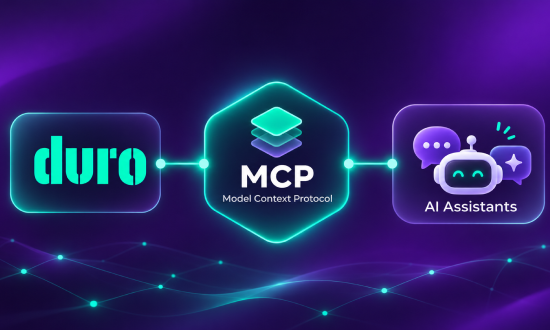
Fortunately, Duro’s PLM has evolved a new skillset to help alleviate this fear, especially for less tech savvy and novice users. Duro’s MCP (Model Context Protocol) now makes it possible for you to use plain, natural language to configure your PLM to your liking, and to get real work done without having to be a senior engineer or have years of experience configuring PLM systems.

Ask natural questions to configure your account, such as:

  • “What CPN schemes does Duro support, and which one fits a team that already uses 6-digit numbers with a category prefix?”
  • “Set up revisions so prototypes use numbers and production parts use letters. Show me what that looks like before you apply it.”
  • “We build robotics hardware. What part categories should we start with, and what can I add later?”
  • “Explain how Duro’s change order workflow works, then set up one where engineering and manufacturing both have to approve.”

And onboard existing data just as easily:

  • “Here’s our top-level BOM from SolidWorks. Before importing anything, tell me how Duro will interpret each column.”
  • “Do a dry run of this import and flag duplicates, missing manufacturer part numbers, and anything that won’t map cleanly.”
  • “Our part numbers don’t match the CPN scheme we just set up. Can I keep the legacy numbers and still use the new scheme going forward?”
  • “Import only the subassemblies first so I can check the results before loading the full 2,000-line BOM.”

This webinar features Duro’s tech leadership performing a live demonstration of just how easy it is to install Duro MCP to your LLM of choice, along with adding workspace plugins such as Slack, to get your team interfacing with your PLM in plain language.

Author

Author


Michael Corr is the Founder of Duro, an AI-native, API-first PLM platform helping hardware teams streamline design and manufacturing. With over 20 years of experience in hardware engineering and product development, he founded Duro to modernize how teams manage product data, collaboration, and change processes.
More content by Michael Corr
Just Ask Duro
JUN
CET
No result.
View All Dates

Registration has recently closed. Check back soon for on-demand webinar.

Related Resources

44:22 Digitally Connecting ECAD-MCAD Collaboration Key Takeaways Most companies still exchange ECAD and MCAD data as files (STEP, IDF, DXF, IDX), which is slow, error-prone, and leaves no lasting record of decisions. Altium MCAD CoDesigner replaces file exchange with a server-managed push-pull process, so only incremental updates move between the two domains after the first baseline. Every change is previewed, accepted or rejected, and retained with the project for its lifetime. Altium Agile Watch Video
00:54:07 Simplify Your Workflows: Altium 365 Cloud PLM Integration with Duro® Watch the webinar to discover how Altium 365 Cloud PLM Integration with Duro® can optimize your electronics product development processes. Discover the connection between Altium 365 and a leading Cloud PLM system designed to automate data flow, eliminate manual input, and minimize errors that lead to costly rework. Watch Video
Altium Designer & Altium Platform: Understanding the Complete PCB Design Ecosystem Modern PCB Design Goes Beyond Schematics and Layout. Your Workflow Should Too. Watch Video
28:03 Faster Design, Fewer Errors with Requirements & Systems Portal Do you need help with disjointed design and requirement processes? We have exciting news for you! Altium Requirements Portal connects design data and requirements for faster design with fewer errors. Watch our webinar and learn how to connect your live design and requirements workflow to implement design intent better and comply with industry standards. Here's what you can expect: Resolving Modern Design Process Challenges Connecting Design and Watch Video
00:48:46 Iterate Faster in Complex Engineering Projects Learn how Valispace is transforming the world of requirements and systems engineering, enabling teams to do super fast design iterations and develop quality products while ensuring they comply with standards and regulations. Watch Video
00:53:41 Bridge the Gap Between Engineering and Procurement: Altium 365 BOM Portal Watch the webinar to learn how to make informed decisions and mitigate supply chain risks with Altium 365 BOM Portal, BOM management application purpose-built for electronics engineering and procurement. Improve your time to market and proactively manage electronic component supply chain risks. Watch Video
Design PCBs and Meet US Government Requirements with Altium 365 GovCloudWebinar Cover Photo How to Design PCBs and Meet US Government Requirements with Altium 365 GovCloud Watch our informative webinar and discover how Altium 365 GovCloud can assist you in PCB design while ensuring compliance with US government regulations. Altium 365 GovCloud is a specialized region of the Altium 365 cloud platform designed for regulated companies and organizations handling sensitive data. It is located on US soil and exclusively managed by US persons, and it helps organizations ensure compliance with various US government Watch Video
57:29 Overcoming Production Blockers: How Altium 365 & Basler AR Accelerate Last-Minute Design Changes Has a component shortage or unexpected part EOL caused a design change at the last minute? Watch our webinar to learn how to solve this problem and overcome production blockers with Altium 365 and Basler AR! Watch Video
46:21 Designing Structural Electronics Explore structural electronics in this on-demand webinar. Learn how IMSE reduces cost, weight & enables smart surfaces with Altium. Watch Video
Webinar Cover Photo Bridge the Information Divide: Altium 365 Meets Z2Data Watch the webinar and learn how Z2Data integration can help you build resilience in engineering, compliance, and procurement through the comprehensive supply chain and component data. Speakers Grace Gladue, Sr. Product Marketing Manager at Altium 365 Pavel Polischuk, Product Manager at Altium 365 Guest Speaker Arjun Peruvemba - Product Marketing Specialist, Z2Data Brandon Nader - Sr. Director of Marketing, Z2Data The founders of Z2Data bring over Watch Video

Related Technical Documentation

Altium 365 Platform Interface Altium 365 Platform Interface

Get familiar with the Altium 365 browser-based interface, from registering an Altium Account and signing in to accessing your Personal Space and available Workspaces. This article introduces the interface’s main navigation areas, account controls, and ways to switch between Workspaces, with details on supported sign-in methods and administrator-controlled authentication. Keep reading to navigate…

Read Documentation
New in CoDesigner New in CoDesigner

Altium's MCAD CoDesigner technology connects the mechanical and electrical design domains, allowing the mechanical and electronic engineers to pass the loaded PCB back and forth between the two domains. In your Altium design software, this is achieved through an extension that loads and extracts board and component data from the PCB editor, the MCAD CoDesigner extension. In the MCAD software the…

Read Documentation
New in Requirements Portal New in Requirements Portal

Requirements Portal is under continuous development. This page outlines new features and enhancements made to Requirements Portal in key updates. 2.60, at the release: remove the box below, leave the content. Update - 12 November 2026 Simple Start In this release, the concept of Simple Start has been implemented in order to make establishing a requirements project easier and make the required…

Read Documentation
Project Git Access Project Git Access

Altium 365 can host a Git repository for your project's source files. Altium Designer works with these repositories as a native client, but you can also work with them like any other Git remote — clone, pull, push, etc. with the standard Git client. This page shows how to: Discover a project's repository URL through the Altium 365 API. Authenticate Git requests using an Altium 365 access token…

Read Documentation
OAuth Scopes OAuth Scopes

Scopes define what an access token is authorized to do. The Altium 365 API validates scopes on every request – a token without the required scope for an operation will receive an authorization error. Scopes are assigned by the platform based on the context in which a token is issued. You don't select scopes manually, but you will encounter them when inspecting tokens and when working with the API…

Read Documentation
Using a Refresh Token Using a Refresh Token

The refresh token flow is a more secure way to authorize API requests. Instead of using a single long-lived credential directly, you exchange a refresh token for a short-lived access token. When that access token expires, you exchange again. Note that the refresh token cannot be used by itself to authorize API requests; it always has to be exchanged for a refresh token first. To use this flow,…

Read Documentation
Using an Access Token Using an Access Token

An access token authorizes requests to Altium 365 API. You include it in every request as a bearer token in the Authorization header. Access tokens can be obtained in two ways: Directly – when you create a long-lived access token in Admin → Developer Via exchange – when you use a refresh token to generate a short-lived access token (which will not be listed under Admin → Developer) The…

Read Documentation
Tokens Tokens

Tokens are credentials used to authorize requests to the Altium 365 API. All API requests must include a valid token in the Authorization header. Tokens are created in your Workspace under Admin → Developer. Only Workspace administrators can create tokens. Tokens are shown once. At creation, the token value is displayed once and is never stored or retrievable by Altium. Copy and store it securely…

Read Documentation
GRID GRID

A GRID (Global Resource ID) is a globally unique, stable identifier for any entity on the Altium platform – a project, a component, a BOM, a task, and so on. Why GRIDs Exist Platform entities typically carry local identifiers (GUIDs, numeric IDs) that are unique only within their own context. A project GUID is not globally unique – two projects in different Workspaces can share the same GUID. A…

Read Documentation
Realms Realms

A realm is a named, isolated logical instance of Altium 365. Every Workspace belongs to exactly one realm, and all data within that Workspace is stored and processed within it. Why Realms Exist Altium 365 operates across multiple geographies and deployment models. Historically, the term region was used to refer to a single instance of Altium 365 per geography – one for Europe, one for the US, and…

Read Documentation

Just Ask Duro’s MCP: Set Up & Configure Your PLM in Plain English

Created: November 11, 2026
Go Deeper with AI:
ChatGPT Perplexity Claude Gemini Grok
Product: Webinars Data Management and Version Control Data Management PLM Integration Lifecycle Management

Product Lifecycle Management (PLM) platforms have always been a powerful way to connect your entire tech stack. But with great power, often comes great intimidation. “What if I mess something up?” is a common worry when it comes to dealing with a single source of truth for your BOMs, revisions, and other crucial files.

Fortunately, Duro’s PLM has evolved a new skillset to help alleviate this fear, especially for less tech savvy and novice users. Duro’s MCP (Model Context Protocol) now makes it possible for you to use plain, natural language to configure your PLM to your liking, and to get real work done without having to be a senior engineer or have years of experience configuring PLM systems.

Ask natural questions to configure your account, such as:

  • “What CPN schemes does Duro support, and which one fits a team that already uses 6-digit numbers with a category prefix?”
  • “Set up revisions so prototypes use numbers and production parts use letters. Show me what that looks like before you apply it.”
  • “We build robotics hardware. What part categories should we start with, and what can I add later?”
  • “Explain how Duro’s change order workflow works, then set up one where engineering and manufacturing both have to approve.”

And onboard existing data just as easily:

  • “Here’s our top-level BOM from SolidWorks. Before importing anything, tell me how Duro will interpret each column.”
  • “Do a dry run of this import and flag duplicates, missing manufacturer part numbers, and anything that won’t map cleanly.”
  • “Our part numbers don’t match the CPN scheme we just set up. Can I keep the legacy numbers and still use the new scheme going forward?”
  • “Import only the subassemblies first so I can check the results before loading the full 2,000-line BOM.”

This webinar features Duro’s tech leadership performing a live demonstration of just how easy it is to install Duro MCP to your LLM of choice, along with adding workspace plugins such as Slack, to get your team interfacing with your PLM in plain language.

Related Resources

44:22 Digitally Connecting ECAD-MCAD Collaboration Key Takeaways Most companies still exchange ECAD and MCAD data as files (STEP, IDF, DXF, IDX), which is slow, error-prone, and leaves no lasting record of decisions. Altium MCAD CoDesigner replaces file exchange with a server-managed push-pull process, so only incremental updates move between the two domains after the first baseline. Every change is previewed, accepted or rejected, and retained with the project for its lifetime. Altium Agile Watch Video
00:54:07 Simplify Your Workflows: Altium 365 Cloud PLM Integration with Duro® Watch the webinar to discover how Altium 365 Cloud PLM Integration with Duro® can optimize your electronics product development processes. Discover the connection between Altium 365 and a leading Cloud PLM system designed to automate data flow, eliminate manual input, and minimize errors that lead to costly rework. Watch Video
Altium Designer & Altium Platform: Understanding the Complete PCB Design Ecosystem Modern PCB Design Goes Beyond Schematics and Layout. Your Workflow Should Too. Watch Video
28:03 Faster Design, Fewer Errors with Requirements & Systems Portal Do you need help with disjointed design and requirement processes? We have exciting news for you! Altium Requirements Portal connects design data and requirements for faster design with fewer errors. Watch our webinar and learn how to connect your live design and requirements workflow to implement design intent better and comply with industry standards. Here's what you can expect: Resolving Modern Design Process Challenges Connecting Design and Watch Video
00:48:46 Iterate Faster in Complex Engineering Projects Learn how Valispace is transforming the world of requirements and systems engineering, enabling teams to do super fast design iterations and develop quality products while ensuring they comply with standards and regulations. Watch Video
00:53:41 Bridge the Gap Between Engineering and Procurement: Altium 365 BOM Portal Watch the webinar to learn how to make informed decisions and mitigate supply chain risks with Altium 365 BOM Portal, BOM management application purpose-built for electronics engineering and procurement. Improve your time to market and proactively manage electronic component supply chain risks. Watch Video
Design PCBs and Meet US Government Requirements with Altium 365 GovCloudWebinar Cover Photo How to Design PCBs and Meet US Government Requirements with Altium 365 GovCloud Watch our informative webinar and discover how Altium 365 GovCloud can assist you in PCB design while ensuring compliance with US government regulations. Altium 365 GovCloud is a specialized region of the Altium 365 cloud platform designed for regulated companies and organizations handling sensitive data. It is located on US soil and exclusively managed by US persons, and it helps organizations ensure compliance with various US government Watch Video
57:29 Overcoming Production Blockers: How Altium 365 & Basler AR Accelerate Last-Minute Design Changes Has a component shortage or unexpected part EOL caused a design change at the last minute? Watch our webinar to learn how to solve this problem and overcome production blockers with Altium 365 and Basler AR! Watch Video
46:21 Designing Structural Electronics Explore structural electronics in this on-demand webinar. Learn how IMSE reduces cost, weight & enables smart surfaces with Altium. Watch Video
Webinar Cover Photo Bridge the Information Divide: Altium 365 Meets Z2Data Watch the webinar and learn how Z2Data integration can help you build resilience in engineering, compliance, and procurement through the comprehensive supply chain and component data. Speakers Grace Gladue, Sr. Product Marketing Manager at Altium 365 Pavel Polischuk, Product Manager at Altium 365 Guest Speaker Arjun Peruvemba - Product Marketing Specialist, Z2Data Brandon Nader - Sr. Director of Marketing, Z2Data The founders of Z2Data bring over Watch Video

Related Technical Documentation

Altium 365 Platform Interface Altium 365 Platform Interface

Get familiar with the Altium 365 browser-based interface, from registering an Altium Account and signing in to accessing your Personal Space and available Workspaces. This article introduces the interface’s main navigation areas, account controls, and ways to switch between Workspaces, with details on supported sign-in methods and administrator-controlled authentication. Keep reading to navigate…

Read Documentation
New in CoDesigner New in CoDesigner

Altium's MCAD CoDesigner technology connects the mechanical and electrical design domains, allowing the mechanical and electronic engineers to pass the loaded PCB back and forth between the two domains. In your Altium design software, this is achieved through an extension that loads and extracts board and component data from the PCB editor, the MCAD CoDesigner extension. In the MCAD software the…

Read Documentation
New in Requirements Portal New in Requirements Portal

Requirements Portal is under continuous development. This page outlines new features and enhancements made to Requirements Portal in key updates. 2.60, at the release: remove the box below, leave the content. Update - 12 November 2026 Simple Start In this release, the concept of Simple Start has been implemented in order to make establishing a requirements project easier and make the required…

Read Documentation
Project Git Access Project Git Access

Altium 365 can host a Git repository for your project's source files. Altium Designer works with these repositories as a native client, but you can also work with them like any other Git remote — clone, pull, push, etc. with the standard Git client. This page shows how to: Discover a project's repository URL through the Altium 365 API. Authenticate Git requests using an Altium 365 access token…

Read Documentation
OAuth Scopes OAuth Scopes

Scopes define what an access token is authorized to do. The Altium 365 API validates scopes on every request – a token without the required scope for an operation will receive an authorization error. Scopes are assigned by the platform based on the context in which a token is issued. You don't select scopes manually, but you will encounter them when inspecting tokens and when working with the API…

Read Documentation
Using a Refresh Token Using a Refresh Token

The refresh token flow is a more secure way to authorize API requests. Instead of using a single long-lived credential directly, you exchange a refresh token for a short-lived access token. When that access token expires, you exchange again. Note that the refresh token cannot be used by itself to authorize API requests; it always has to be exchanged for a refresh token first. To use this flow,…

Read Documentation
Using an Access Token Using an Access Token

An access token authorizes requests to Altium 365 API. You include it in every request as a bearer token in the Authorization header. Access tokens can be obtained in two ways: Directly – when you create a long-lived access token in Admin → Developer Via exchange – when you use a refresh token to generate a short-lived access token (which will not be listed under Admin → Developer) The…

Read Documentation
Tokens Tokens

Tokens are credentials used to authorize requests to the Altium 365 API. All API requests must include a valid token in the Authorization header. Tokens are created in your Workspace under Admin → Developer. Only Workspace administrators can create tokens. Tokens are shown once. At creation, the token value is displayed once and is never stored or retrievable by Altium. Copy and store it securely…

Read Documentation
GRID GRID

A GRID (Global Resource ID) is a globally unique, stable identifier for any entity on the Altium platform – a project, a component, a BOM, a task, and so on. Why GRIDs Exist Platform entities typically carry local identifiers (GUIDs, numeric IDs) that are unique only within their own context. A project GUID is not globally unique – two projects in different Workspaces can share the same GUID. A…

Read Documentation
Realms Realms

A realm is a named, isolated logical instance of Altium 365. Every Workspace belongs to exactly one realm, and all data within that Workspace is stored and processed within it. Why Realms Exist Altium 365 operates across multiple geographies and deployment models. Historically, the term region was used to refer to a single instance of Altium 365 per geography – one for Europe, one for the US, and…

Read Documentation
Back to Home
Altium logo

Solutions for Every Role and Team

  • Discover and evaluate design options earlier
  • Develop in one shared workspace
  • Scale with control and compliance
  • Connect every stage of hardware development

Learn More

Altium Develop
PCB Data Management

Bring all electronic design data together in one secure workspace.

Learn More
Platform-based Solutions
  • Octopart Discover
  • Altium Develop
  • Altium Agile Teams
  • Altium Agile Enterprise
Tools
  • Altium Designer
  • Octopart
Platform
  • Altium 365
Company
  • Our Customers
  • Trust Center
  • Newsroom
Software Capabilities
  • PCB Layout and Design
  • Requirements Management
  • Electronics Data Management
  • IT Security
  • Electronics Manufacturing
  • Electronics Supply Chain
  • Engineering Management
Resources & Support
  • Status
  • Downloads
  • Learning Hub
  • Support Center
  • Bug Crunch
  • Forum
  • Documentation
  • Ideas
  • Education
  • Professional Training / Certification
  • Webinars
  • Beta Program
Education
  • Student Lab
  • Educator Center
  • Altium Education Curriculum
Careers
  • Career at Altium
  • Copyrights & Trademark
  • Privacy policy
  • Cookie policy
  • Terms of Service
  • Legal
© 2026 Altium LLC.