
Mobile menu
  • Solutions
    • Octopart Discover Go beyond part search to discover viable solutions, evaluate tradeoffs, and make better decisions earlier
    • Altium Develop Design advanced PCBs in Altium Designer, working independently or connecting reviewers, sourcing data, and release coordination when needed
    • Altium Agile Teams Bring structure to multidisciplinary electronics development and collaboration without sacrificing speed
    • Altium Agile Enterprise Connect context from intent through release with an intelligent, governed, extensible platform
  • Resources & Support
    Free Altium 365 Tools
    • Gerber Compare
    • Online PCB Viewer
    Resources & Support
    • Learning Hub
    • Support Center
    • Documentation
    • Webinars
    Altium Community
    • Forum
    • Bug Crunch
    • Ideas
  • Education & Training
    • Student Lab Free access to professional PCB design software, training, and learning resources for students
    • Educator Center A comprehensive education platform providing curriculum, software, training, and classroom resources for educators
    • Altium Education Curriculum Free college- and university-level PCB design curriculum designed to prepare students for real-world engineering careers
    • Altium Professional Training Flexible on-demand and instructor-led training courses that help engineers build and advance their PCB design skills
  • Search Open
    Search Close
Sign In
Webinars

Main menu

  • Home
  • PCB Design
    • Collaboration
    • Component Creation
    • Data Management
    • Design Outputs
    • ECAD/MCAD
    • HDI Design
    • High Speed Design
    • Multi-Board
    • PCB Layout
    • PCB Routing
    • PCB Supply Chain
    • Power Integrity
    • RF Design
    • Rigid Flex
    • Schematic Capture
    • Signal Integrity
    • Simulation
  • Software
    • Discover
    • Develop
    • Agile Teams
    • Agile Enterprise
    • Altium 365
    • Altium Designer
  • Education
    • Programs
    • Altium Academy
    • Engineering News
    • Guide Books
    • Newsletters
    • Podcasts
    • Projects
    • Training Courses
    • Webinars
    • Whitepapers
Learning Hub Webinars Beyond Length Matching: From Controlled Impedance to DDR4/DDR5 Signal Integrity Verification

Beyond Length Matching: From Controlled Impedance to DDR4/DDR5 Signal Integrity Verification

Length matching is only one part of a successful DDR interface. Controlled impedance, discontinuities, loss, and other layout effects can influence signal behavior. The correct electrical design target, including controlled impedance, is not always obvious from the standard or routing rules alone. 

In this practical session, we will work through a DDR4/DDR5 design and show how to approach SI verification directly within the PCB design workflow. 

Rather than focusing on individual features, the session follows the engineer's actual problem-solving process: identify what needs to be checked, prepare the design for analysis, examine the results, understand what they mean, and determine what should change in the PCB. 

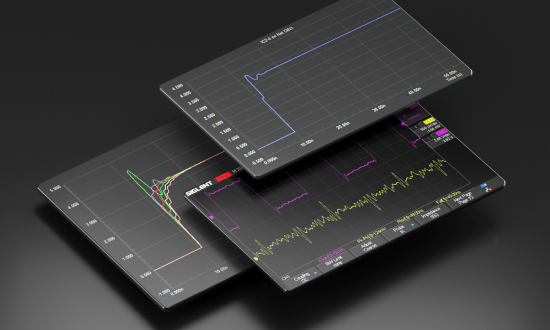
Using Signal Analyzer by Keysight within Altium Designer, we will demonstrate how integrated analysis can provide additional insight into high-speed signals before the design reaches prototype or physical validation.

What You'll Learn

  • Identify what matters in a DDR4/DDR5 design: Understand which signal integrity questions should be investigated beyond basic routing and length constraints. 
  • Prepare the design for meaningful analysis: See how stackup, nets and other design data affect the quality of the analysis. 
  • Evaluate critical signal behavior: Use Signal Analyzer to examine impedance and other relevant characteristics such as delay, insertion loss, and return loss on routed DDR signals. 
  • Turn results into design decisions: Learn how to interpret analysis results, identify potential root causes of SI problems, and determine what PCB changes should be considered. 
  • Understand when deeper analysis is needed: See where integrated design-stage analysis can support engineering decisions and when a more specialized verification approach may be appropriate. 

Why Attend?

  • Follow a real engineering workflow rather than a product feature walkthrough 
  • See signal integrity analysis applied to a practical DDR4/DDR5 design 
  • Learn how to move from an electrical analysis result to an actionable PCB decision 
  • Understand what design information is needed before electrical analysis becomes meaningful 
  • See how Signal Analyzer fits naturally into the Altium Designer workflow 
  • Ask questions directly during the live Q&A 

Who Should Attend?

  • PCB Designers working with  high-speed digital interfaces like DDR4/DDR5 
  • Hardware Engineers responsible for board-level signal and power integrity 
  • Technical Leads and Principal Engineers looking to introduce earlier electrical verification into the design process 
  • Engineers using Altium Designer who want a practical understanding of Signal Analyzer  
  • Engineering teams looking to reduce reliance on late-stage troubleshooting and better understand design behavior before prototype 

Reserve Your Spot

Join us for a practical walkthrough of DDR4/DDR5 signal integrity analysis and see how to move from design data to electrical analysis, interpretation, and an informed PCB design decision. 

Author

Author

Alexsander joined Altium as a Technical Marketing Engineer and brings years of engineering expertise to the team. His passion for electronics design combined with his practical business experience provides a unique perspective to the marketing team at Altium. Alexsander graduated from one of the top 20 universities in the world at UCSD where he earned a Bachelor’s degree in Electrical Engineering.

More content by Alexsander Tamari

Author

Author

Martin Malenica has a masters in electronic and computer engineering at the University of Zagreb. His previous experience consists of multiple embedded systems positions at robotics start-ups (Gideon with USD 35m in Seed and Series-A funding) and SMEs. His engineering strengths lie in system architecture, PCB design and embedded programming. Aside from engineering, Martin has spent the last 1.5 years working at a leading European management consulting firm, where he focused on strategies to support large OEMs and Tier-1s regarding the current semiconductor shortage across the whole EMEA region. Martin has practical experience within AD, but also a good understanding of competitor tools, especially on the procurement and supply chain side, like Everstream, Resilinc, Silicon Expert, Z2Data etc. Martin Joined Altium in 2023 as part of the Technical Sales team in Germany.

 

More content by Martin Malenica

Author

Author

Majdi Thouabtia’s background is in electrical engineering, with several years of experience in hardware development and technical project management. He has worked across the full hardware lifecycle, from EMC-compliant circuit design and PCB layout to prototyping, testing, and production. Throughout my career, Altium Designer has been a key tool in his daily work, so he is especially proud to now be part of the team behind it.

Before joining Altium, he contributed to projects in the EV charging and IoT sectors, leading development efforts and collaborating with cross-functional teams and external partners. He holds a Master’s degree in Electrical Engineering from FAU Erlangen-Nürnberg.

More content by Majdi Thouabtia

Author

Author

Francesco holds a Master's degree in Electrical Engineering from EPFL, Switzerland. He is currently part of the Field Applications Engineering team at Altium. During his studies, his primary focus was on bioelectronics and the microfabrication of biomedical implants. After graduating, Francesco transitioned into a technical sales role with a global supplier and manufacturer of custom magnetics, where he was responsible for both technical and sales discussions, serving as the liaison between design engineers, manufacturing engineers, and customers.
More content by Francesco Cecchetti
Signal Analyzer Webinar
JUN
CET
No result.
View All Dates

Registration has recently closed. Check back soon for on-demand webinar.

Related Resources

Beyond ECAD: How Altium Agile Teams optimizes your engineering process Altium Agile Teams, a product platform, helps optimize the entire development lifecycle across departments. Watch Video
Core Altium Designer Basics: Getting Started with PCB Design Every Great PCB Design Starts With the Basics. Learn the Tools to Get There. October 27, 2026 8:00 AM Register
00:39:52 Sustainability & Energy Efficiency in Electronic Product Development Watch Video
00:44:59 Streamline your customer relation with Altium 365 Enterprise Join our webinar designed for engineers and users in EMS companies Watch Video
00:33:23 Eliminate the Design-to-Production Gap with Agile Teams + Duro See how Agile Teams and Duro PLM unify design and production workflows with a connected, system-driven approach. Watch Video
00:37:54 Safety & Reliability in Electronics Design – Strategies, Standards & Tools How can development teams and decision-makers effectively implement safety, security, and compliance without delaying innovation? Watch Video
00:41:02 Altium Customization with Scripting or Low-Code See how scripting, low-code, no-code, and API integrations can help you work more efficiently—without extra setup or complex systems. Watch Video
00:45:05 What's New in Requirements Portal Discover the latest additions to Altium’s Requirements Portal — including a brand-new AI-assisted importer that turns unstructured documents into structured requirements with ease.
Watch Video
Collaboration Lessons from a Hardware Design CEO A CEO’s Story About How a Design Service Bureau Puts Collaboration First October 27, 2026 9:00 AM Register
00:43:59 From Complexity to Clarity: Smart Design Reviews for Agile Engineering Teams Smart Design Reviews speed up your design process
Watch Video

Related Technical Documentation

Altium 365 Platform Interface Altium 365 Platform Interface

Depending on your relationship with Altium, the services offered on the Altium Platform will be experienced from within Altium Designer and through the platform's browser-based interface. This page takes a look at the latter and provides an overview of what you'll see when you register an Altium Account and sign in to the Altium Platform Interface. For the latest information on the security,…

Read Documentation
Altium 365 Workspace Altium 365 Workspace

An integral part of the Altium 365 infrastructure platform, the Altium Workspace is a dedicated server for hosting and managing all your design content. It enables the seamless connectivity of, and the mechanics for moving data between, the design, manufacturing and supply domains. It works with Altium Designer to provide an elegant answer to the question of handling design data with secured…

Read Documentation
New in Requirements Portal New in Requirements Portal

Requirements Portal is under continuous development. This page outlines new features and enhancements made to Requirements Portal in key updates. When the Sharing of Requirements Projects feature is released: remove the box below, leave the content. Update - xx October 2026 Sharing of Requirements Projects Requirements projects are now shown on the Projects page of the Workspace browser interface…

Read Documentation
Exploring the Browser-based Interface Exploring the Browser-based Interface

In addition to connecting to a Workspace through Altium Designer – interfacing to it through the Explorer panel and Components panel (for direct interaction with the components therein) – you also connect to it through a dedicated browser interface, with access to management interfaces for the various services available as part of the Workspace. In fact, with some of these services, your only…

Read Documentation
Agentic Requirements Engineering Agentic Requirements Engineering

AI agents provide substantial advantages for engineering tasks like requirements capturing and test planning by significantly enhancing efficiency and automating complex, repetitive workflows. Requirements Portal's Engineering Assistant leverages AI technologies to provide you with fast, automated review tool for your requirements projects that allows you to ask questions about requirements and…

Read Documentation
Commenting Commenting

Requirements Portal supports commenting within your requirement projects. A comment is a user-added note that is assigned to a specific requirement, specification, section, V&V activity, or block and may be replied to by other users. Comments promote collaboration between users without altering the shared data itself, because comments are stored by the Workspace independently of that data. You…

Read Documentation
Workspace Components Workspace Components

The Workspace gives you convenient access for browsing all of the managed components that are currently stored within that Workspace. Accessible through the Workspace browser interface (a constituent part of the parent Altium 365 Platform Interface) not only can you quickly see what (and how many) components you currently have at your disposal, but you can also view a summary of the health of…

Read Documentation
Workspace Projects Workspace Projects

Altium Designer, in conjunction with the Altium 365 Workspace, brings support for an advanced project construct that targets the development stage of the project lifecycle, simplifying the creation and ongoing workflow for version-controlled projects. Centralized storage under the control of the Workspace also enables this feature to be a foundation for other collaborative services. Some key…

Read Documentation
Project Module Project Module

The Project Module in Requirements Portal details and provides project management capabilities. The user interface to the Project Module is the Home page that opens when Requirements Portal is accessed from the nine-dot menu at the top right of the Workspace's browser-based interface (). The page provides access to existing requirements projects, which target requirements management, and also…

Read Documentation
New in CoDesigner New in CoDesigner

Altium's MCAD CoDesigner technology connects the mechanical and electrical design domains, allowing the mechanical and electronic engineers to pass the loaded PCB back and forth between the two domains. In your Altium design software, this is achieved through an extension that loads and extracts board and component data from the PCB editor, the MCAD CoDesigner extension. In the MCAD software the…

Read Documentation

Beyond Length Matching: From Controlled Impedance to DDR4/DDR5 Signal Integrity Verification

Created: October 20, 2026
At a Glance
See how to investigate signal integrity on a real DDR4/DDR5 design and turn electrical analysis results into practical PCB design decisions.
Go Deeper with AI:
ChatGPT Perplexity Claude Gemini Grok
Product: Webinars Altium Agile Teams Simulation and Analysis Signal Integrity PCB Design Engineers Simulation Engineers

Length matching is only one part of a successful DDR interface. Controlled impedance, discontinuities, loss, and other layout effects can influence signal behavior. The correct electrical design target, including controlled impedance, is not always obvious from the standard or routing rules alone. 

In this practical session, we will work through a DDR4/DDR5 design and show how to approach SI verification directly within the PCB design workflow. 

Rather than focusing on individual features, the session follows the engineer's actual problem-solving process: identify what needs to be checked, prepare the design for analysis, examine the results, understand what they mean, and determine what should change in the PCB. 

Using Signal Analyzer by Keysight within Altium Designer, we will demonstrate how integrated analysis can provide additional insight into high-speed signals before the design reaches prototype or physical validation.

What You'll Learn

  • Identify what matters in a DDR4/DDR5 design: Understand which signal integrity questions should be investigated beyond basic routing and length constraints. 
  • Prepare the design for meaningful analysis: See how stackup, nets and other design data affect the quality of the analysis. 
  • Evaluate critical signal behavior: Use Signal Analyzer to examine impedance and other relevant characteristics such as delay, insertion loss, and return loss on routed DDR signals. 
  • Turn results into design decisions: Learn how to interpret analysis results, identify potential root causes of SI problems, and determine what PCB changes should be considered. 
  • Understand when deeper analysis is needed: See where integrated design-stage analysis can support engineering decisions and when a more specialized verification approach may be appropriate. 

Why Attend?

  • Follow a real engineering workflow rather than a product feature walkthrough 
  • See signal integrity analysis applied to a practical DDR4/DDR5 design 
  • Learn how to move from an electrical analysis result to an actionable PCB decision 
  • Understand what design information is needed before electrical analysis becomes meaningful 
  • See how Signal Analyzer fits naturally into the Altium Designer workflow 

Who Should Attend?

  • PCB Designers working with  high-speed digital interfaces like DDR4/DDR5 
  • Hardware Engineers responsible for board-level signal and power integrity 
  • Technical Leads and Principal Engineers looking to introduce earlier electrical verification into the design process 
  • Engineers using Altium Designer who want a practical understanding of Signal Analyzer  
  • Engineering teams looking to reduce reliance on late-stage troubleshooting and better understand design behavior before prototype 

Related Resources

Beyond ECAD: How Altium Agile Teams optimizes your engineering process Altium Agile Teams, a product platform, helps optimize the entire development lifecycle across departments. Watch Video
Core Altium Designer Basics: Getting Started with PCB Design Every Great PCB Design Starts With the Basics. Learn the Tools to Get There. October 27, 2026 8:00 AM Register
00:39:52 Sustainability & Energy Efficiency in Electronic Product Development Watch Video
00:44:59 Streamline your customer relation with Altium 365 Enterprise Join our webinar designed for engineers and users in EMS companies Watch Video
00:33:23 Eliminate the Design-to-Production Gap with Agile Teams + Duro See how Agile Teams and Duro PLM unify design and production workflows with a connected, system-driven approach. Watch Video
00:37:54 Safety & Reliability in Electronics Design – Strategies, Standards & Tools How can development teams and decision-makers effectively implement safety, security, and compliance without delaying innovation? Watch Video
00:41:02 Altium Customization with Scripting or Low-Code See how scripting, low-code, no-code, and API integrations can help you work more efficiently—without extra setup or complex systems. Watch Video
00:45:05 What's New in Requirements Portal Discover the latest additions to Altium’s Requirements Portal — including a brand-new AI-assisted importer that turns unstructured documents into structured requirements with ease.
Watch Video
Collaboration Lessons from a Hardware Design CEO A CEO’s Story About How a Design Service Bureau Puts Collaboration First October 27, 2026 9:00 AM Register
00:43:59 From Complexity to Clarity: Smart Design Reviews for Agile Engineering Teams Smart Design Reviews speed up your design process
Watch Video

Related Technical Documentation

Altium 365 Platform Interface Altium 365 Platform Interface

Depending on your relationship with Altium, the services offered on the Altium Platform will be experienced from within Altium Designer and through the platform's browser-based interface. This page takes a look at the latter and provides an overview of what you'll see when you register an Altium Account and sign in to the Altium Platform Interface. For the latest information on the security,…

Read Documentation
Altium 365 Workspace Altium 365 Workspace

An integral part of the Altium 365 infrastructure platform, the Altium Workspace is a dedicated server for hosting and managing all your design content. It enables the seamless connectivity of, and the mechanics for moving data between, the design, manufacturing and supply domains. It works with Altium Designer to provide an elegant answer to the question of handling design data with secured…

Read Documentation
New in Requirements Portal New in Requirements Portal

Requirements Portal is under continuous development. This page outlines new features and enhancements made to Requirements Portal in key updates. When the Sharing of Requirements Projects feature is released: remove the box below, leave the content. Update - xx October 2026 Sharing of Requirements Projects Requirements projects are now shown on the Projects page of the Workspace browser interface…

Read Documentation
Exploring the Browser-based Interface Exploring the Browser-based Interface

In addition to connecting to a Workspace through Altium Designer – interfacing to it through the Explorer panel and Components panel (for direct interaction with the components therein) – you also connect to it through a dedicated browser interface, with access to management interfaces for the various services available as part of the Workspace. In fact, with some of these services, your only…

Read Documentation
Agentic Requirements Engineering Agentic Requirements Engineering

AI agents provide substantial advantages for engineering tasks like requirements capturing and test planning by significantly enhancing efficiency and automating complex, repetitive workflows. Requirements Portal's Engineering Assistant leverages AI technologies to provide you with fast, automated review tool for your requirements projects that allows you to ask questions about requirements and…

Read Documentation
Commenting Commenting

Requirements Portal supports commenting within your requirement projects. A comment is a user-added note that is assigned to a specific requirement, specification, section, V&V activity, or block and may be replied to by other users. Comments promote collaboration between users without altering the shared data itself, because comments are stored by the Workspace independently of that data. You…

Read Documentation
Workspace Components Workspace Components

The Workspace gives you convenient access for browsing all of the managed components that are currently stored within that Workspace. Accessible through the Workspace browser interface (a constituent part of the parent Altium 365 Platform Interface) not only can you quickly see what (and how many) components you currently have at your disposal, but you can also view a summary of the health of…

Read Documentation
Workspace Projects Workspace Projects

Altium Designer, in conjunction with the Altium 365 Workspace, brings support for an advanced project construct that targets the development stage of the project lifecycle, simplifying the creation and ongoing workflow for version-controlled projects. Centralized storage under the control of the Workspace also enables this feature to be a foundation for other collaborative services. Some key…

Read Documentation
Project Module Project Module

The Project Module in Requirements Portal details and provides project management capabilities. The user interface to the Project Module is the Home page that opens when Requirements Portal is accessed from the nine-dot menu at the top right of the Workspace's browser-based interface (). The page provides access to existing requirements projects, which target requirements management, and also…

Read Documentation
New in CoDesigner New in CoDesigner

Altium's MCAD CoDesigner technology connects the mechanical and electrical design domains, allowing the mechanical and electronic engineers to pass the loaded PCB back and forth between the two domains. In your Altium design software, this is achieved through an extension that loads and extracts board and component data from the PCB editor, the MCAD CoDesigner extension. In the MCAD software the…

Read Documentation
Back to Home
Altium logo

Solutions for Every Role and Team

  • Discover and evaluate design options earlier
  • Develop in one shared workspace
  • Scale with control and compliance
  • Connect every stage of hardware development

Learn More
Altium Agile Teams
Speed at Scale. Structured Repeatability. Secure Flexibility.

 A unified platform for advanced multidisciplinary collaboration

Learn More
Platform-based Solutions
  • Octopart Discover
  • Altium Develop
  • Altium Agile Teams
  • Altium Agile Enterprise
Tools
  • Altium Designer
  • Octopart
Platform
  • Altium 365
Company
  • Our Customers
  • Trust Center
  • Newsroom
Software Capabilities
  • PCB Layout and Design
  • Requirements Management
  • Electronics Data Management
  • IT Security
  • Electronics Manufacturing
  • Electronics Supply Chain
  • Engineering Management
Resources & Support
  • Status
  • Downloads
  • Learning Hub
  • Support Center
  • Bug Crunch
  • Forum
  • Documentation
  • Ideas
  • Education
  • Professional Training / Certification
  • Webinars
  • Beta Program
Education
  • Student Lab
  • Educator Center
  • Altium Education Curriculum
Careers
  • Career at Altium
  • Copyrights & Trademark
  • Privacy policy
  • Cookie policy
  • Terms of Service
  • Legal
© 2026 Altium LLC.
