







Locate Every Obsolete Part in Every PCB Project

At a Glance
See how where-used visibility helps electronics teams find every project affected by an obsolete part, assess risk, manage replacements, and prevent repeat use.


An end-of-life notice can look small. It names one part, one supplier, and one date. The engineering impact can be much larger. The same regulator, memory device, connector, or sensor may sit in twelve PCB projects, several product variants, old release packages, and one new design that has not reached prototype yet.
Most teams can find the part in the BOM they are looking at. The hard task is finding every other place where it is used. People search spreadsheets, open archived projects, ask designers, and compare part numbers by hand. That work is slow, and it can still miss a released variant or a service product.
Where-used visibility changes the starting point. Instead of asking each project owner to search for the part, the team starts with the part and follows its links to every design and BOM that uses it. The result is a bounded impact list that engineering, procurement, manufacturing, quality, and service teams can work through together.
Key Takeaways
- An end-of-life notice is a portfolio event when the same part appears in many boards, variants, and released BOMs.
- Where-used visibility links one manufacturer part to every design and BOM that uses it, so teams can define the full impact before they choose a replacement.
- Good component obsolescence management joins live part data with clear ownership, technical review, approval, release, and prevention controls.
- Altium Agile Teams can support this work through Parts in Use, Used In links, managed BOMs, lifecycle data, comments, tasks, and shared project records.
Why One EOL Notice Becomes a Portfolio Problem
A part becomes a portfolio problem when its use is spread across products, releases, and teams. The risk is not just future supply. A replacement can affect electrical limits, PCB layout, firmware, mechanical fit, test steps, regulatory evidence, and factory instructions.
The same part can also play different roles. One board may use it in a safety path. Another may use it in a low-risk monitor circuit. A third may use it only in a prototype. Those cases should not receive the same priority or test plan.
Hidden question | Why it matters | What visibility should show |
Which products use the part? | The EOL impact may extend beyond the active project. | Projects, managed BOMs, variants, and releases. |
Where is it placed? | One part can serve different circuit functions. | BOM source and designators. |
Which builds are active? | Prototype, production, and service demand differ. | Lifecycle and release context. |
Is there an approved alternate? | A supplier cross is not the same as an engineering-approved replacement. | Part choices, status, owner, and evidence. |
What must be retested? | Package, rating, firmware, or performance changes can expand the work. | Linked reviews, tasks, and release records. |
What Where-Used Visibility Means
Where-used visibility is the ability to start with a part and see every managed source that depends on it. The useful answer is not a search result with similar text. It is a relationship between the manufacturer part, the BOM source, and the exact design references.
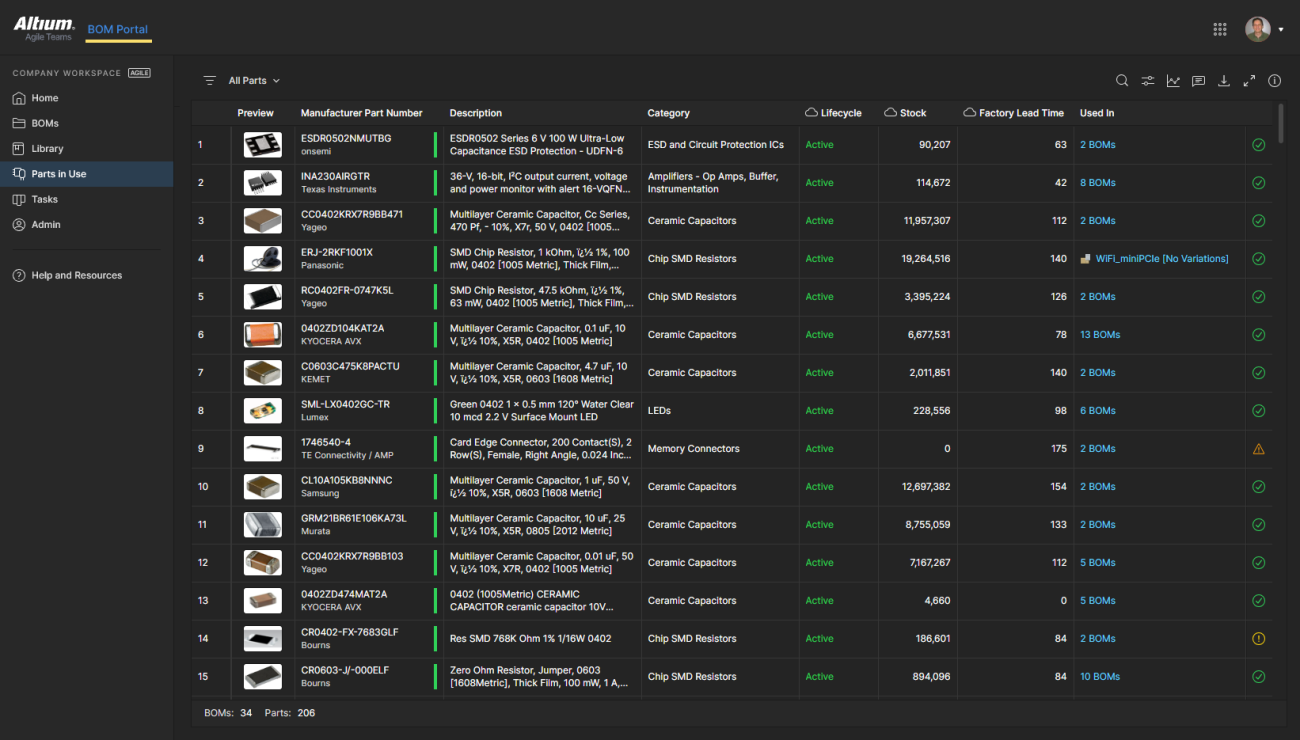
In Altium Agile Teams, Parts in Use give you an aggregated view of manufacturer parts used in Workspace Projects and Managed BOMs. Its Used In links can show the BOM sources and related designators. Custom views can include project variants, release files, managed BOMs, and releases.
That level of detail matters during an EOL event. It separates a complete impact review from a broad text search. It also lets the team save or filter a view for a product family, active program, factory, or service scope.
A Practical Response to an Obsolete Component
The best response is a controlled change process, not a rush to pick the first available cross. Use the steps below as a working pattern.
- Confirm the notice: Check the manufacturer part number, lifecycle state, last-time-buy date, and source of the notice. Separate true EOL from low stock or a temporary lead-time issue.
- Build the impact list: Use where-used data to list each affected project, variant, managed BOM, release, and designator. Remove duplicates, but keep release context.
- Classify business risk: Record demand, stock, product stage, service obligations, customer commitments, and the date when supply becomes critical.
- Assess technical impact: Review function, ratings, package, footprint, pinout, thermal needs, firmware links, compliance, test coverage, and manufacturing effect.
- Choose a response: Use available stock, qualify a part choice, redesign the circuit, make a last-time buy, or retire the affected product. One response may not fit every project.
- Control the change: Assign owners, run design reviews, update the library and BOM, release affected designs, and retain the decision and evidence.
- Prevent reuse: Change the component lifecycle or usage rule so new designs do not select the obsolete item while existing product records remain traceable.
Why a Drop-In Replacement May Still Need Engineering Work
A replacement is safe only after the team checks the design context. Matching the package and headline function is not enough. Pin compatibility, electrical limits, startup behavior, thermal performance, tolerance, qualification level, firmware assumptions, symbol data, footprint data, and supply stability can all matter.
- Electrical: Compare absolute limits, operating range, timing, noise, accuracy, power, and protection behaviour.
- Physical: Check package, footprint, height, pad geometry, orientation, and assembly process.
- System: Review firmware, calibration, test limits, safety controls, and dependent requirements.
- Supply: Check manufacturer lifecycle, approved sources, stock depth, lead time, alternates, and counterfeit risk.
- Evidence: Define the review, test, approval, and release records needed for each affected product.
How Altium Agile Teams Supports the Workflow
Altium Agile Teams can keep part risk, design context, and change work in one shared environment. The team can find the affected work, assign action, and keep the result connected to the product record.
Altium Agile Teams provides up-to-date lifecycle, availability, pricing, compliance, alternatives, and where-used tracking across BOMs. You can identify parts facing shortages, compliance issues, or obsolescence, and determine which projects are affected.
Here are some of the capabilities you may find particularly useful:
- Parts in Use: Review manufacturer parts across Workspace Projects and Managed BOMs.
- Used In links: Open each affected source and see related designators.
- Live component data: Bring lifecycle, stock, lead-time, compliance, and risk signals into design and BOM work.
- Comments and tasks: Give engineering and procurement one place to record questions, ownership, and follow-up.
- Managed releases: Keep the replacement decision tied to the product revision and release path.
- Lifecycle controls: Mark parts so their use in new designs follows the organization’s rules.
A simple Obsolescence Control Model
Electronic component obsolescence management works best as a loop. Monitor part data, locate use, assess impact, decide, change, verify, release, and keep watching. The loop should run before production is blocked.
Control point | Owner focus | Proof of completion |
Detect | Procurement and component engineering | Verified lifecycle or supply-risk signal. |
Locate | Library and product data owners | Complete where-used list. |
Assess | Engineering, quality, manufacturing | Impact and test plan by product. |
Decide | Product and supply owners | Approved response and priority. |
Change | Design and library teams | Updated part, BOM, design, and review. |
Release | Configuration and manufacturing | Controlled release and downstream notice. |
Prevent | Library governance | Obsolete part blocked or restricted for new use. |
The Better Question is “Where is This Part Used?”
An EOL notice should not start twelve separate searches. It should start one connected impact review. Where-used visibility gives the team the map. Engineering judgment still decides the route, but the work begins with a clear view of every affected design.
See how Altium Agile Teams can help you identify parts in use and connect the impact assessment to owners, technical reviews, BOM updates, and controlled releases. Turn part obsolescence management from a document hunt into a repeatable engineering process.
Learn more about Altium Agile Teams →
Frequently Asked Questions About Part Obsolescence Management
What is component obsolescence management?
It is the process of finding lifecycle risk, locating every affected product, choosing a response, controlling the design change, and preventing unsafe reuse.
What does where-used mean in PCB design?
Where-used shows which projects, BOMs, variants, releases, and design references use a selected part.
Does an EOL notice always require a redesign?
No. The response may be an approved alternate, a last-time buy, existing stock, a redesign, or product retirement. The right choice depends on product and supply risk.
Why is a supplier cross-reference not enough?
A suggested cross may differ in ratings, package details, performance, firmware behavior, qualification, or long-term supply. Engineering must review the actual use.

About Author
Related Resources
Related Technical Documentation
Table of Contents
- Key Takeaways
- Why One EOL Notice Becomes a Portfolio Problem
- What Where-Used Visibility Means
- A Practical Response to an Obsolete Component
- Why a Drop-In Replacement May Still Need Engineering Work
- How Altium Agile Teams Supports the Workflow
- A simple Obsolescence Control Model
- The Better Question is “Where is This Part Used?”
- Frequently Asked Questions About Part Obsolescence Management
Speed at Scale. Structured Repeatability. Secure Flexibility.
- Start up fast with out‑of‑the‑box workflows
- Collaborate using ECAD‑MCAD codesign tools
- Manage BOMs with live supply chain part data
- Manage access and security as teams scale
Contact Us
Thank you, you are now subscribed to updates.