
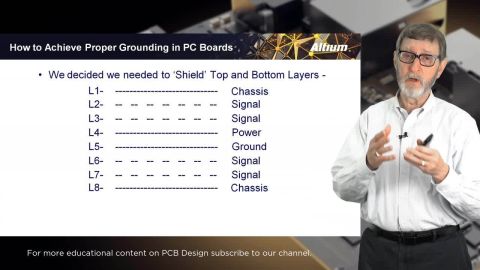



Want to see the presentation slides up close or download a copy for yourself?
Get the The Extreme Importance of PC Board Stack-up with Rick Hartley slides here.
Depending on your relationship with Altium, the services offered on the Altium Platform will be experienced from within Altium Designer and through the platform's browser-based interface. This page takes a look at the latter and provides an overview of what you'll see when you register an Altium Account and sign in to the Altium Platform Interface. For the latest information on the security,…
The project Design Reviews page is the central location for all project stakeholders to perform and manage structured reviews of a Workspace design project. The interface allows the creation, access and management of Design Review instances by any Workspace member, which in turn can be assigned to other Workspace members as Reviewers. The Design Review creator (the Initiator) can add attachments…
The standalone Altium 365 Gerber Comparison viewer provides free access to graphically view the differences between Gerber fabrication files through your web browser. This offers a quick and easy solution for checking a design's fabrication output between release iterations or prior to sending your board production data out to manufacture. As a free service developed and provided by Altium, the…
The standalone Altium 365 Viewer provides free access to view and share your electronic designs and CAM manufacturing data through your Web rowser. No downloads, no installations, and no registration required. A truly tool-neutral viewing experience that allows you to view and share designs sourced from an ever-expanding variety of supported ECAD design tools. You can even embed Altium 365 Viewer…
The Altium 365 Workspace project view provides design data comparison features that allow you to compare data changes that have occurred between different project releases and/or commits. Particularly valuable for performing final checks prior to sending your product data to the manufacturing side, the features allow you to determine exactly what changes have occurred in your Gerber (or ODB++),…
In addition to connecting to a Workspace through Altium Designer – interfacing to it through the Explorer panel and Components panel (for direct interaction with the components therein) – you also connect to it through a dedicated browser interface, with access to management interfaces for the various services available as part of the Workspace. In fact, with some of these services, your only…
Requirements Portal's Document Export wizard is your go-to for whipping up editable Microsoft Word *.docx files straight from your requirements and V&V activities. You can use predefined templates or upload your own templates. The wizard is fueled by the Python-Docx-Template library, which, in turn, leverages the Jinja Templating Engine. This dynamic duo allows you to craft custom templates…
In early stages of electronic designs, it is important to define the design on the conceptual/functional level. This initial step serves as a crucial foundation for the entire development process, providing a high-level overview of the system's architecture and its primary elements. A well-crafted block diagram clarifies the major functional units of the electronic system and illustrates their…
Requirements Portal is under continuous development. This page outlines new features and enhancements made to Requirements Portal in key updates. Update - 6 August 2026 Consolidated UI of the Importer In this release, the Import Wizard used to import requirements to your projects has been updated to consolidate the user interface of the AI importer and the classic (formerly legacy) importer. When…
You can quickly and easily upload your existing requirements data into Requirements Portal using the Import Wizard available in the Requirements Module. Leveraging AI-powered extraction, you can import requirements from unstructured PDF, Word, Excel, and CSV files, reducing the time and effort required to manually transfer requirement data and helping you capture requirements more accurately and…
Learn More