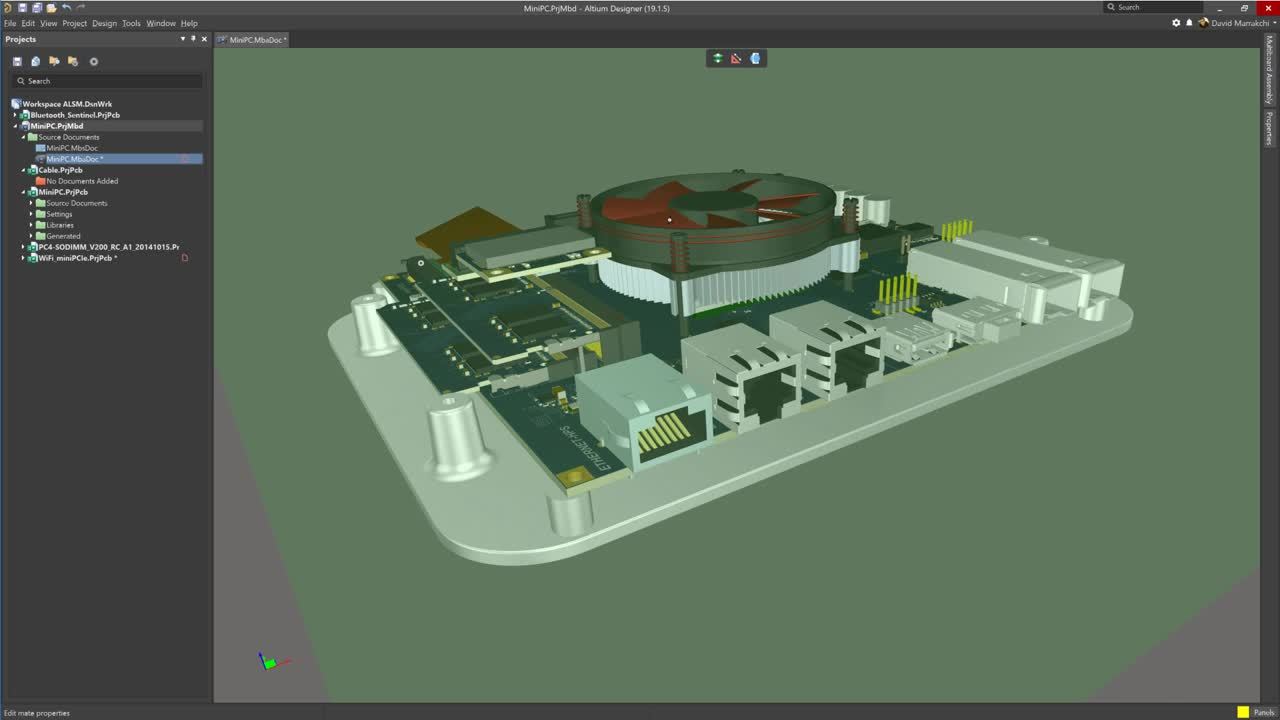


Gewährleisten Sie Passform und Funktion mit den erweiterten Multi-Board-Anzeigefunktionen von Altium Designer
The SPICE netlist is a textual representation of the circuit. It must include all necessary components with parameters, component models, connections, and types of analysis. It is the SPICE netlist that is processed by the simulation engine. The graphical representation of the schematic is used to simplify the creation of the netlist from the user's work when simulating. Because the netlist is…
Parent page: Advanced Topics Installed by default and available from the Components panel, the Simulation Generic Components library provides access to various simulation-ready components: from RLC passives through discrete semiconductors to digital components in different formats. Refer to the Adding Simulation Models to the Design section of the Verifying & Preparing a Project for…
Diese Seite enthält detaillierte Informationen zu Merkmalen und Funktionen, die sich derzeit in der Closed Beta befinden. Altium Designer users: Wenn Sie Ihre Altium Designer-Installation auf eine neuere Version aktualisieren und eine Standalone- oder Private-Server-Lizenz verwenden, müssen Sie die Lizenz möglicherweise erneut aktivieren/aktualisieren, um auf neue Merkmale und Funktionen…
Wenn sich eine Schaltung nicht simulieren lässt, müssen Sie feststellen, ob das Problem in der Schaltung oder im Simulationsprozess liegt. Folgen Sie den Informationen in diesem Abschnitt der Referenz und arbeiten Sie die vorgeschlagenen Punkte nacheinander durch. Manchmal wird während einer Simulation eine Meldung angezeigt, die Fehler oder Warnungen meldet. Diese Meldungen sind im Messages…
Auf den folgenden Seiten erfahren Sie mehr über fortgeschrittene Simulationsthemen in Altium Designer: Wenn sich eine Schaltung nicht simulieren lässt, sollten Sie feststellen, ob das Problem in der Schaltung oder im Simulationsprozess liegt. Empfehlungen zur Behebung von Problemen bei der Durchführung verschiedener Simulationsarten finden Sie auf der Seite Simulation Troubleshooting. Altium…
The following sections present shortcut keys that are specific to the SimData Editor. For general information regarding shortcut keys - including access and editing, general Altium environment shortcuts, and accelerator keys - see Altium Designer Shortcut Keys. When looking at the shortcut key listings, keep in mind the following: When referring to shortcuts, use of the plus (+) symbol denotes…
Parent page: Analyzing Your Design Using Circuit Simulation When required analyses are configured and run, analysis results are written to a Simulation Data File (SDF), which is named after the project itself (<ProjectName>.sdf) and appears in the Projects panel under the Generated\Simulation Documents folder. The file automatically opened as a document tab – presented in the SimData editor…
Parent page: Analyzing Your Design using Circuit Simulation The Analysis Setup & Run region of the Simulation Dashboard panel is used to configure and run the simulation analyses. Once the circuit is verified and prepared for simulation, configure the required analysis type as described in the below sections. The Analysis Setup & Run region of the Simulation Dashboard panel The following…
Parent page: Analyzing Your Design Using Circuit Simulation The design to be simulated should be verified and adequately prepared so you can receive the proper simulation results. The relevant regions of the Simulation Dashboard panel will guide you in design verification and preparation to make sure that the design meets the requirements necessary for simulation. Controlling the Scope of the…
Mixed-Signal Circuit Simulation Circuit simulation allows the designer to explore their ideas before committing to manufacture. Concepts can be verified and the circuit can be tuned quickly and accurately. Circuit simulation also gives the designer the opportunity to perform measurements that may not be physically possible on the workbench. The Simulator is a true mixed-signal simulator, meaning…
Erste Schritte
Easily synchronize designs between Altium Designer and top MCAD systems.