












Are Your ECAD Tools Holding Back Engineers’ Productivity?

At a Glance
Identify whether your ECAD is blocking productivity. Improve version control and ECAD-MCAD handoffs. Reduce rework across teams.


While engineers have the potential to achieve greater productivity, the tools they use may be preventing them from sustaining efficiency. Identifying and remedying this issue is a critical management responsibility.
Electrical engineers (EEs) and PCB designers face mounting pressures to meet tighter deadlines, necessitating an objective assessment of current workflows. The goal is to determine how to sustain these heavy workloads and what measures are required to make schematic and layout design more efficient.
Key Takeaways
- Engineer productivity issues often stem from tool friction, not skill or effor. ECAD effectiveness is a key management concern as project complexity and pace increase.
- Modern engineering managers are responsible not just for delivery, but for enabling efficient, repeatable workflows across distributed, cross-disciplinary teams.
- Poor ECAD-MCAD integration, unclear change control, and disconnected libraries or revision histories create downstream delays that impact procurement and manufacturing.
- Effective ECAD tools support role-based collaboration, clear change visibility, task dependency management, and tight linkage between design data and the BOM, reducing rework and coordination overhead.
The Modern Role of an Engineering Manager
As electronics projects have grown in complexity and pace, the role of the engineering manager has expanded accordingly. What was once focused on coordinating PCB layout reviews or overseeing a small team now demands a far broader perspective that increasingly centers on how effectively engineers can work within their digital environment.
Today’s engineering manager is no longer just responsible for what gets built, but how efficiently.
Core responsibilities of an engineering manager now include:
- Project planning
- Cross-disciplinary coordination
- Scheduling
- Coordinating sourcing and delivery
- Review of engineering workflows
Why are Engineering Managers Important?
The answer comes in two parts:
- There is an exponential increase in demand for complex electronic products in more flexible and compatible packages
- Digitalization has encouraged the decentralization of teams, requiring more collaborative design workflows among globalized teams
Modern engineering managers now orchestrate global projects rather than only overseeing local teams. In many cases, they collaborate with other managers with increased reliance on digital ecosystems and cloud services.
Simply boosting visibility and handover speed won't automatically improve productivity. Without a clear information hierarchy and a robust change control strategy, increased automation can quickly lead to confusion. Design changes ripple across the ECAD-MCAD environment, driving up iteration counts and obscuring design ownership.
Engineering managers must identify effective process changes. The objective isn't just speed but also a repeatable, project-agnostic workflow. This ensures control and oversight, which are essential for process simplification.
Productivity Extends Beyond the Design Team
The impact of engineers’ productivity can be seen far beyond the ECAD environment. Supply chain, procurement, and manufacturing stakeholders all depend on timely, accurate design data. And vice versa, engineers leverage more sourcing insights to guide their design efforts.
If ECAD-MCAD collaboration is already strained within the core engineering workflow, external collaboration often suffers. Inconsistency and poor visibility in libraries, unclear revision histories, and disconnected tools can bolster the compounding delays downstream.
From a productivity standpoint, this raises an uncomfortable but necessary question for engineering managers: are their ECAD tools supporting engineers’ productivity? To answer this, they must understand the needs of the team and the integration capabilities of their tools.

What Do Engineers Need from ECAD Tools?
When productivity stalls, it is tempting to reach for new project management layers, additional checkpoints, or further reporting. Assuming these process-level issues have already been addressed, it is time to uncover the root of poor alignment between the process and the design tools used.
In many cases, inefficiency originates inside the ECAD environment itself.
Engineer Perspective
ECAD tools are not simply drawing platforms but the operational backbone of daily work. As such, those tools can also introduce friction, oftentimes a result of poor performance in the following areas.
Engineering Manager Perspective
The engineering manager’s core query shifts from “Do we have the tools?” to “Is our ECAD well suited to the design workflow?” To answer this, they must look beyond the features list and determine the right fit for their team’s specific needs.
Cross-Disciplinary Integrations and Communication Channels
Engineers need ECAD that enables collaboration without creating noise.
As electrical, mechanical, procurement, and manufacturing teams work in parallel, design data must be shared selectively. When ECAD exposes all stakeholders to the same level of detail, productivity drops: changes are misinterpreted, clarification cycles increase, and engineers lose time managing downstream confusion.
Effective ECAD supports:
- Controlled access to design data
- Controlled propagation of design changes
- Clear visibility into what changed and why
Task and Dependency-Aware Workflow
Design cannot be managed with flat to-do lists. PCB development involves tightly coupled tasks, where changes in one area directly impact others.
Engineers need ECAD that recognizes task dependencies and supports structured co-creation in the midst of a constant stream of data, allowing teams to iterate, question changes, and resolve conflicts without breaking workflow. This requires hierarchical task management across departments along with clear, dynamic, low-effort version control.
Hardware Design, EDA and BOM Linkage
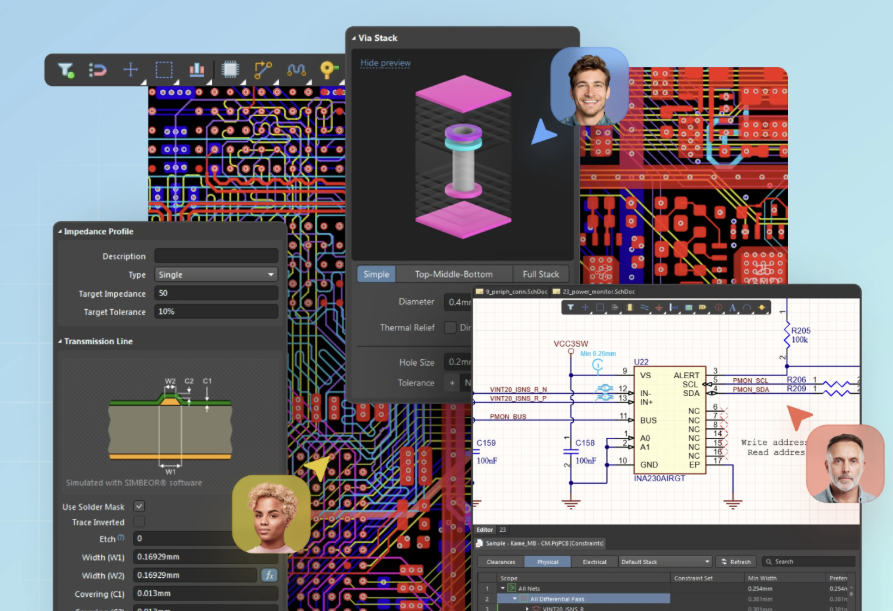
Linking hardware design, electronics design automation (EDA), and bill of materials (BOM) management can be achieved through integrated ECAD, such as Altium’s toolset. It is essential to incorporate these aspects of the product lifecycle to build a workflow that increases efficiency across all areas.
When ECAD tools connect electrical design, mechanical constraints, and supply-chain data, the BOM becomes a living artifact rather than a static document.
- Design decisions are reflected in BOM structure and mechanical fit.
- MEs know when and how to factor electrical changes into their workload.
- Sourcing teams identify when components become obsolete within the current schematic and layout.
Final Thoughts
Engineer productivity is seldom a result of skill limitation or effort. More often, it is shaped by the tools and systems that structure daily work. Engineering managers focus their attention on this shift, managing the output by enabling flow. ECAD plays an increasingly active role here and can be leveraged as a source of insight to keep projects moving smoothly.
The aim for engineers should be to reduce friction in their own workloads, including their inevitable collaboration with external engineers, designers, and sourcing. Integrated ECAD platforms, such as Altium Develop, takes this a step further, by amalgamating all of the necessary resources for EEs to work closely with these teams.
Whether you need to build reliable power electronics or advanced digital systems, Altium Develop unites every discipline into one collaborative force. Free from silos. Free from limits. It’s where engineers, designers, and innovators work as one to co-create without constraints. Experience Altium Develop today!
Frequently Asked Questions
How can ECAD tools reduce (or increase) engineer productivity?
ECAD tools shape daily engineering work. Unclear change tracking and disconnected libraries create friction and rework, while well-aligned tools streamline collaboration, reduce iteration cycles, and keep engineers focused on design instead of coordination overhead.
What should engineering managers look for when evaluating ECAD productivity issues?
Managers should assess whether ECAD tools support the actual workflow: clear version control, controlled change propagation, task dependencies, and integration with MCAD, sourcing, and BOM data, not just feature checklists.
Why doesn’t more automation or visibility automatically improve productivity?
Without a clear information hierarchy and change control strategy, added automation can increase noise and confusion. Design changes can ripple across teams, obscuring ownership and driving unnecessary iterations rather than improving speed.
How does ECAD productivity affect teams outside engineering?
Inconsistent design data, unclear revisions, and poor ECAD-MCAD alignment slow procurement, manufacturing, and supply chain planning. Productivity issues in ECAD often surface later as delays, sourcing errors, or rework downstream.
What capabilities do engineers actually need from modern ECAD tools?
Engineers benefit most from ECAD that supports selective data sharing, dependency-aware task management, low-friction version control, and tight linkage between schematic, layout, and BOM so design decisions stay aligned across disciplines.

About Author
Related Resources
Related Technical Documentation
Table of Contents
- Key Takeaways
- The Modern Role of an Engineering Manager
- Why are Engineering Managers Important?
- Productivity Extends Beyond the Design Team
- What Do Engineers Need from ECAD Tools?
- Engineer Perspective
- Engineering Manager Perspective
- Cross-Disciplinary Integrations and Communication Channels
- Task and Dependency-Aware Workflow
- Hardware Design, EDA and BOM Linkage
- Final Thoughts
- Frequently Asked Questions
- How can ECAD tools reduce (or increase) engineer productivity?
- What should engineering managers look for when evaluating ECAD productivity issues?
- Why doesn’t more automation or visibility automatically improve productivity?
- How does ECAD productivity affect teams outside engineering?
- What capabilities do engineers actually need from modern ECAD tools?
Solutions for Every Role and Team
- Discover and evaluate design options earlier
- Develop in one shared workspace
- Scale with control and compliance
- Connect every stage of hardware development
Learn More
Thank you, you are now subscribed to updates.