











BOM Management Software Comparison: Which Tools Handle Multi-Level BOMs Best?

At a Glance
Stop guessing on BOM tools. Compare platforms by multi-level BOM support, supplier data, alternates, lifecycle tracking, and cross-team collaboration.


As departments find deeper ways to collaborate, the bill of materials (BOM) now proves its value more than it may have once appeared. It gives engineers, procurement managers, logistics operators, and manufacturing specialists a blueprint for lean and efficient printed-circuit-board (PCB) production.
A BOM is more than a mere documentation of a product’s components, though, as it also holds vital information on different product functions; the individual subassemblies within a finished electronic device and the impacts of a single part on multiple design levels. Consider a multi-level BOM as the "family tree" of components in a device, a hierarchy of micro-projects involved in delivering the finished goods.
In electronics, managing a BOM means maintaining that component data across the entire product lifecycle, from design through procurement, manufacturing, and post-production support. It's an ongoing discipline, not a one-time export. It's worth noting that the term "BOM" means different things in different industries. For instance, in software development, a BOM is a list of open-source libraries and dependencies. While in the electronics manufacturing BOM is a fundamentally different document that drives purchasing, assembly, cost rollup, and quality control, with dedicated tooling to match.
This article will educate you and your team on the composition and benefits of a multi-level BOM, and the must-have software to manage a complex supply chain of parts and the effects they have at all stages of the design and production process.
Key Highlights
- Multi-level BOMs (indented BOMs) give a hierarchical "family tree" of parts and subassemblies, enabling cross-functional visibility for engineering, procurement, logistics, and manufacturing.
- They speed fault isolation and obsolescence handling by pinpointing exactly where a component sits across assemblies, reducing tear-downs and mitigating supply and quality risks.
- Spreadsheets are a bottleneck. Choose fit-for-purpose BOM tools (cloud/standalone, API-based, PLM/ERP modules, or CAD-integrated) to gain up-to-date lifecycle data, alternates, and collaboration.
- Best results come from CAD-integrated, design-to-source workflows (e.g., Altium Agile Teams) that unify data, version control, and supply insights across teams to break silos.
A Multi-Level Bill of Materials Defined
A multi-level BOM, also referred to as an indented BOM, incorporates a web of components found in products and their subassemblies. It is the hierarchical structure of parts within finished goods; a representation of an electronic product in layer list format that is often designed for use by procurement professionals.
The engineering BOM (eBOM) and manufacturing BOM (mBOM) serve distinct purposes. The eBOM reflects the designer's intent, listing components as they appear in the schematic, organized by function. The mBOM is derived from the eBOM but restructured for the factory floor. It accounts for, assembly sequence, substitutions, work instructions, and how parts are kitted into subassemblies. Engineering owns the eBOM; manufacturing operations own the mBOM. Keeping them synchronized as designs change is one of the central challenges a good BOM tool needs to solve.
Until now, companies have leveraged BOMs to acquire components at the best prices and ensure product requirements are met. Now there are more functions in the electronics world for this documentation. Now, electronics makers are uncovering more valuable functions, including the latest visibility into the component lifecycle and integration with third parties to rapidly source alternative parts.
Multi-Level BOM Use-Case
In the event of component obsolescence or a defect in a known batch of products or subassemblies, there is seldom a need to break down the entire product. With this in mind, there is inherent value in pinpointing the immediate connections to that particular component, which leaves little room to speculate where a fault may arise.
For instance, say a product returns a fault, perhaps a component local to a decoupling capacitor along a power rail. Knowing where the fault occurs and aligning this visibility with a multi-level BOM can help pinpoint the section or group of connections in which the fault lies.
Electronic devices contain a series of components which, for assembly, have BOMs of their own. While a PCB has a list of components, individual mounted parts (i.e. resistors, transistors, and integrated circuits) hold their own parts lists. This is information essential to subassembly procurement and pieces that are susceptible to obsolescence, defects, or shortages.
That breadth of use reflects how many roles depend on the BOM being accurate. Design engineers author the eBOM and own component selection. Procurement managers use it to source parts and track lead times. Manufacturing engineers translate it into the mBOM. Quality engineers reference it during inspection and non-conformance investigations. Supply chain managers monitor it for obsolescence risk. Each role needs a current, trustworthy version, which is why live data and version control aren't optional.
Multi-Level BOM Management Is Risk Mitigation
In order to understand the full benefit of BOM management at such a granular level, it is, firstly, worth recognizing the myriad of factors that make up risk. As procurement departments become more invested in design and build functions, the digital solutions available to all stakeholders are developing rapidly.
The lack of digital adoption in this sphere (on average, 61% of procurement leaders are yet to experiment with more intelligent tools) is crucial to the next point, which is choosing the right BOM management tool for your organization. Oftentimes we hear a lot of businesses are yet to branch out and leverage more dynamic tools that can significantly reduce the friction in the design-procurement processes.
Most of that risk originates at the design stage. A wrong part number, a missing alternate, or a component already moving toward EOL. Any of these discovered after release means a re-spin, a production delay, or both! Industry data puts the average PCB re-spin at $46,000, and 80% of designs require at least one part replacement. The earlier those issues are caught, the cheaper they are to fix. A BOM that leaves the ECAD environment clean is the most effective way to protect the schedule and budget downstream.
Choose a Suitable Tool for Multi-Level BOM Management
Many organizations still suffer in silos, which leaves them short of many benefits of interdepartmental collaboration. This can be a result of the time and monetary cost associated with digitalization, and they are yet to realize the returns that technology brings. It is important to note that many of the leading global manufacturers are shifting their efforts to become more proactive, thus requiring greater visibility from the supply chain and in further advance of production launches.
There are a number of different ways to approach BOM management, but each has its own benefits depending on the user’s readiness and proficiency with managed digital BOMs. The factors that impact how effective a solution can be are:
- Size of the organization
- Complexity of their operations
- Stakeholder integration requirements
- Capacity to automate and adapt to certain systems
Ultimately, the more a BOM solution can integrate all necessary data streams and automate changes across different languages, the more useful it becomes to all types of stakeholders. Procurement managers have their own systems to incorporate, as do mechanical and electrical engineers.
Automated Spreadsheets
There are fewer and fewer use-cases for automated spreadsheets (purpose-built or configurable solutions). Yet, 50% of organizations in the Supplyframe survey still rely on them. Only 25% of North American manufacturers have stepped away from spreadsheets and other ad hoc solutions to immediate sourcing conditions.
While this entry-level BOM management system works well for data entry, multi-level management is stunted by outdated information. The moment a spreadsheet is created, it seldom flexes to achieve greater accuracy and efficiency.
Independent Cloud-Based BOM Tools
Standalone solutions with cloud access are capable of integrating CAD and EDA systems. Cloud-based solutions are more flexible to changing needs of suppliers and provide greater collaboration benefits. This kind of tool can be successful, but requires good connectors and APIs to integrate other platforms and systems.
API-Based Solutions
APIs are core BOM engines that can be customized to meet the needs of the business. This offers greater benefits for expansion, such as the co-use of custom tooling, and aids a future outlook. The only downside is exactly that - futureproofing. While incredibly flexible to business needs, API-based BOM solutions require more engineering in order to achieve the desired outcomes year after year.
Product Lifecycle Management (PLM)
A costly solution, but PLM works as an integral part of supply chain systems. Managing multi-level BOMs requires a myriad of insights from stakeholders, and integrating supply chain management allows for greater visibility of version changes.
Version visibility only delivers value if revisions are managed properly. Each BOM revision should carry a unique identifier, a record of what changed and why, and sign-off before it's released for use. Never overwrite a released BOM, any previous production run needs to be traceable back to the exact component set used. Link BOM revisions to design revisions so component data and schematics stay in sync. Spreadsheets almost always drift here; a dedicated tool with built-in revision control closes that gap.
Enterprise Resource Planning (ERP) Modules
ERP can be tied into procurement functions exceptionally well. BOM management is embedded into procurement and manufacturing planning systems to ensure factors such as inventory, cost rollout, and scheduling are accounted for. ERP does lack electronics-specific integrations, though, and rarely integrates component lifecycle, CAD, and alternate parts data.
CAD-Integrated BOM Tools
A purpose-built solution is not always bespoke. CAD-integrated BOM management allows greater cohesion between electronics engineers and their procurement managers. For example, Altium Agile Teams allows both parties to view product designs in agnostic formats. Procurement teams can pinpoint potential supply issues through a multi-level BOMs while engineers target physical defects with insight into the parts and their sourcing information.
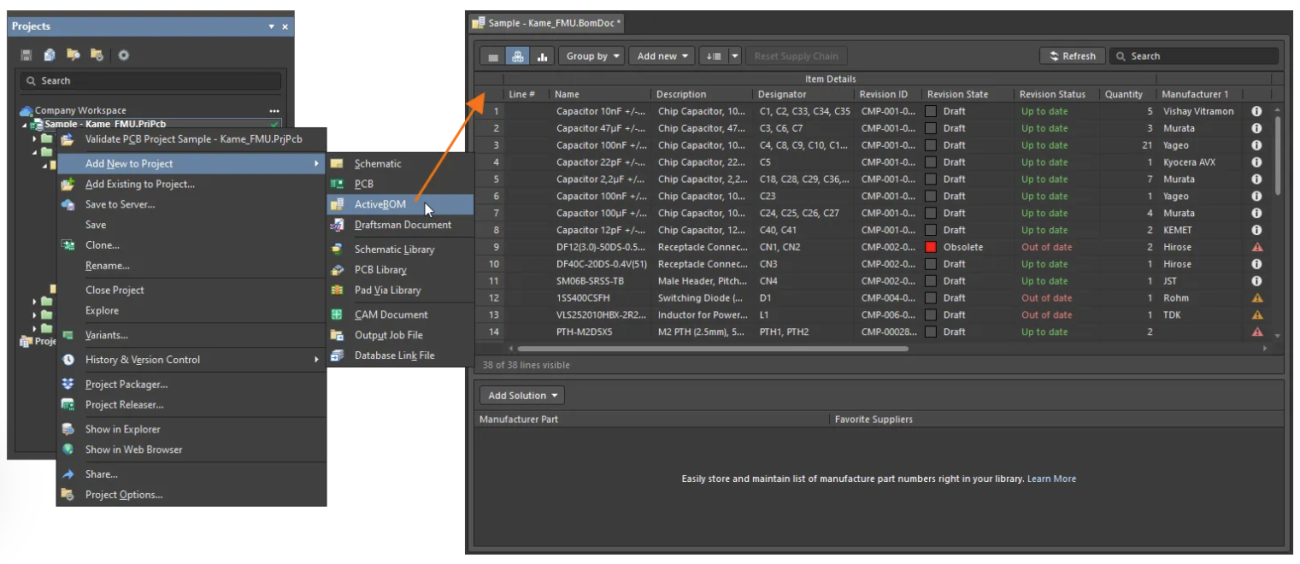
CAD-integrated tools also remove the manual work of creating the BOM in the first place. Tools like Altium Agile Teams generate a live BOM directly from the design, one that updates as components are added or changed, and inherits part number, description, lifecycle status, and supplier data already stored in the component library. The BOM is always a current reflection of the design, not a spreadsheet filled in after the fact.
Integrate BOM Management Tools Into Design-to-Source Workflows
The most effective way to design and source collaboratively can be found by answering the following questions:
- What are the needs of electrical engineers?
- How much visibility does procurement need?
- How much money do you have to spend on custom-configured solutions?
- Do you have the capacity to revisit your BOM management solution on a regular basis to ensure it functions properly in an ever-changing environment?
The answers, and the inevitable need to integrate both design and procurement workflows, point to a more intuitive solution: a collaborative, CAD-integrated workspace that enables clear cross-department communication.
Before the BOM reaches procurement, each line item should be checked for a valid in-production part number, available stock and realistic lead times, RoHS/REACH compliance status, and at least one approved alternate for critical components. The most effective way to do this is inside the BOM tool itself, where lifecycle flags and stock alerts surface automatically, not during the quoting process when it's too late to act cheaply. Once validation is complete, the BOM should be frozen, assigned a revision, and published to a shared system with a change log entry and stakeholder sign-off. Any subsequent change requires a new revision; the baseline stays intact as the reference for that production run.
Including Altium Designer and Altium 365, Altium Agile Teams is the package for teams to build better and more efficiently. The solution aids co-creation in real time and translates design and procurement contexts so insights are visible to everyone.
With Altium Agile Teams, there is little need to worry about data. Meanwhile, creating version control and product history has never been easier. This is a core step to breaking down silos and ensuring no changes slip through the cracks.
Whether you need to build reliable power electronics or advanced digital systems, Altium Agile Teams unites every discipline into one collaborative force. Free from silos. Free from limits. It’s where engineers, designers, and innovators work as one to co-create without constraints.

About Author
Related Resources
Related Technical Documentation
Table of Contents
- Key Highlights
- A Multi-Level Bill of Materials Defined
- Multi-Level BOM Use-Case
- Multi-Level BOM Management Is Risk Mitigation
- Choose a Suitable Tool for Multi-Level BOM Management
- Automated Spreadsheets
- Independent Cloud-Based BOM Tools
- API-Based Solutions
- Product Lifecycle Management (PLM)
- Enterprise Resource Planning (ERP) Modules
- CAD-Integrated BOM Tools
- Integrate BOM Management Tools Into Design-to-Source Workflows
Speed at Scale. Structured Repeatability. Secure Flexibility.
- Start up fast with out‑of‑the‑box workflows
- Collaborate using ECAD‑MCAD codesign tools
- Manage BOMs with live supply chain part data
- Manage access and security as teams scale
Contact Us
Thank you, you are now subscribed to updates.