











How to Create a Verification & Validation Plan

At a Glance
Learn why hardware verification and validation planning has to start early. See how to create a V&V plan, write test cases, and record the work.


Test planning can easily become an afterthought in hardware development. When engineers wait until the prototype is ready, they may focus on what the board can do rather than on what the requirements specify it must do.
A verification and validation (V&V) plan helps prevent this. For each requirement, it defines a method, expected results, pass/fail criteria, and a place to record evidence before the prototype exists. It also establishes how teams will validate customer needs and helps them identify gaps early, when changes are still inexpensive.
In this article, we explain how to create and execute a V&V plan, from assigning a method to each requirement to recording the evidence. We also show what a verification activity looks like and which test case management software to use to manage your process.
Key Takeaways
- Plan V&V early, when changes are cheap, and the method you choose can still shape the design.
- Verification checks against technical requirements. Validation checks against customer needs.
- Record every activity’s result and evidence in a V&V matrix, traced back to the requirements.
Why Start V&V Planning Early?
Start verification and validation planning before building the hardware. Decisions made during planning — what to measure, against which limit, and how — can shape the hardware design and are easiest to make before design begins.
Creating the V&V plan early settles three things while changes are still cheap to make:
- Whether you can check the requirement, if you can’t say how you’d measure a stable supply, the requirement needs more work, and that means a requirement rewrite.
- How you’ll measure. Want to measure the 5 V power rail under load? Put a test point on it and leave room for a probe. Adding one to already-manufactured boards means changing the board.
- What equipment you need. A thermal chamber or a custom fixture can take a while to arrive, and shared labs fill up. Order or book test equipment early, while the design is still in progress.
The same logic applies to validation. A product can pass verification by meeting all technical requirements yet still fail to solve the user's problem. The earlier you identify a gap between specifications and user needs, the less rework it costs.
Leaving V&V planning until the end of the hardware design cycle can go wrong in three ways:
- Relying only on testing. Teams may miss the chance to catch design errors through early reviews, inspections, and analysis. Finding those errors after building the hardware can make fixes more expensive.
- Overlooking high-risk requirements. Without a risk-based strategy, teams may spend time on easier checks while missing requirements that matter most to safety or performance.
- Stopping when time or budget runs out. Define completion criteria, such as verification coverage, before testing begins. Otherwise, teams risk ending testing without knowing what was completed.
How to Create a V&V Plan
A V&V plan assigns a V&V method and an activity to each requirement and works best as a living blueprint that you write alongside the design. In practice, it comes down to six steps.
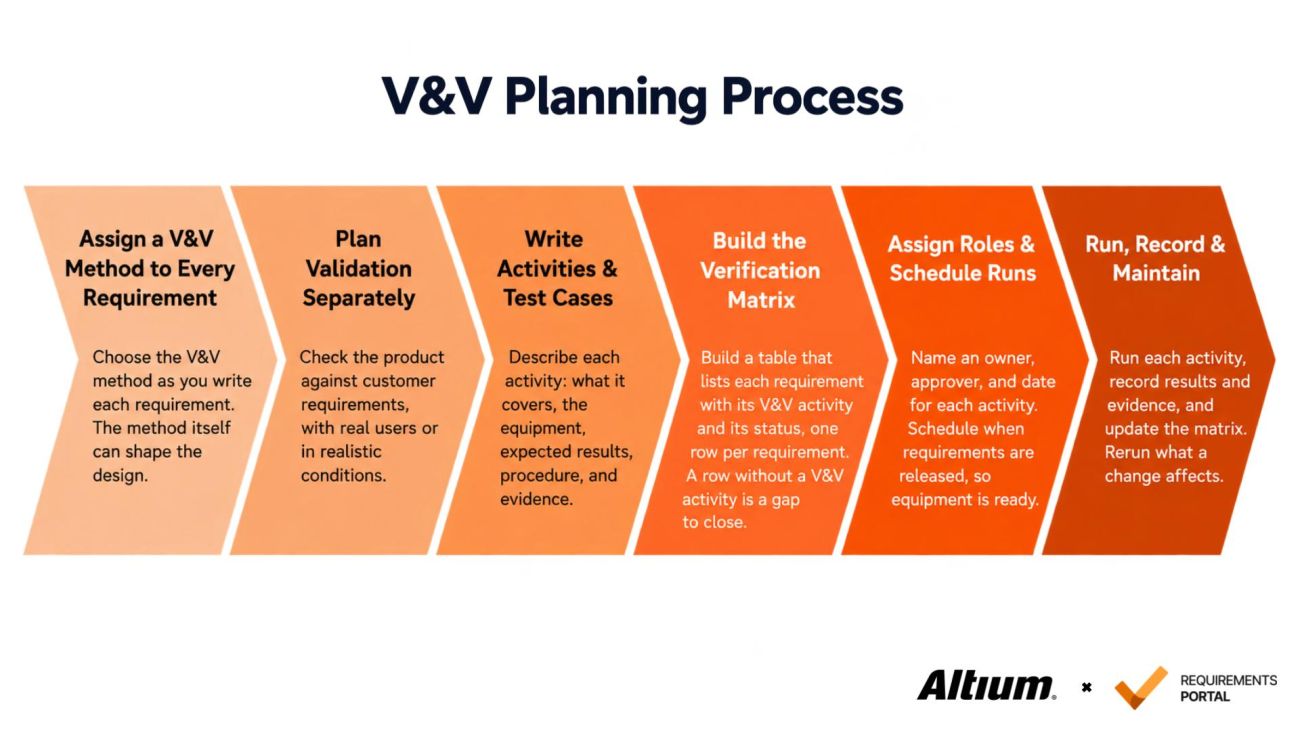
The six steps of creating a V&V plan, from assigning a method to every requirement to running the activities and maintaining the matrix.
Step 1: Assign a V&V Method to Every Requirement
While defining each requirement, assign a V&V method and expected result. Five methods serve both verification and validation:
- Review: Examine schematics, layout, and drawings against the requirement before prototyping (confirming that the regulator’s input stage is rated for the full input range).
- Analysis: Use calculations, models, or simulation to check that the requirement will be met (calculating the regulator’s power dissipation from datasheet thermal resistances).
- Inspection: Examine the physical hardware or its records against the requirement (checking component placement, assembly, and board dimensions against the drawings).
- Test: Measure performance under controlled conditions and record detailed data (step the load on the 5 V rail and measure voltage sag and ripple with an oscilloscope).
- Demonstration: Operate the product under real-world conditions without detailed data capture (confirming that a technician can press the reset button with the board in its enclosure).
A method works only if you can check the requirement. Compare two requirements:
- The sensor shall respond quickly.
- The sensor output shall settle within 2 s of a 10 °C step change in air temperature.
The first has nothing to check. The second does. If you can’t explain how you would measure a requirement, send it back to the requirements owner for a rewrite.
Step 2: Plan Validation Separately
Validation has its own starting point: the customer needs behind the requirements. Collect them, decide how to validate each one, and plan activities with real users or in realistic conditions, for example, checking that the sensor node’s status LED can still be read outdoors in direct sunlight.
Validation uses the same methods as verification. Choose a method for each need as you did for each requirement. Combine verification and validation activities only where one activity can serve both.
Step 3: Write Activities & Test Cases
A test case describes one V&V activity: the requirements it covers, the system or subsystem it tests, the equipment, the procedure steps, the expected results, and the recorded evidence. Settle three things before you run anything.
- Conditions: List the input voltage, the load, the temperature, and the hardware and firmware revision of the unit under test.
- Expected result: A number and a limit, written before the test. Writing it afterward lets the result decide it. For a requirement of 12 hours on a full battery, 12 hours passes and 11 hours 50 minutes fails.
- Procedure: List the exact steps in order, starting with preparation. Anyone should be able to repeat the test.
Step 4: Build the Verification Matrix
Bring the plan together in a table called the verification matrix. List every requirement next to the activities that cover it, and give each one a status: pass, fail, or TBD. Then check the list for gaps. A requirement with no activity is not yet planned, so it's a gap to close. From here on, the matrix is the working record for next steps.
Step 5: Assign Roles & Schedule Runs
Name an owner, an approver, and a planned date for each activity, with the equipment and lab it needs. Then schedule activities when the requirements are released. You cannot check everything at once, so start with safety-critical requirements, things you can’t change after manufacturing, and components close to their thermal or electrical limits.
Place each activity in the build stage where the hardware it needs exists. In hardware development, the stages usually follow EVT (Engineering Validation Test), DVT (Design Validation Test), and PVT (Production Validation Test). EVT shows that the design meets the requirements, DVT verifies yields using production parts and tooling, and PVT validates yields at production scale.
Step 6: Run, Record & Maintain
Run each activity, record the result and capture the evidence, then update the verification matrix. A record notes what was tested, the hardware and firmware revision, the equipment, the raw data, the outcome, and who ran it and when. Link these records back to your requirements traceability matrix so you can open a requirement and see whether you checked it, how, and with what result.
Whenever a requirement or design changes, identify the affected activities and rerun them. When a result fails, determine whether the product, the test, or the requirement is wrong, fix it, and rerun whatever the change affects. A requirement is verified when its evidence is on file, and every failure against it is closed.
What Does a Verification Activity Look Like?
A verification activity is a planned check that covers a requirement and is written so anyone can run it and judge the result. Teams often document it as a test case. Writing it before designs exist turns a requirement into something you can actually test.
Below is an example of what a verification activity can look like and how it should be documented.
Field | Data |
Name | 5 V Rail Output Test |
Description | Measure the 5 V output on the main board at EVT (first boards, rev C), with the input at 10.8 V, 12 V, and 13.2 V and the load stepped from 0 A to 2 A, at 25 °C ±5 °C. Equipment: bench power supply, programmable electronic load, multimeter (more accurate than the 0.2 V tolerance it measures), test point TP5V. |
Expected Results | Every reading between 4.8 V and 5.2 V. Evidence: log file with the readings, photo of the setup, notes on what was actually done. |
V&V Method | Test |
Requirements | REQ-PWR-001 |
Tags | For review |
Owner | Verification Engineer |
The procedure makes the activity repeatable. For REQ-PWR-001, the steps should be performed in this order:
- Power up the board and let it stabilize at the test temperature.
- Check the multimeter’s calibration date.
- Connect the programmable load to the board’s 5 V rail output and the multimeter to test point TP5V.
- Set the input to 10.8 V, then step the load from 0 A to 2 A, recording the output voltage at each step after it settles.
- Repeat at 12 V and 13.2 V.
One requirement usually involves multiple activities. REQ-PWR-001 could be verified first by reviewing the schematic and checking component ratings, then by analyzing the power stage in simulation, and finally by measuring it on a real board. Each adds evidence, and the cheaper ones come first.
Software Tools to Manage Verification & Validation
V&V produces many records, and software tools keep them in one place instead of scattered across files. A tool for V&V has to manage three things:
- The verification matrix and the validation matrix: how each requirement and each customer need is checked, and with what result.
- The V&V activities: their procedures, schedule, owners, and evidence.
- Traceability to requirements: a traceability matrix that links every activity and result back to the requirement it comes from.
Requirements Portal covers V&V in one shared workspace. You can plan test cases, link them to requirements and electronic designs, and see coverage as the project moves.
AI in Requirements Portal can also help at the Test & Verify stage. It can draft a V&V plan, flag requirements without V&V methods or linked activities, draft test cases from requirements, and help troubleshoot failed tests. AI proposes changes only, and nothing is applied until an engineer approves them.
Conclusion & Next Steps
Plan V&V early, assign each requirement a method, an expected result, and evidence, and use the plan to answer two questions: was the product built right, and is it the right product?
If you want to go deeper into V&V planning, these resources are a good place to continue:
- NASA Systems Engineering Handbook: 5.3 Product Verification and 5.4 Product Validation give practical guidance on carrying out product verification and validation.
- SEBoK: System Verification and System Validation explain from a systems engineering view how the two differ and how each is planned.
- INCOSE V&V Across Product Lifecycle covers V&V across lifecycle stages, the V-Model, V&V methods, test cases, and success criteria.
If you are ready to put this into action on a hardware product, try Requirements Portal and plan your first V&V activities against real requirements.
Frequently Asked Questions
Who Is Responsible for Creating the V&V Plan?
The Requirements Owner and the Verification Engineers write it together. As requirements take shape, the Requirements Owner assigns a V&V method to each requirement, and Verification Engineers define the activities, expected results, and test procedures. Test Engineers run them and collect the evidence.
What Should a Hardware Test Case Include?
A hardware test case describes one V&V activity from start to finish: what it covers, the conditions and equipment it needs, the steps in order, the expected result, and where the evidence goes. Another engineer should be able to repeat the test and compare results.
What Happens When a Hardware Test Fails?
Start by recording the result and the conditions under which it happened. Then trace the cause: a defect in the product, a mistake in the test setup, or a requirement that was wrong or incomplete. After the fix, rerun the affected activities and close the failure only when you have new evidence on file.

About Author
Related Resources
Related Technical Documentation
Table of Contents
Better Requirements
Less Busywork
Build better hardware with AI agents that live and act in your requirements tool.
Learn More
Thank you, you are now subscribed to updates.