





How Design Review Automation Saves Hours (and Headaches) Per Project

At a Glance
Stop chasing comments across emails and PDFs. Design review automation gives teams a structured way to track feedback, assign actions, and close reviews faster.


Design reviews should improve the product. Too often, they become a search mission. Feedback sits in email, screenshots, chat threads, PDFs, and meeting notes. Someone must turn that noise into actions. Someone else has to prove the actions were closed.
That is where hours disappear. The design team may think the review is finished when the meeting ends, but the real work often starts afterwards. The project lead collects comments. The engineer checks whether each comment still applies. Reviewers ask for status updates. Actions are copied into another tracker. Approval evidence is saved somewhere else.
Design review automation changes that rhythm. It gives teams a structured way to comment, assign, track, approve, and learn from each review. In Altium Agile Teams, reviews can happen around design context, not around loose files.
The result is a cleaner review process. Reviewers can focus on risk. Designers can focus on changes. Project leads can see what is open, what is blocked, and what is ready to close.
Key takeaways
- Design review automation saves time by keeping comments, tasks, checklists, and approvals in the same design context.
- Asynchronous reviews help busy teams take part without waiting for one long meeting.
- Automated tracking and audit trails reduce the risk that feedback is lost, repeated, or closed without clear evidence.
- Altium Agile Teams helps teams review live design data, track requested changes, and move faster through iteration cycles.
- The biggest saving is not from rushing the review but from removing the admin work that normally happens before and after the review.
Why Fragmented Review Feedback Wastes Time
Fragmented feedback wastes time because teams must manage the review before they can act on it.
A typical PCB review may involve electrical engineers, mechanical engineers, procurement, firmware, test, quality, manufacturing, and an outside partner. Each person sees a different risk. That is useful. The problem starts when their input lands in different places.
One reviewer marks up a PDF. Another sends screenshots by email. A third person comments in chat. Someone captures actions in meeting notes. A supplier sends a late observation in a separate file. None of the feedback is wrong, but the process becomes slow because the project lead must rebuild the full picture by hand.
Design Review Pain Point | What It Feels Like | Hidden Cost |
Screenshots in email | Comments lack design context. | Reviewers repeat questions or miss the exact issue. |
PDF markups | Feedback is hard to link to live design data. | Teams spend time checking whether the issue still exists. |
Meeting-only decisions | Actions depend on notes and memory. | Owners and due dates become unclear. |
Manual checklists | Teams copy the same list from project to project. | Steps are skipped when work gets urgent. |
No audit trail | Approval proof is scattered. | Teams scramble later to explain what changed. |
Separate action trackers | Issues sit away from the design. | Designers spend time matching tasks back to the layout. |
Late reviewer input | Comments arrive after the team has moved on. | Rework increases because context has already shifted. |
The headache is not only the review meeting. It is the admin work after the meeting. That is where hours disappear.
Fragmented review also creates a confidence problem. If actions are scattered, people are never quite sure whether the review is truly closed. The design may move forward, but the team still carries uncertainty. That uncertainty shows up later as rechecking, repeated questions, and extra sign-off loops.
What Design Review Automation Does Differently
Design review automation puts the review process inside a clear workflow. In Altium Agile Teams, for example, design review happens in a central location where project stakeholders can create and manage structured reviews of a Workspace design project. Reviews can be assigned to reviewers, include attachments and checklist items, and be controlled through a completion or approval process.
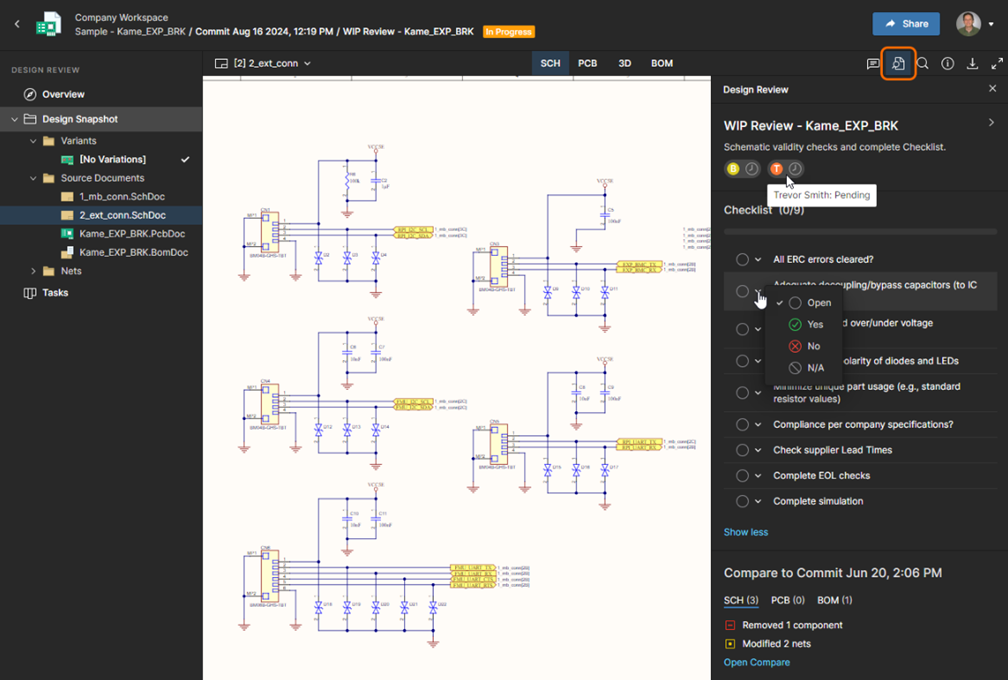
Design review in Altium Agile Teams
That structure helps teams review design data with less context switching. Instead of treating the review as a separate activity, the review becomes part of the project flow. Comments, decisions, checklist status, and approval evidence stay closer to the design.
For a growing electronics team, this matters. A reviewer can raise a point. The team can track the requested change. The initiator can see what is open, what is approved, and what needs attention. The next review can build on what was learned, rather than starting again from a blank sheet. Such a design review helps identify design issues, provides a traceable compliance record, and helps ensure the design meets company requirements and standards.
Structured Reviews Make Feedback Easier to Act On
Structured reviews turn comments into clear work items. A helpful review creates a shared answer to three questions:
- What is the issue
- Who owns it
- What evidence is needed to close it
Without that structure, feedback can stay vague. A comment such as “check connector clearance” may be useful, but it still leaves questions. Which connector? Which clearance? Which revision? Who will confirm the fix?
Automation helps by keeping feedback closer to the design object and the review record. Design reviews in Altium Agile Teams provide access to relevant project data, files, comments, visual representations, and feedback tools needed by reviewers. Workflows can include interactive forms that allow users to comment, attach files, view design documents, and progress through process steps.
That is the useful shift. Feedback becomes easier to act on because it is not just a message but part of a controlled review flow.
Structured reviews also make it easier to separate major issues from minor improvements. A blocked release item should not sit beside a style preference with the same weight. Clear review status helps the team decide what must be fixed now, what can be deferred, and what needs another pass.
Asynchronous Reviews Improve Participation
Asynchronous reviews let experts contribute when they can, while the project keeps moving. This matters because the right reviewer is not always free at the same time as the rest of the team. A mechanical engineer may be in a supplier call. A manufacturing engineer may be on the shop floor. A procurement lead may be resolving a part risk. A quality reviewer may need time to check whether the release evidence is complete.
If the only way to contribute is one long meeting, some input will arrive late or not at all. The team may get speed, but it loses the quality of review. Asynchronous review keeps the door open for better input without forcing every decision into one meeting slot.
It also changes the tone of the review work. Reviewers can look at the design when they have enough focus to make a useful contribution. Designers can respond without waiting for the next meeting. Project leads can see participation and closure status without asking for repeated updates.
This does not mean meetings disappear. Some issues still need live discussion. But the meeting becomes more focused because the team can use it for decisions, not for reading comments aloud.
Checklists Make Standards Easier to Repeat
Checklists help teams review against known standards instead of relying on memory.
Custom checklists are useful for items that must be checked every time, such as connector orientation, lifecycle status, high-risk components, assembly constraints, thermal risk, test access, release outputs, and known manufacturability risks. The goal is not to make engineers follow a script but to stop avoidable misses from reaching the next phase.
This is important because review quality often depends on consistency. Experienced reviewers may know what to look for, but a growing team cannot rely only on experience and memory. A checklist gives the team a common baseline. It helps new reviewers contribute. It also makes the review process easier to improve after each project.
The best checklists are short, relevant, and tied to real risk. If the checklist is too long, people will skim it. If the checklist is too generic, people will ignore it. If the checklist reflects actual product, process, and release risks, it becomes a useful control.
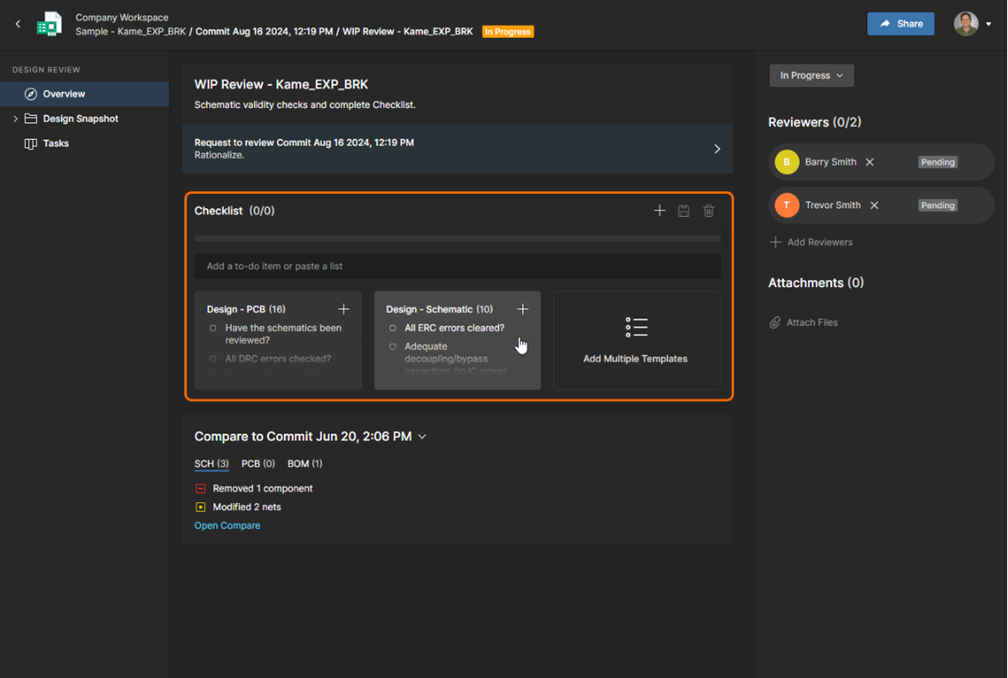
In Altium Agile Teams, you can start with a checklist template and then customize it
Where the Hours Are Saved
The largest time saving comes from reducing review admin, not from rushing the engineering work.
Use this simple model as a planning guide. The exact number will vary by team, board size, and review depth, but the pattern is common.
Manual Review Activity | Typical Effort Per Review | Automation Effect |
Collecting comments from email, chat, and files | 1 to 3 hours | Comments stay closer to the design context |
Creating and assigning action lists | 1 to 2 hours | Tasks can be created from comments |
Running checklist follow-up | 1 to 2 hours | Checklist status is visible in the review flow |
Proving closure before release | 1 to 3 hours | Audit trail and review state are easier to trace |
Repeating the same issue in the next review | Variable | Standard review templates reduce repeat misses |
Preparing review status updates | 30 minutes to 1 hour | Open items and review state are easier to see |
Rechecking whether feedback still applies | Variable | Comments remain closer to the relevant design context |
Across three formal reviews, even a modest two-hour saving per review gives a team six hours back. Larger boards and distributed teams can save more because there is less chasing, less sorting, and fewer status meetings.
The time saving is not only administrative but also protects engineering focus. Every hour spent chasing comments is an hour not spent improving the design. Every repeated question breaks concentration. Every unclear action creates delay.
Automation helps teams spend more review time on judgement and less time on coordination.
Why Faster Reviews Lead to Faster Iteration Cycles
Faster reviews improve iteration speed because design teams can act on feedback sooner. If comments arrive late or in pieces, the designer must stop, rebuild context, and decide what still matters. If feedback is structured, assigned, and visible, the next layout pass starts sooner. The team can also see whether the review is blocked by one critical issue or many small items.
This is where design review automation supports real agility. It does not remove review discipline but the drag around review discipline.
A faster review loop also improves morale. Designers do not have to defend decisions that were already agreed on. Reviewers do not have to repeat comments that were already made. Project leads do not have to chase status through five channels. The process becomes calmer because the work is visible.
That visibility matters most when the project is under pressure. Late in a project, teams are often dealing with design changes, supply constraints, manufacturing feedback, and release deadlines at the same time. A structured review process helps the team see what matters now and what can wait.
Conclusion
Design reviews exist to catch risk, not to create it. When the process around the review is fragmented, the review itself becomes a source of delay, repeated work, and uncertainty. That is the problem automation solves; not by replacing engineering judgment, but by removing the coordination overhead that surrounds it.
The teams that move fastest through iteration cycles are not the ones that skip review discipline. They are the ones that have made review discipline easy to execute. Comments stay close to the design. Actions have owners. Checklists reflect real risk. Closure is visible without anyone having to ask.
That is what a structured review process looks like in practice, and it is within reach for any team willing to change how feedback flows.
Ready to run cleaner, faster design reviews?
Altium Agile Teams gives your team a purpose-built environment for structured design reviews with centralized comments, checklist templates, action tracking, and approval workflows built directly into your design project context. Explore Altium Agile Teams →
Frequently Asked Questions
What is design review automation in electronics development?
Design review automation uses structured workflows to manage comments, action items, checklists, and approvals within a shared project environment. Instead of collecting feedback manually from emails, PDFs, and chat threads, teams work from a central review record tied directly to the design. The result is less coordination overhead and a clearer audit trail from comment raised to closure confirmed.
How does automated design review reduce rework?
Most rework originates not from bad engineering decisions but from feedback that arrived late, was misunderstood, or was never formally closed. Structured reviews reduce rework by ensuring every comment has a clear owner, every action has a visible status, and every approval is traceable. When the next design iteration starts, the team knows exactly what changed and why rather than re-litigating decisions that were already made.
Who should be involved in a PCB design review?
A thorough PCB design review typically involves electrical engineers, mechanical engineers, firmware, manufacturing, procurement, test, and quality. Each discipline sees a different category of risk. The challenge is collecting that input in a usable form. Asynchronous, structured reviews make it practical for all stakeholders to contribute without requiring everyone to be available at the same time.
How do design review checklists improve consistency across projects?
Checklists capture institutional knowledge in a repeatable form. Without them, review quality depends on the experience of whoever is in the room. A well-maintained checklist ensures that high-risk items are checked on every project, not only when an experienced reviewer happens to raise them.

About Author
Related Resources
Related Technical Documentation
Table of Contents
- Key takeaways
- Why Fragmented Review Feedback Wastes Time
- What Design Review Automation Does Differently
- Structured Reviews Make Feedback Easier to Act On
- Asynchronous Reviews Improve Participation
- Checklists Make Standards Easier to Repeat
- Where the Hours Are Saved
- Why Faster Reviews Lead to Faster Iteration Cycles
- Conclusion
- Frequently Asked Questions
Solutions for Every Role and Team
- Discover and evaluate design options earlier
- Develop in one shared workspace
- Scale with control and compliance
- Connect every stage of hardware development
Learn More
Thank you, you are now subscribed to updates.