











How Reusable Parameters in Requirements Reduce Errors and Speed Up Iterations

At a Glance
See how reusable parameters in requirements keep numeric values aligned across design, verification, and tests to catch issues early.


Most teams don’t realize their requirements have drifted until a reviewer catches it, a test fails, or someone spots a mismatch between the requirement and the design. By then, the number has often been wrong in at least two places for weeks.
Reusable parameters address this problem. They turn key numeric values into shared engineering data that teams can reference across requirements, verification activities, and related engineering work. Teams get one shared workspace to collaborate and store every engineering artifact.
Key Takeaways
- Requirement issues often start when one numeric value gets copied into multiple places and drifts out of sync.
- Reusable parameters let teams define an important value once and reference it across requirements, verification activities, and linked design work.
- With V&V rules, teams can automatically compare calculated system performance and CAD data against requirement targets.
How Requirement Misalignment Starts
Consider a power consumption limit that appears in a requirement, an engineering budget table, and a test case procedure. Each instance lives in a separate document. There’s no connection between them.
Then the design changes:
- A different battery is selected.
- A new component increases current draw.
- A subsystem allocation is revised.
An engineer updates the requirements document and the engineering budget table, but the test case still mentions the old value. The team is now working with two different values for the same target.
The consequences are too familiar:
- Engineers chase the same value across disconnected documents.
- Reviewers waste time figuring out which artifact needs to get updated.
- Test cases fall out of sync with the current specifications.
From Static Text to Reusable Parameters
Reusable parameters act as a reference point for values that must stay aligned across requirements, verification, and engineering work. Instead of editing the same number in multiple files, teams update the parameter once. The value then propagates to every linked artifact.
Examples of good candidates for reusable parameters include:
- Maximum power consumption
- Operating temperature range
- Minimum PCB trace widths
- Allowable weight or dimensions
- Timing margins
Parameters like these constraint design decisions and drive verification work. They are also reused throughout a project’s life cycle. Teams often restate the same values in requirements, design documents, and test procedures.
Reusable parameters make that reuse explicit, traceable, and structured. Key values stay consistent, connected, and current as the design evolves.

Use Case 1: ImplicitTraceability
Change It Once. Update It Everywhere.
Let’s take a power consumption limit as an example. With reusable parameters, the team can define the value once and reference it across system requirements, related subsystem specs, verification activities, and testing procedures.
If the battery choice or subsystem allocation changes, the team only needs to update a value once. The new value flows to every requirement and verification artifact that references the parameter.
This removes the need for manual re-entry across multiple artifacts and creates an implicit traceability thread.
For day-to-day work, that means:
- Less time spent manually editing disconnected document and artifacts
- Fewer misalignments between requirements and verification work
- Greater confidence that linked engineering artifacts reflect the current design state
Use Case 2: Automated Verification
V&V Rules Compare System Performance Against Requirement Targets
A more advanced use case compares functional targets in requirements with actual system performance for verification and validation (V&V).
V&V rules automate these comparisons. They flag violations when values fall out of alignment. Two parameters are required to set up a V&V rule:
- A parameter in a requirement, which defines the design target.
- A parameter in a system block, which describes how the system is designed or performs.
In our power limit example, a requirement parameter — for example, $maximum_power_consumption — defines the maximum allowable system power.
The actual power consumption of the system is stored in a second parameter — in this example, let’s call it $system_power_consumption.
A requirements tool with a calculation engine, like Altium’s Requirements Portal, helps teams create engineering budget tables that derive system performance from subsystem data. The tool pulls data from linked CAD or simulation files. It then calculates system performance using equations you define.
The V&V rule then runs the comparison automatically:
$system_power_consumption > $maximum_power_consumption
If a value changes and the calculated total exceeds the target, the V&V rule flags the violation.
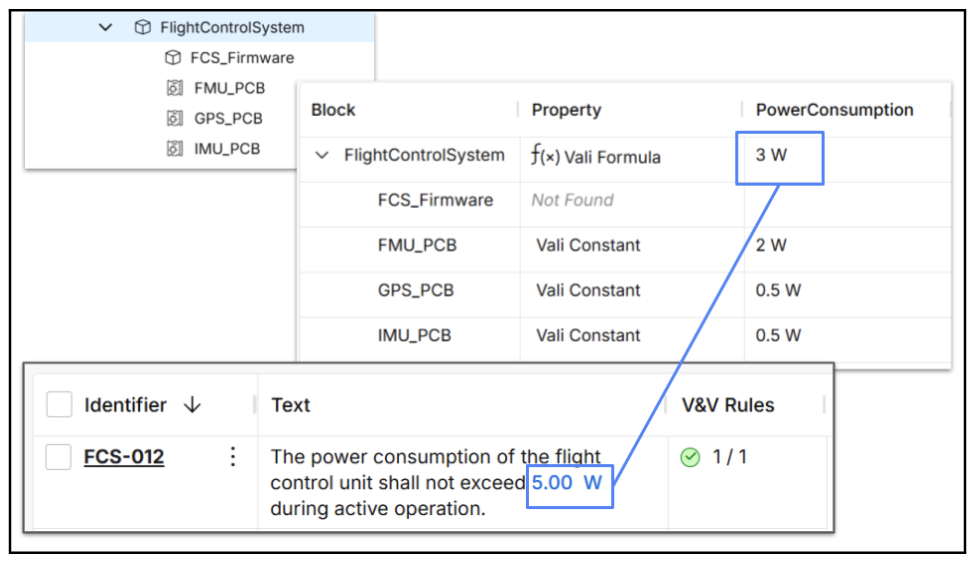
To summarize, the workflow looks like this:
- Define the target in the requirement parameter.
- Calculate actual performance in the system parameter.
- Use a V&V rule to compare the two and flag violations automatically.
The same approach works for other parameters. Here are a few examples from electronics design:
- Compare a minimum trace width requirement with PCB data to support design for manufacturing (DfM).
- Compare a temperature limit against all components to confirm they operate within specified limits.
This rules-based verification helps teams catch errors early, before they become larger problems.
How To Get Started with Reusable Parameters
Engineers often start with a list of unstructured design parameters or requirements in a Word or Excel file. These may come from internal planning, customer inputs, supplier material, or past projects.
Using Altium’s Requirements Portal, engineers can import requirements from any format, structure and manage them in a shared cloud workspace and link them to their design and verification artifacts.
Once in the tool, the workflow continues with two steps:
- First, the tool automatically detects numeric values in imported requirements and converts them into parameters.
- Second, engineers build their system architecture and define the parameters they want to track at the system, and subsystem level. These often include power, weight, and other similar engineering budgets.
Reusable parameters then become shared reference points across the whole team. Requirements, verification activities, and design work all use the same values. This approach establishes a consistent engineering data model that supports requirements management, verification, and design collaboration throughout the project lifecycle.
To identify suitable use cases of reusable parameters in your projects, think of values that are referenced in multiple places. These values usually have a direct impact on your design and verification activities. The table below highlights a few recommended starting points.
| Domain | Example Parameter |
|---|---|
| Power |
|
| Thermal |
|
| Electronics |
|
| Mechanical |
|
| Manufacturing |
|
| Regulatory |
|
From Static Requirements to Shared Engineering Data
Reusable parameters turn requirement values into shared engineering data. Instead of treating requirements as isolated documents, engineering teams can manage them as connected data that informs design, verification, and system-level decision-making.
With reusable parameters, engineers work with live requirements as they make decisions. Verification teams reference the same values when planning and documenting tests. Once the design is ready, teams can compare performance against requirements using test cases that reference requirement parameters directly.
Altium Requirements Portal’s calculation engine takes this approach a step further. The tool automatically calculates system performance from its subsystems using linked design data. With automated V&V rules, engineers can compare system performance against requirement targets to detect violations.
Together, these capabilities keep requirement intent connected to implementation. They deliver immediate workflow improvements, including:
- Faster iteration because key values stay connected through change
- Clearer reviews because teams work from the same requirement and design data
- Less rework because mismatches are caught earlier

About Author
Related Resources
Related Technical Documentation
Table of Contents
- Key Takeaways
- How Requirement Misalignment Starts
- From Static Text to Reusable Parameters
- Use Case 1: ImplicitTraceability
- Change It Once. Update It Everywhere.
- Use Case 2: Automated Verification
- V&V Rules Compare System Performance Against Requirement Targets
- How To Get Started with Reusable Parameters
- From Static Requirements to Shared Engineering Data
Better Requirements
Less Busywork
Build better hardware with AI agents that live and act in your requirements tool.
Learn More
Thank you, you are now subscribed to updates.