












Strategic Procurement with BOM Portal: Cost Optimization for Production BOMs

At a Glance
Optimize production BOM costs with BOM Portal and move beyond simple availability checks. Learn how procurement teams drive savings, reduce risk, and scale sourcing.


Production BOMs need more than availability checks. You need cost optimization across hundreds of distributors, consolidated purchasing for multi-board products, lifecycle risk assessment, and approved alternate management—all without needing CAD software access. Altium’s BOM Portal gives procurement and supply chain teams the NPI (New Product Introduction) workflow to move from reactive purchasing to strategic sourcing: automated saving opportunities, target pricing with variance alerts, consolidated BOMs for volume discounts, and supplier comparison tools that turn hours of spreadsheet work into minutes.
BOM Tool vs BOM Portal: Choosing the Right Tool
Octopart BOM Tool helps procurement teams turn a parts list into a costed, sourceable BOM in seconds. It allows users to instantly compare pricing and availability from 679 distributors in one place, identify the best offers, and move quickly from analysis to order. Built around how high-volume buyers actually procure, it streamlines bulk sourcing, simplifies distributor comparison, and makes it easy to validate real-time offers before you commit.
BOM Portal is perfect when you're ready to involve your team or work on bigger/multiple projects: working in teams, production volumes, multi-board purchasing, cost optimization, lifecycle tracking, and a structured engineering-to-procurement handoff. Same familiar interface, significantly deeper capability. If you're already using BOM Tool for early-stage work, BOM Portal is the natural next step.
In short, BOM Tool vs BOM Portal comes down to scope. BOM Tool is built for fast, individual sourcing, while BOM Portal extends that foundation into a scalable, team‑ready solution for production and multi‑project workflows.
The Procurement Problem Nobody Talks About
Engineering hands over a BOM and expects optimal sourcing. But the reality is rarely that clean. Parts are unavailable at required quantities. No approved alternates exist. Pricing comes in over budget. Single-source components are buried throughout the design.
And you're working from a spreadsheet that was accurate when the engineer created it two weeks ago.
This is the typical NPI challenge: procurement teams inheriting designs that weren't built with supply chain in mind, then scrambling to make them manufacturable. BOM Portal is built for exactly this scenario.
The NPI Workflow for Procurement
Here's how procurement teams use BOM Portal from engineering handoff to manufacturing-ready:
Step 1: Access the Production BOM
No CAD software required. Procurement gets web-based access to Managed BOMs created by engineering in Altium 365. The system automatically enriches each BOM with pricing from 679 distributors (Octopart), manufacturer-verified lifecycle status and compliance data (IHS Markit), and optional risk scoring and lifecycle prediction from SiliconExpert or Z2Data.
When you open the BOM, you're looking at live data—not the static spreadsheet that's been bouncing around in your inbox.
Step 2: Assess What Needs Attention
The Dashboard gives you an immediate health overview: components Active versus at risk, compliance coverage, stock availability, and cost totals. The Issues panel categorizes problems by type so you can prioritize:
- Availability issues: Parts with insufficient stock for your batch size
- Lifecycle risks: NRND or EOL components that threaten production continuity
- Compliance gaps: Missing RoHS, REACH, or TSCA verification
- Single-source exposure: Components with no approved alternates
- Pricing overruns: Line items exceeding your target price
Click through any flagged component to see detailed information: lifecycle status, stock across distributors, pricing trends, and compliance documentation. Use the comment system to document findings and flag items for engineering review.
Step 3: Cost Optimization
This is where BOM Portal earns its keep for procurement teams.
Saving Opportunities automatically analyzes your BOM and surfaces where you can save: lower-cost suppliers for identical parts, alternative components with better pricing but same specs, price break thresholds you're close to, and single-order versus split-order comparisons. Apply recommendations with one click and BOM cost recalculates immediately.
Typical savings on production BOMs: 5-15%.

Beyond automated suggestions, you have several manual tools:
- Target Price sets per-component budgets with variance alerts so overruns don't slip through.
- Extra Qty adds parts to reach the next price break—the system shows thresholds so you can decide whether the extra spend makes sense at your volume.
- Batch Size adjusts production quantity and instantly recalculates pricing across every line item.
- Median Price benchmarks each component against market average, flagging anything where you're paying a premium.
Step 4: Supplier Strategy
The Order List generates purchasing recommendations based on your enabled distributors. For each component, compare stock levels, unit pricing, lead times, MOQs, and packaging options side by side.
Preset modes make common decisions fast: Lowest Price, Single Order, Fastest Ship, or Preferred Suppliers. Override any line item with custom contract pricing when your negotiated rates don't match list pricing.
Ready to order? Click "Buy" in the Octocart panel to add parts directly into the supplier's checkout cart. No manual part number copying across multiple websites.
Step 5: Consolidated BOM for Multi-Board Products
If your product includes multiple PCBs, this is where significant savings live.
Consolidated BOM merges individual board BOMs into a single procurement view. Parts used across multiple boards map automatically by manufacturer part number. You can also manually consolidate equivalent parts—for example, merging 100nF capacitors from different manufacturers when they're functionally interchangeable. Fewer line items, higher aggregate quantities, better price breaks.
If three boards each use 150 of the same resistor, you're buying 450 instead of three separate 150-piece orders. Parts in Use tracking shows which boards use which components, so you can see the full impact of any sourcing decision before committing.
Step 6: Supply Chain Resilience
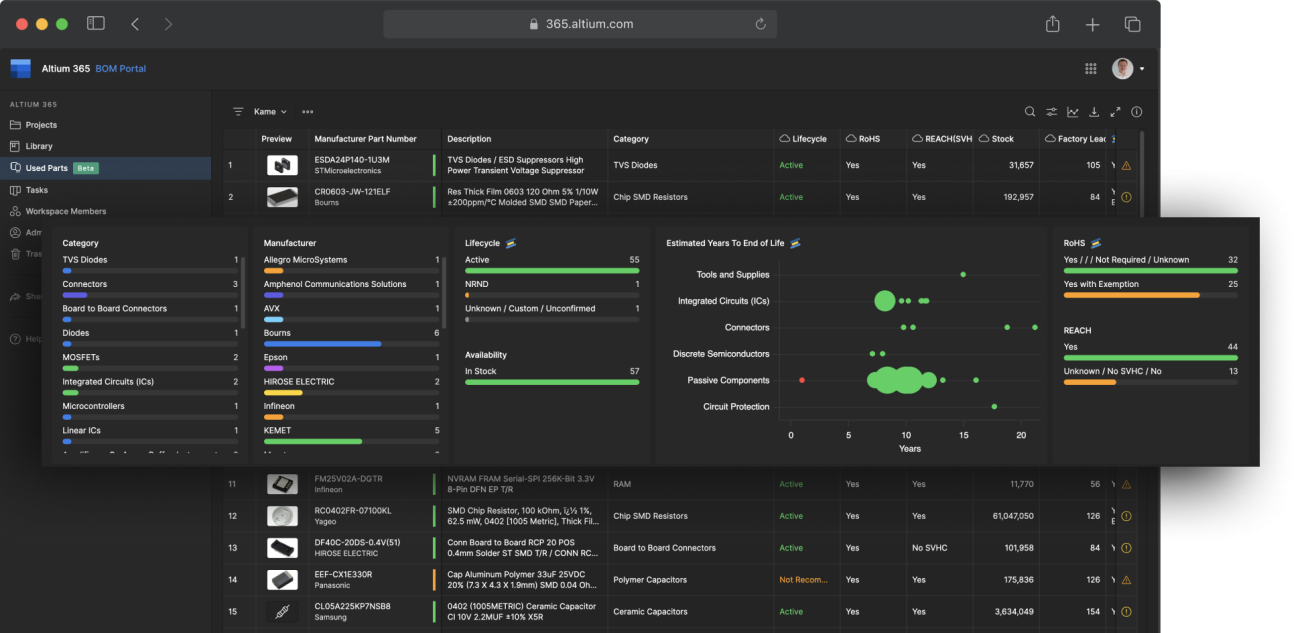
Single-source components are a production risk. BOM Portal helps you identify them and build in protection.
For at-risk parts, Alternates Search finds form-fit-function equivalents with the help of the data integrations. Document approval rationale in comments and add approved alternates to your library for future designs.
With SiliconExpert enabled, YTEOL forecasting shows how long each component is expected to remain available—18 months of warning on an EOL announcement gives you time to qualify an alternate, execute a lifetime buy, or plan a redesign. Z2Data adds risk scoring across multiple dimensions, including geopolitical exposure and manufacturer concentration.
Step 7: Release for Manufacturing
When the BOM is clean, create a formal "Released" version as the official handoff. Export to Excel or CSV for ERP integration, or publish it with a few clicks to a PLM.
Draft/Released/Obsolete lifecycle states make it clear which version is current. No more accidental handoffs of outdated BOMs.
Getting Started
No Altium Designer license needed. Start the eval, upload any production BOM, and look for your Saving Opportunities.
The 30-day trial includes full feature access with no per-seat charges—add your whole team at no extra cost.
Ready to move from reactive purchasing to strategic sourcing? Compare features and start your 30-day trial →

About Author
Related Resources
Related Technical Documentation
Table of Contents
Build Resilient Electronics Supply Chains
- Drive confident, data-driven choices in electronics procurement
- Improve procurement and engineering collaboration
- Minimize supply chain risk with visibility
Learn More
Thank you, you are now subscribed to updates.