

Mobile menu
  • Solutions
    • Octopart Discover Go beyond part search to discover viable solutions, evaluate tradeoffs, and make better decisions earlier
    • Altium Develop Design advanced PCBs in Altium Designer, working independently or connecting reviewers, sourcing data, and release coordination when needed
    • Altium Agile Teams Bring structure to multidisciplinary electronics development and collaboration without sacrificing speed
    • Altium Agile Enterprise Connect context from intent through release with an intelligent, governed, extensible platform
  • Resources & Support
    Free Altium 365 Tools
    • Gerber Compare
    • Online PCB Viewer
    Resources & Support
    • Learning Hub
    • Support Center
    • Documentation
    • Webinars
    Altium Community
    • Forum
    • Bug Crunch
    • Ideas
  • Education & Training
    • Student Lab Free access to professional PCB design software, training, and learning resources for students
    • Educator Center A comprehensive education platform providing curriculum, software, training, and classroom resources for educators
    • Altium Education Curriculum Free college- and university-level PCB design curriculum designed to prepare students for real-world engineering careers
    • Altium Professional Training Flexible on-demand and instructor-led training courses that help engineers build and advance their PCB design skills
  • Search Open
    Search Close
Sign In
Webinars

Main menu

  • Home
  • PCB Design
    • Collaboration
    • Component Creation
    • Data Management
    • Design Outputs
    • ECAD/MCAD
    • HDI Design
    • High Speed Design
    • Multi-Board
    • PCB Layout
    • PCB Routing
    • PCB Supply Chain
    • Power Integrity
    • RF Design
    • Rigid Flex
    • Schematic Capture
    • Signal Integrity
    • Simulation
  • Software
    • Develop
    • Discover
    • Agile
    • Altium 365
    • Altium Designer
  • Education
    • Programs
    • Altium Academy
    • Engineering News
    • Guide Books
    • Newsletters
    • Podcasts
    • Projects
    • Training Courses
    • Webinars
    • Whitepapers
Learning Hub Webinars ECAD Engineering Management Beyond Design

ECAD Engineering Management Beyond Design

You own the development process. Your teams work across requirements, design, manufacturing, and product lifecycle management. But visibility is often fragmented across multiple systems.

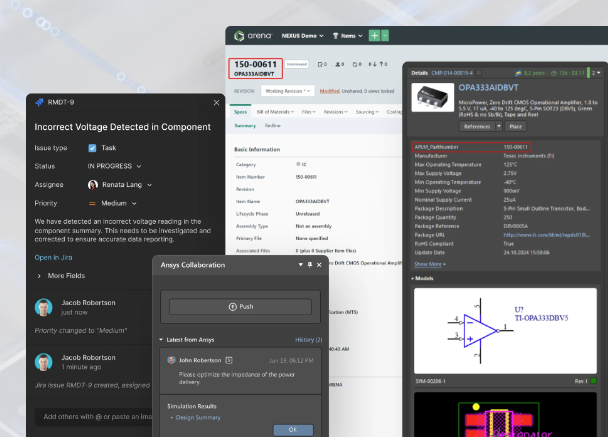
In this webinar, learn how Altium Agile Enterprise platform brings the entire product development process together in a single platform. See how engineering managers can gain end-to-end visibility and traceability, create structured team workflows, connect requirements with design data and PLM systems, and align every stakeholder around a shared source of truth, all while building on existing Altium Designer workflows.
Author

Author

Simone joined Altium in 2018 as a Technical Sales Engineer and works closely with the sales team, taking care of both prospects and existing customers, supporting them with technical sales and marketing activities on Altium's products and services. He earned the Degree in Telecommunication Engineering at the University of Pisa (Italy). Simone started working in several sectors, from IT/networking, wireless and satellite communications and mechanical industries, where he gained more than 10 years experience in both Pre-Sales and Post-Sales technical support.

More content by Simone Marchetti

Author

Author

Christian started at Altium 2007 as a member of the technical support, where he earned a reputation for direct support, training, presentations and consulting over the years. Prior to Altium, Christian graduated in Electrical Engineering and worked as a development engineer. The experience Christian gained during that time serves as the solid basis for a deep technical understanding, not only on the application side, also of the underlying architecture in the development process.

More content by Christian Keller
Altium Agile Enterprise
JUN
CET
No result.
View All Dates

Registration has recently closed. Check back soon for on-demand webinar.

Related Technical Documentation

Altium 365 Platform Interface Altium 365 Platform Interface

Depending on your relationship with Altium, the services offered on the Altium Platform will be experienced from within Altium Designer and through the platform's browser-based interface. This page takes a look at the latter and provides an overview of what you'll see when you register an Altium Account and sign in to the Altium Platform Interface. For the latest information on the security,…

Read Documentation
Exploring the Browser-based Interface Exploring the Browser-based Interface

In addition to connecting to a Workspace through Altium Designer – interfacing to it through the Explorer panel and Components panel (for direct interaction with the components therein) – you also connect to it through a dedicated browser interface, with access to management interfaces for the various services available as part of the Workspace. In fact, with some of these services, your only…

Read Documentation
Design Data Comparisons Design Data Comparisons

The Altium 365 Workspace project view provides design data comparison features that allow you to compare data changes that have occurred between different project releases and/or commits. Particularly valuable for performing final checks prior to sending your product data to the manufacturing side, the features allow you to determine exactly what changes have occurred in your Gerber (or ODB++),…

Read Documentation
New in Requirements Portal New in Requirements Portal

Requirements Portal is under continuous development. This page outlines new features and enhancements made to Requirements Portal in key updates. Update - 6 August 2026 Consolidated UI of the Importer In this release, the Import Wizard used to import requirements to your projects has been updated to consolidate the user interface of the AI importer and the classic (formerly legacy) importer. When…

Read Documentation
Design Reviews Design Reviews

The project Design Reviews page is the central location for all project stakeholders to perform and manage structured reviews of a Workspace design project. The interface allows the creation, access and management of Design Review instances by any Workspace member, which in turn can be assigned to other Workspace members as Reviewers. The Design Review creator (the Initiator) can add attachments…

Read Documentation
Agentic Requirements Engineering Agentic Requirements Engineering

AI agents provide substantial advantages for engineering tasks like requirements capturing by significantly enhancing efficiency and automating complex, repetitive workflows. Requirements Portal's Engineering Assistant leverages AI technologies to provide you with fast, automated review tool for your requirements that allows you to ask questions about requirements in your current project in free…

Read Documentation
Standalone Gerber Compare Standalone Gerber Compare

The standalone Altium 365 Gerber Comparison viewer provides free access to graphically view the differences between Gerber fabrication files through your web browser. This offers a quick and easy solution for checking a design's fabrication output between release iterations or prior to sending your board production data out to manufacture. As a free service developed and provided by Altium, the…

Read Documentation
Standalone Viewer Standalone Viewer

The standalone Altium 365 Viewer provides free access to view and share your electronic designs and CAM manufacturing data through your Web rowser. No downloads, no installations, and no registration required. A truly tool-neutral viewing experience that allows you to view and share designs sourced from an ever-expanding variety of supported ECAD design tools. You can even embed Altium 365 Viewer…

Read Documentation
Document Export Custom Templates Document Export Custom Templates

Requirements Portal's Document Export wizard is your go-to for whipping up editable Microsoft Word *.docx files straight from your requirements and V&V activities. You can use predefined templates or upload your own templates. The wizard is fueled by the Python-Docx-Template library, which, in turn, leverages the Jinja Templating Engine. This dynamic duo allows you to craft custom templates…

Read Documentation
Electronic System Design Electronic System Design

In early stages of electronic designs, it is important to define the design on the conceptual/functional level. This initial step serves as a crucial foundation for the entire development process, providing a high-level overview of the system's architecture and its primary elements. A well-crafted block diagram clarifies the major functional units of the electronic system and illustrates their…

Read Documentation

ECAD Engineering Management Beyond Design

Created: July 28, 2026
At a Glance
Connecting Requirements, Development, and PLM in One Enterprise Workflow
Go Deeper with AI:
ChatGPT Perplexity Claude Google Grok
Product: Agile Agile Enterprise Webinars Engineering Teams Engineering Managers PCB Design Engineers Altium Enterprise Solutions (Formerly Altium Nexus) CoDesign and CoEngineering (ECAD/MCAD Collaboration) ECAD/MCAD Data Management and Version Control Lifecycle Management

You own the development process. Your teams work across requirements, design, manufacturing, and product lifecycle management. But visibility is often fragmented across multiple systems.

In this webinar, learn how Altium Agile Enterprise platform brings the entire product development process together in a single platform. See how engineering managers can gain end-to-end visibility and traceability, create structured team workflows, connect requirements with design data and PLM systems, and align every stakeholder around a shared source of truth, all while building on existing Altium Designer workflows.

Related Technical Documentation

Altium 365 Platform Interface Altium 365 Platform Interface

Depending on your relationship with Altium, the services offered on the Altium Platform will be experienced from within Altium Designer and through the platform's browser-based interface. This page takes a look at the latter and provides an overview of what you'll see when you register an Altium Account and sign in to the Altium Platform Interface. For the latest information on the security,…

Read Documentation
Exploring the Browser-based Interface Exploring the Browser-based Interface

In addition to connecting to a Workspace through Altium Designer – interfacing to it through the Explorer panel and Components panel (for direct interaction with the components therein) – you also connect to it through a dedicated browser interface, with access to management interfaces for the various services available as part of the Workspace. In fact, with some of these services, your only…

Read Documentation
Design Data Comparisons Design Data Comparisons

The Altium 365 Workspace project view provides design data comparison features that allow you to compare data changes that have occurred between different project releases and/or commits. Particularly valuable for performing final checks prior to sending your product data to the manufacturing side, the features allow you to determine exactly what changes have occurred in your Gerber (or ODB++),…

Read Documentation
New in Requirements Portal New in Requirements Portal

Requirements Portal is under continuous development. This page outlines new features and enhancements made to Requirements Portal in key updates. Update - 6 August 2026 Consolidated UI of the Importer In this release, the Import Wizard used to import requirements to your projects has been updated to consolidate the user interface of the AI importer and the classic (formerly legacy) importer. When…

Read Documentation
Design Reviews Design Reviews

The project Design Reviews page is the central location for all project stakeholders to perform and manage structured reviews of a Workspace design project. The interface allows the creation, access and management of Design Review instances by any Workspace member, which in turn can be assigned to other Workspace members as Reviewers. The Design Review creator (the Initiator) can add attachments…

Read Documentation
Agentic Requirements Engineering Agentic Requirements Engineering

AI agents provide substantial advantages for engineering tasks like requirements capturing by significantly enhancing efficiency and automating complex, repetitive workflows. Requirements Portal's Engineering Assistant leverages AI technologies to provide you with fast, automated review tool for your requirements that allows you to ask questions about requirements in your current project in free…

Read Documentation
Standalone Gerber Compare Standalone Gerber Compare

The standalone Altium 365 Gerber Comparison viewer provides free access to graphically view the differences between Gerber fabrication files through your web browser. This offers a quick and easy solution for checking a design's fabrication output between release iterations or prior to sending your board production data out to manufacture. As a free service developed and provided by Altium, the…

Read Documentation
Standalone Viewer Standalone Viewer

The standalone Altium 365 Viewer provides free access to view and share your electronic designs and CAM manufacturing data through your Web rowser. No downloads, no installations, and no registration required. A truly tool-neutral viewing experience that allows you to view and share designs sourced from an ever-expanding variety of supported ECAD design tools. You can even embed Altium 365 Viewer…

Read Documentation
Document Export Custom Templates Document Export Custom Templates

Requirements Portal's Document Export wizard is your go-to for whipping up editable Microsoft Word *.docx files straight from your requirements and V&V activities. You can use predefined templates or upload your own templates. The wizard is fueled by the Python-Docx-Template library, which, in turn, leverages the Jinja Templating Engine. This dynamic duo allows you to craft custom templates…

Read Documentation
Electronic System Design Electronic System Design

In early stages of electronic designs, it is important to define the design on the conceptual/functional level. This initial step serves as a crucial foundation for the entire development process, providing a high-level overview of the system's architecture and its primary elements. A well-crafted block diagram clarifies the major functional units of the electronic system and illustrates their…

Read Documentation
Back to Home
Altium logo

Solutions for Every Role and Team

  • Discover and evaluate design options earlier
  • Develop in one shared workspace
  • Scale with control and compliance
  • Connect every stage of hardware development

Learn More

ECAD-MCAD Collaboration

Easily synchronize designs between Altium Designer and top MCAD systems.

Learn More
Platform-based Solutions
  • Octopart Discover
  • Altium Develop
  • Altium Agile Teams
  • Altium Agile Enterprise
Tools
  • Altium Designer
  • Octopart
Platform
  • Altium 365
Company
  • Our Customers
  • Trust Center
  • Newsroom
Software Capabilities
  • PCB Layout and Design
  • Requirements Management
  • Electronics Data Management
  • IT Security
  • Electronics Manufacturing
  • Electronics Supply Chain
  • Engineering Management
Resources & Support
  • Status
  • Downloads
  • Learning Hub
  • Support Center
  • Bug Crunch
  • Forum
  • Documentation
  • Ideas
  • Education
  • Professional Training / Certification
  • Webinars
  • Beta Program
Education
  • Student Lab
  • Educator Center
  • Altium Education Curriculum
Careers
  • Career at Altium
  • Copyrights & Trademark
  • Privacy policy
  • Cookie policy
  • Terms of Service
  • Legal
© 2026 Altium LLC.