
Mobile menu
  • Solutions
    • Octopart Discover Go beyond part search to discover viable solutions, evaluate tradeoffs, and make better decisions earlier
    • Altium Develop Design advanced PCBs in Altium Designer, working independently or connecting reviewers, sourcing data, and release coordination when needed
    • Altium Agile Teams Bring structure to multidisciplinary electronics development and collaboration without sacrificing speed
    • Altium Agile Enterprise Connect context from intent through release with an intelligent, governed, extensible platform
  • Resources & Support
    Free Altium 365 Tools
    • Gerber Compare
    • Online PCB Viewer
    Resources & Support
    • Learning Hub
    • Support Center
    • Documentation
    • Webinars
    Altium Community
    • Forum
    • Bug Crunch
    • Ideas
  • Education & Training
    • Student Lab Free access to professional PCB design software, training, and learning resources for students
    • Educator Center A comprehensive education platform providing curriculum, software, training, and classroom resources for educators
    • Altium Education Curriculum Free college- and university-level PCB design curriculum designed to prepare students for real-world engineering careers
    • Altium Professional Training Flexible on-demand and instructor-led training courses that help engineers build and advance their PCB design skills
  • Search Open
    Search Close
Sign In
Webinars

Main menu

  • Home
  • PCB Design
    • Collaboration
    • Component Creation
    • Data Management
    • Design Outputs
    • ECAD/MCAD
    • HDI Design
    • High Speed Design
    • Multi-Board
    • PCB Layout
    • PCB Routing
    • PCB Supply Chain
    • Power Integrity
    • RF Design
    • Rigid Flex
    • Schematic Capture
    • Signal Integrity
    • Simulation
  • Software
    • Develop
    • Discover
    • Agile
    • Altium 365
    • Altium Designer
  • Education
    • Programs
    • Altium Academy
    • Engineering News
    • Guide Books
    • Newsletters
    • Podcasts
    • Projects
    • Training Courses
    • Webinars
    • Whitepapers
Learning Hub Webinars Efficient Thermal Management with SPICE Simulation in Altium Designer 24

Get the Most from Altium Designer 24

Efficient Thermal Management with SPICE Simulation in Altium Designer 24

Audience:
Electronic Engineers, Mechanical Engineers, Engineering Managers

Teams that don't incorporate simulation for power analysis often find themselves grappling with unforeseen challenges in their design journey. Without simulation, they may encounter difficulties in accurately predicting power consumption, leading to suboptimal designs and increased risk of costly errors during the later stages of development.

Ready to transform your design approach? Take action now by leveraging the power of Altium Designer 24 for simulation. Our advanced SPICE Simulation tool empowers you to design intuitively and intelligently by addressing power-related challenges and optimizing your designs with confidence. With Altium Designer 24, you gain real-time insights into power behavior, ensuring robust and efficient electronic designs.

JOIN US FOR THIS WEBINAR RECORDING THAT WAS COVER:

  • Streamlining Design Processes: Learn how simulation in Altium Designer 24 can streamline your design workflow, saving time and resources.

  • Mitigating Risks: Explore how simulation helps identify and address potential issues early in the design phase, reducing the risk of costly errors.

  • Optimizing Performance: Discover the benefits of using Altium Designer 24 for simulation to achieve optimal power performance and reliability in your electronic designs.

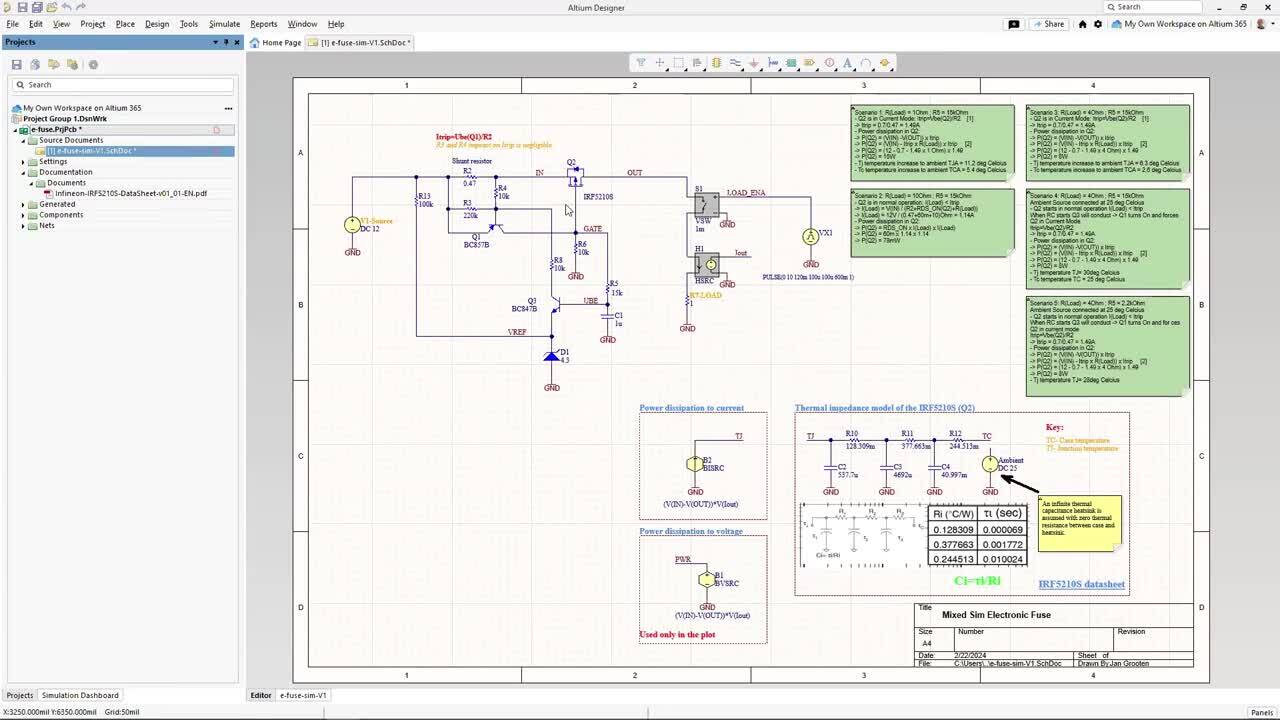
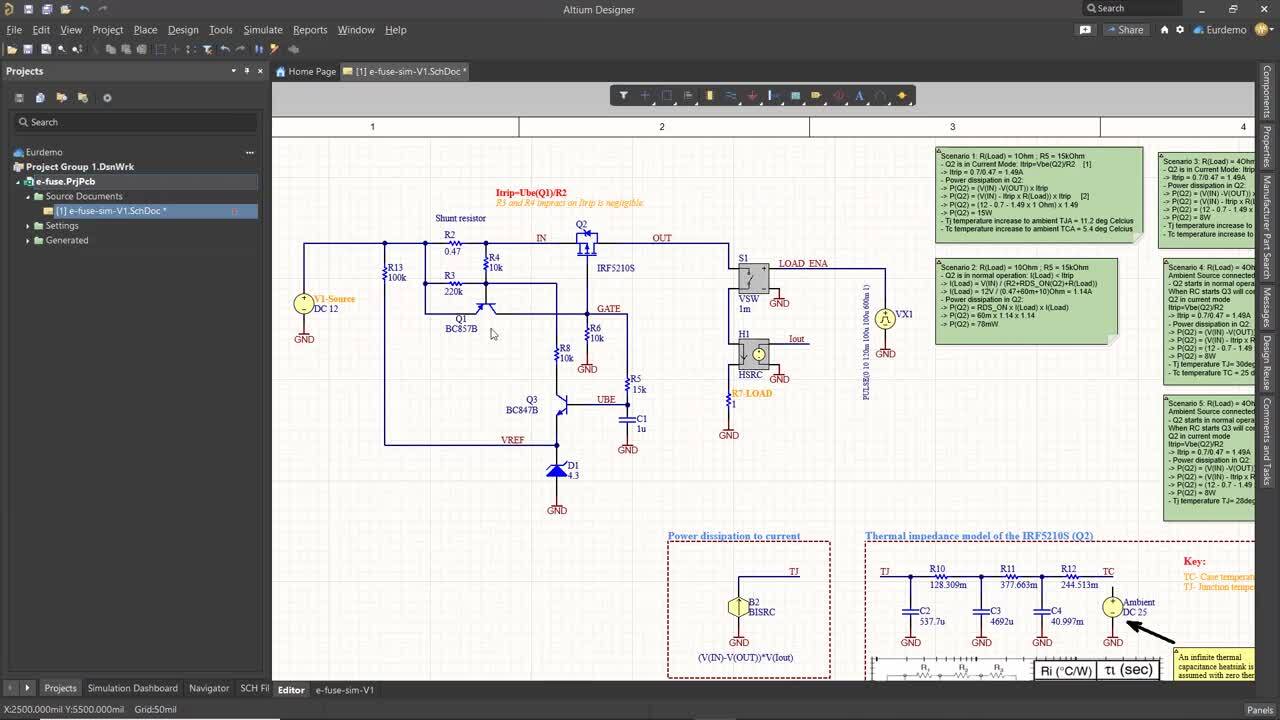
power analyzed on a pcb

Registration has recently closed. Check back soon for on-demand webinar.

Related Resources

ECAD Engineering Management Beyond Design Connecting Requirements, Development, and PLM in One Enterprise Workflow September 10, 2026 3:00 PM Register
00:45:05 What's New in Requirements Portal Discover the latest additions to Altium’s Requirements Portal — including a brand-new AI-assisted importer that turns unstructured documents into structured requirements with ease.
Watch Video
01:00:30 Introducing the Requirements & Systems Portal Watch our webinar to learn about the application of the Altium 365 suite. Requirements & Systems Portal will help align engineering teams to get to market quicker Watch Video
00:21:26 Integrating Requirements into Your PCB Design Workflow Join our webinar where you will learn about integrated requirements tools who can help you eliminate late-stage design changes, AI support through system requirements and integration of design requirements directly in PCB Design. Don't miss it, register now! Watch Video
00:22:36 From Design to First Assembly: Complete Your BOM & Plan Your Build Discover how BOM Portal and Assembly Assistant take you from a released design to prototype-ready in minutes, not days. Watch Video
00:34:19 How BOM Portal supports R&D and Procurement with DFM & DFC analysis throughout the entire product lifecycle Explore how shared BOM projects help R&D and procurement teams collaborate more effectively. Watch Video
37:15 Altium Designer: Key Benefits of ActiveBOM Webinar What is ActiveBOM? ActiveBOM is an editor in Altium Designer that sits alongside, in importance, with the schematic and PCB editors. You can think of ActiveBOM as an alternative (table-based) way to view and interact with your design. The schematic provides the logical representation of the design and the PCB provides the physical representation. ActiveBOM supplements these two domains with focus on selection, sourcing and cost of the items Watch Video
00:38:06 Altium Agile Teams - Solution Overview Get an overview of this new Electronic Product Development Platform. Watch Video
00:33:05 Your Design Data Has Zero Defense See how Altium Agile builds speed, structure, and security into every stage of electronics development. Watch Video
00:52:37 Holistic Engineering Management in Electronic Design See how engineering leaders gain the visibility and control to deliver on time, with less risk
Watch Video

Related Technical Documentation

Altium 365 Platform Interface Altium 365 Platform Interface

Depending on your relationship with Altium, the services offered on the Altium Platform will be experienced from within Altium Designer and through the platform's browser-based interface. This page takes a look at the latter and provides an overview of what you'll see when you register an Altium Account and sign in to the Altium Platform Interface. For the latest information on the security,…

Read Documentation
Agentic Requirements Engineering Agentic Requirements Engineering

AI agents provide substantial advantages for engineering tasks like requirements capturing by significantly enhancing efficiency and automating complex, repetitive workflows. Requirements Portal's Engineering Assistant leverages AI technologies to provide you with fast, automated review tool for your requirements that allows you to ask questions about requirements in your current project in free…

Read Documentation
Grouping Requirements Grouping Requirements

In engineering projects, it is common for your Systems to have a large number of Specifications, containing many Requirements. In the Requirements Module, Specifications can be grouped into Folders. Additionally, each Specification can be further subdivided into Sections, Subsections etc. allowing easier navigation and organization of the requirements within your project. Organizing…

Read Documentation
New in Requirements Portal New in Requirements Portal

Requirements Portal is under continuous development. This page outlines new features and enhancements made to Requirements Portal in key updates. Update - 3 September 2026 Enhanced Highlight of Changes Suggested by the Engineering Assistant Highlight of changes suggested by the Engineering Assistant has been enhanced in this release. Now, the bubbles in the left-hand project tree reflect the type…

Read Documentation
Workspace Components Workspace Components

The Workspace gives you convenient access for browsing all of the managed components that are currently stored within that Workspace. Accessible through the Workspace browser interface (a constituent part of the parent Altium 365 Platform Interface) not only can you quickly see what (and how many) components you currently have at your disposal, but you can also view a summary of the health of…

Read Documentation
Import Requirements Import Requirements

You can quickly and easily upload your existing requirements data into Requirements Portal using the Import Wizard available in the Requirements Module. Leveraging AI-powered extraction, you can import requirements from unstructured PDF, Word, Excel, and CSV files, reducing the time and effort required to manually transfer requirement data and helping you capture requirements more accurately and…

Read Documentation
Web Viewer Web Viewer

The Altium 365 Web Viewer interface provides universal access to PCB project documents through a standard web browser. Much more than just a web-based viewer, its advanced browser technology allows users to navigate through the project structure, interact with design documents, extract information about elements in the design, and highlight areas or objects for commenting notes. When viewing…

Read Documentation
Advanced Design Search Advanced Design Search

To locate, list and highlight design objects in a hardware design project the Altium Workspace includes a powerful search engine based on a flexible query-based syntax. Accessed within the Web Viewer, the search system streamlines the task of finding the exact information you need, from the simple isolation of a specific component to the complex relationship between objects, data and connectivity…

Read Documentation
Managing Workspace Membership Managing Workspace Membership

User Management for a Workspace is performed by an Administrator through the Team and Admin areas of that Workspace's browser interface. This provides the interface to the Identity Service (IDS), with which to define applicable service access, through the specification of Users (Members) and Groups. An MCAD user can be invited to be a Team member from within Altium Designer, too. For more…

Read Documentation
Design Reviews Design Reviews

The project Design Reviews page is the central location for all project stakeholders to perform and manage structured reviews of a Workspace design project. The interface allows the creation, access and management of Design Review instances by any Workspace member, which in turn can be assigned to other Workspace members as Reviewers. The Design Review creator (the Initiator) can add attachments…

Read Documentation

Efficient Thermal Management with SPICE Simulation in Altium Designer 24

Created: February 26, 2024
At a Glance
Uncover the art of predicting and refining circuit behavior using cutting-edge simulation tools within Altium Designer.
Go Deeper with AI:
ChatGPT Perplexity Claude Gemini Grok
8 videos
  • Presented by Alex Hall
    00:24:53 • Feb 26, 2024
    Presented by Alex Hall
    00:24:53 • Feb 26, 2024
  • Presented by Jan Grooten
    00:21:05 • Feb 26, 2024
    Presented by Jan Grooten
    00:21:05 • Feb 26, 2024
  • Präsentiert von Martin Malenica
    00:20:43 • Feb 27, 2024
    Präsentiert von Martin Malenica
    00:20:43 • Feb 27, 2024
  • Présenté par Nourhene Kerkeni
    00:15:21 • Feb 26, 2024
    Présenté par Nourhene Kerkeni
    00:15:21 • Feb 26, 2024
  • Presentado por Manuel Valero
    00:32:45 • Feb 26, 2024
    Presentado por Manuel Valero
    00:32:45 • Feb 26, 2024
  • Presentato da Manuel Valero
    00:31:18 • Feb 26, 2024
    Presentato da Manuel Valero
    00:31:18 • Feb 26, 2024
  • 오힘찬 FAE 발표
    00:23:07 • Feb 25, 2024
    오힘찬 FAE 발표
    00:23:07 • Feb 25, 2024
  • プレゼンター:ダニエル チョウ
    00:41:22 • Feb 25, 2024
    プレゼンター:ダニエル チョウ
    00:41:22 • Feb 25, 2024
Product: Altium Designer Webinars Electrical Engineers Simulation and Analysis
Other Recordings
Clear ×
Region
Language

Teams that don't incorporate simulation for power analysis often find themselves grappling with unforeseen challenges in their design journey. Without simulation, they may encounter difficulties in accurately predicting power consumption, leading to suboptimal designs and increased risk of costly errors during the later stages of development.

Ready to transform your design approach? Take action now by leveraging the power of Altium Designer 24 for simulation. Our advanced SPICE Simulation tool empowers you to design intuitively and intelligently by addressing power-related challenges and optimizing your designs with confidence. With Altium Designer 24, you gain real-time insights into power behavior, ensuring robust and efficient electronic designs.

WATCH THIS SHORT WEBINAR RECORDING, WHERE WE COVERED:

  • Streamlining Design Processes: Learn how simulation in Altium Designer 24 can optimize your design workflow, saving time and resources.

  • Mitigating Risks: Explore how simulation helps identify and address potential issues early in the design phase, reducing the risk of costly errors.

  • Optimizing Performance: Discover the benefits of utilizing Altium Designer 24 for simulation to achieve optimal power performance and reliability in your electronic designs.

Author

Author

Alex has a background in electrical engineering and a strong passion for technical marketing. Graduating with a bachelor’s in electrical engineering from Clemson University in 2018, he has since excelled in various roles within the technology sector. Starting his career at Kyocera AVX, Alex served as an RF Field Applications Engineer, establishing strong client relationships and designing passive bandpass filters and antenna systems. He then transitioned to TDK as an Account Executive, where he provided sales and technical support, leading a dynamic sales team and offering design assistance to customers. Currently, Alex is a Technical Marketing Engineer at Altium, leveraging his technical expertise to develop marketing materials.
 

More content by Alex Hall

Author

Author

Jan Grooten is an Electronics Design Engineer who graduated (MScEE) in Asic design at the University of Twente, Netherlands. Besides Altium, Jan’s work experience includes Ericcsson, Sony and Plantronics where he served as Electronic System Engineer with focus on product development for Bluetooth headsets, with specialisation in small Li-ion batteries and Power management IC's. Jan started his career at Altium in 2017 as Field Application Engineer and is a Certified Interconnect Designer by IPC Council.
 

More content by Jan Grooten

Author

Author

Martin Malenica has a masters in electronic and computer engineering at the University of Zagreb. His previous experience consists of multiple embedded systems positions at robotics start-ups (Gideon with USD 35m in Seed and Series-A funding) and SMEs. His engineering strengths lie in system architecture, PCB design and embedded programming. Aside from engineering, Martin has spent the last 1.5 years working at a leading European management consulting firm, where he focused on strategies to support large OEMs and Tier-1s regarding the current semiconductor shortage across the whole EMEA region. Martin has practical experience within AD, but also a good understanding of competitor tools, especially on the procurement and supply chain side, like Everstream, Resilinc, Silicon Expert, Z2Data etc. Martin Joined Altium in 2023 as part of the Technical Sales team in Germany.
 

More content by Martin Malenica

Author

Author

Nourhene is an Electronic Engineer specializing in PCB Design and FPGA Programming, holding a Master’s degree in RFID technologies. Since joining Altium in 2019, she has partnered closely with the sales team to support both prospects and existing customers through technical sales and marketing initiatives across Altium’s portfolio.

Before Altium, Nourhene designed complex PCBs for Automotive and Aerospace applications at large international companies, where she also managed comprehensive testing processes. She has extensive experience collaborating with PCB manufacturers across Europe and Asia. Nourhene holds CID certification and is a certified Altium Designer Trainer.

More content by Nourhene Kerkeni

Author

Author

Manuel Valero is an Electronics Engineer with experience ranging from his own repair and IT businesses to working with multinational companies in the semiconductor and passive components branches; he has covered diverse roles like Repair Engineer, Product Engineer, Testing Engineer, Design Engineer, Product Marketing Engineer, FDE, etc.

He has quite varied interests, not just the electronics area; this go from bicycle riding, swimming, wandering, astrophysics, physics, biology and a long etcetera.
Having worked and lived in several countries, he finds himself comfortable in multicultural environments and enjoys working with customers.
 

More content by Manuel Valero

Author

Author

Aiden은 대학에서 전자공학을 전공하였으며 PCB 설계 분야의 R&D로 7년 이상의 경험을 가지고 있습니다. 그는 전자 제품을 위한 SMPS, 인버터, 컨버터 설계 경험이 있습니다. 제품 프로젝트를 이끌었으며 설계, 관리, 인증 제품 테스트와 같은 모든 작업을 경험했습니다. 그리고 한국 리셀러(Hancom Intelligence) 팀에서 4년 이상 Altium Designer 사용자들을 위한 기술 지원 및 교육을 제공했습니다. Concord Pro와 Altium 365를 사용하여 PLM 요구 사항에 대한 컨설팅 및 지원을 했습니다. 또한 Altium Designer에 대한 수십 차례의 교육 및 웨비나를 경험했습니다.
Aiden은 2022년 11월부터 Altium에서 기술 영업 엔지니어로 근무하고 있으며 현재 한국 사무소에 근무하고 있습니다.

More content by Aiden Oh

Author

Author

Daniel joined Altium in 2019 as an Application engineer and moved into the Technical Sales role in the same year. Daniel provides technical assistance for sales, third party distributors, and customers in the Asia Pacific region (APAC) and is based in the Altium Tokyo, Japan office. Daniel has experience with PCB,  FPGA, and ASIC design in telecommunication and Information industries. 
 

More content by Daniel Cho

Related Resources

ECAD Engineering Management Beyond Design Connecting Requirements, Development, and PLM in One Enterprise Workflow September 10, 2026 3:00 PM Register
00:45:05 What's New in Requirements Portal Discover the latest additions to Altium’s Requirements Portal — including a brand-new AI-assisted importer that turns unstructured documents into structured requirements with ease.
Watch Video
01:00:30 Introducing the Requirements & Systems Portal Watch our webinar to learn about the application of the Altium 365 suite. Requirements & Systems Portal will help align engineering teams to get to market quicker Watch Video
00:21:26 Integrating Requirements into Your PCB Design Workflow Join our webinar where you will learn about integrated requirements tools who can help you eliminate late-stage design changes, AI support through system requirements and integration of design requirements directly in PCB Design. Don't miss it, register now! Watch Video
00:22:36 From Design to First Assembly: Complete Your BOM & Plan Your Build Discover how BOM Portal and Assembly Assistant take you from a released design to prototype-ready in minutes, not days. Watch Video
00:34:19 How BOM Portal supports R&D and Procurement with DFM & DFC analysis throughout the entire product lifecycle Explore how shared BOM projects help R&D and procurement teams collaborate more effectively. Watch Video
37:15 Altium Designer: Key Benefits of ActiveBOM Webinar What is ActiveBOM? ActiveBOM is an editor in Altium Designer that sits alongside, in importance, with the schematic and PCB editors. You can think of ActiveBOM as an alternative (table-based) way to view and interact with your design. The schematic provides the logical representation of the design and the PCB provides the physical representation. ActiveBOM supplements these two domains with focus on selection, sourcing and cost of the items Watch Video
00:38:06 Altium Agile Teams - Solution Overview Get an overview of this new Electronic Product Development Platform. Watch Video
00:33:05 Your Design Data Has Zero Defense See how Altium Agile builds speed, structure, and security into every stage of electronics development. Watch Video
00:52:37 Holistic Engineering Management in Electronic Design See how engineering leaders gain the visibility and control to deliver on time, with less risk
Watch Video

Related Technical Documentation

Altium 365 Platform Interface Altium 365 Platform Interface

Depending on your relationship with Altium, the services offered on the Altium Platform will be experienced from within Altium Designer and through the platform's browser-based interface. This page takes a look at the latter and provides an overview of what you'll see when you register an Altium Account and sign in to the Altium Platform Interface. For the latest information on the security,…

Read Documentation
Agentic Requirements Engineering Agentic Requirements Engineering

AI agents provide substantial advantages for engineering tasks like requirements capturing by significantly enhancing efficiency and automating complex, repetitive workflows. Requirements Portal's Engineering Assistant leverages AI technologies to provide you with fast, automated review tool for your requirements that allows you to ask questions about requirements in your current project in free…

Read Documentation
Grouping Requirements Grouping Requirements

In engineering projects, it is common for your Systems to have a large number of Specifications, containing many Requirements. In the Requirements Module, Specifications can be grouped into Folders. Additionally, each Specification can be further subdivided into Sections, Subsections etc. allowing easier navigation and organization of the requirements within your project. Organizing…

Read Documentation
New in Requirements Portal New in Requirements Portal

Requirements Portal is under continuous development. This page outlines new features and enhancements made to Requirements Portal in key updates. Update - 3 September 2026 Enhanced Highlight of Changes Suggested by the Engineering Assistant Highlight of changes suggested by the Engineering Assistant has been enhanced in this release. Now, the bubbles in the left-hand project tree reflect the type…

Read Documentation
Workspace Components Workspace Components

The Workspace gives you convenient access for browsing all of the managed components that are currently stored within that Workspace. Accessible through the Workspace browser interface (a constituent part of the parent Altium 365 Platform Interface) not only can you quickly see what (and how many) components you currently have at your disposal, but you can also view a summary of the health of…

Read Documentation
Import Requirements Import Requirements

You can quickly and easily upload your existing requirements data into Requirements Portal using the Import Wizard available in the Requirements Module. Leveraging AI-powered extraction, you can import requirements from unstructured PDF, Word, Excel, and CSV files, reducing the time and effort required to manually transfer requirement data and helping you capture requirements more accurately and…

Read Documentation
Web Viewer Web Viewer

The Altium 365 Web Viewer interface provides universal access to PCB project documents through a standard web browser. Much more than just a web-based viewer, its advanced browser technology allows users to navigate through the project structure, interact with design documents, extract information about elements in the design, and highlight areas or objects for commenting notes. When viewing…

Read Documentation
Advanced Design Search Advanced Design Search

To locate, list and highlight design objects in a hardware design project the Altium Workspace includes a powerful search engine based on a flexible query-based syntax. Accessed within the Web Viewer, the search system streamlines the task of finding the exact information you need, from the simple isolation of a specific component to the complex relationship between objects, data and connectivity…

Read Documentation
Managing Workspace Membership Managing Workspace Membership

User Management for a Workspace is performed by an Administrator through the Team and Admin areas of that Workspace's browser interface. This provides the interface to the Identity Service (IDS), with which to define applicable service access, through the specification of Users (Members) and Groups. An MCAD user can be invited to be a Team member from within Altium Designer, too. For more…

Read Documentation
Design Reviews Design Reviews

The project Design Reviews page is the central location for all project stakeholders to perform and manage structured reviews of a Workspace design project. The interface allows the creation, access and management of Design Review instances by any Workspace member, which in turn can be assigned to other Workspace members as Reviewers. The Design Review creator (the Initiator) can add attachments…

Read Documentation
Back to Home
Altium logo

Solutions for Every Role and Team

  • Discover and evaluate design options earlier
  • Develop in one shared workspace
  • Scale with control and compliance
  • Connect every stage of hardware development

Learn More

Platform-based Solutions
  • Octopart Discover
  • Altium Develop
  • Altium Agile Teams
  • Altium Agile Enterprise
Tools
  • Altium Designer
  • Octopart
Platform
  • Altium 365
Company
  • Our Customers
  • Trust Center
  • Newsroom
Software Capabilities
  • PCB Layout and Design
  • Requirements Management
  • Electronics Data Management
  • IT Security
  • Electronics Manufacturing
  • Electronics Supply Chain
  • Engineering Management
Resources & Support
  • Status
  • Downloads
  • Learning Hub
  • Support Center
  • Bug Crunch
  • Forum
  • Documentation
  • Ideas
  • Education
  • Professional Training / Certification
  • Webinars
  • Beta Program
Education
  • Student Lab
  • Educator Center
  • Altium Education Curriculum
Careers
  • Career at Altium
  • Copyrights & Trademark
  • Privacy policy
  • Cookie policy
  • Terms of Service
  • Legal
© 2026 Altium LLC.