




Collaborative Engineering: How Team Ribbot Built a 40 kW Robot

At a Glance
Space is limited, but design complexity keeps growing. Explore how seamless ECAD-MCAD collaboration empowers engineering teams to optimize high-performance designs faster, reduce errors, and accelerate product development.


In engineering for high performance, there is no such thing as extra space. As power density increases, there is no escaping the laws of physics. While mechanical enclosures continue to shrink to meet weight and strength requirements, there must still be sufficient space for high-voltage systems to operate properly.
Key Takeaways
- Team Ribbot Entering BattleBots Pro League: Engineering work needs to be done with precision and professionalism for this event.
- Real-Time Design Feedback: Data synchronization enables engineers to see how mechanical adjustments affect electrical layouts instantly.
- Fast Iteration: The process of optimizing their design becomes significantly faster because they can iterate dozens of times within a couple of hours.
- Collaboration without Confusion: Connecting all CAD software avoids mistakes that come from misunderstanding and manual file transfer.
- Learn How To: Synchronize and transfer design changes between Altium Designer and your MCAD environment without manual file exports.
The Ribbot Case: Welcome to the Pro League
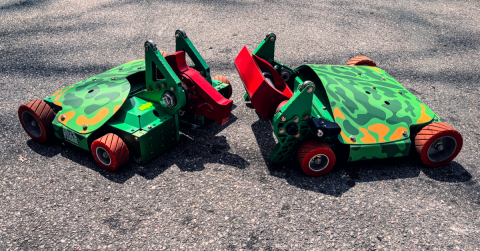
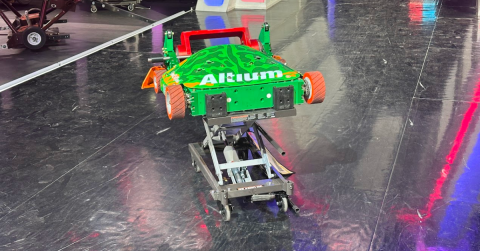
The stakes could not be higher for Team Ribbot when it comes to these compromises. Ribbot was just selected for the BattleBots Pro League, an invitation-only tournament where the world’s top 24 robots compete in a knockout-style format.

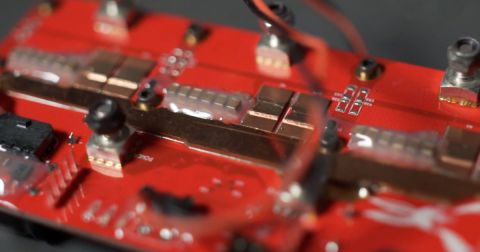
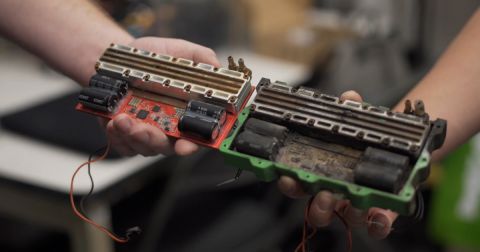
BattleBots has always been a platform for robots to prove themselves in competition; the Pro League, however, represents the emergence of a professional tier of the sport. This new league requires professionalism down to the last technical detail, as any compromise can cause the robot to fail or be eliminated quickly by an opponent. To participate in this new league, Ribbot incorporated a custom 10 kW motor controller into its chassis, making the design more complex than ever before.
Electrical vs. Mechanical Conflict
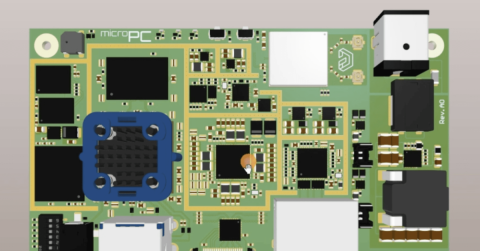
The root cause of this conflict lies in the motor controller enclosure. The mechanical engineers need accurate hole positions to achieve proper preload of the thermal heat sinks; without them, there is no way to prevent a thermal failure during a three-minute match. Meanwhile, the electrical engineers need that same precise positioning to place the high-current power planes.
The Serial Loop Problem
In previous years, the electrical engineer would export a STEP file and send it via email to the mechanical engineer. The mechanical engineer would open it, discover a hole interfering with a capacitor, move the hole, and then send back the modified STEP file. The process was tedious, prone to errors due to version control issues, and frequently resulted in broken CAD references.
Real-Time Collaboration with Push-Pull CAD Integration
Currently, Ribbot is no longer trapped in this vicious cycle thanks to Altium MCAD CoDesigner. Without the need to export and manually import files, the team can work within the push-pull workflow natively supported by the software. When the mechanical engineer makes changes to a mounting hole in their environment, they push the updates to the cloud, where they are picked up by the electrical engineer and pulled into the layout through Altium Designer.
Faster Iteration, Higher Quality, Better Outcomes
The impact of this workflow on their productivity has been tremendous. They no longer need to spend time figuring out what has changed, as everything syncs instantly and automatically. Moreover, they have been able to implement more elaborate board designs and custom flex cables. Overall, the result is a robot that is highly efficient, easily maintainable, and incredibly reliable.
"We can work through a bunch of iterations just in two hours of working on the project one evening. Our ability to iterate quickly and address challenges that we're experiencing makes the design process go so much faster." — Cam, Principal Mechanical Engineer
Bridging ECAD and MCAD with MCAD CoDesigner
Through MCAD CoDesigner, the gap between Altium Designer and leading MCAD software packages, including SOLIDWORKS, PTC Creo, and Autodesk Inventor, is bridged. The bidirectional synchronization process enables engineers from both departments to always be engaged in editing the same digital prototype without exchanging any obsolete IDF/STEP files.
How to Sync ECAD and MCAD Designs (Step-by-Step)
Winning on Millimeters: Why Collaboration Decides Performance
As for the BattleBots Pro League, a triumph or an explosion is sometimes decided by just a couple of millimeters of clearance. By perfecting the ECAD-MCAD integration process, Ribbot can make sure their technology will not only survive but also defeat the competition.
Stop fighting your CAD tools and start syncing your team. Try out MCAD CoDesigner now!
ECAD-MCAD Collaboration: Frequently Asked Questions
How does MCAD CoDesigner handle complex board shapes compared to STEP files?
Unlike static STEP files, which often lose intelligence or break constraints when re-imported, MCAD CoDesigner maintains the native geometry of the board. This allows mechanical engineers to define complex outlines or cutouts in their CAD tool and push them directly to Altium Designer as living, editable board shapes.
Does this workflow require both engineers to be online at the same time?
No. The push-pull system is cloud-based, meaning an engineer can push a change at the end of their shift, and the other engineer can pull and review that change when they start work. This is how Team Ribbot manages a project across five different states and time zones.
Can I preview changes before they affect my actual design?
Yes. Before pulling any change, you can view a preview of the proposed movement or modification. This allows you to verify clearances and ensure the change won’t introduce a new conflict before committing it to your workspace.
Which MCAD tools are compatible with this workflow?
MCAD CoDesigner supports industry-standard tools used by professionals, including SOLIDWORKS, Autodesk Inventor, Autodesk Fusion, PTC Creo, Onshape, and Siemens NX (Enterprise subscription only).
Related Resources
Related Technical Documentation
Table of Contents
- Key Takeaways
- The Ribbot Case: Welcome to the Pro League
- Electrical vs. Mechanical Conflict
- The Serial Loop Problem
- Real-Time Collaboration with Push-Pull CAD Integration
- Faster Iteration, Higher Quality, Better Outcomes
- Bridging ECAD and MCAD with MCAD CoDesigner
- How to Sync ECAD and MCAD Designs (Step-by-Step)
- Winning on Millimeters: Why Collaboration Decides Performance
- ECAD-MCAD Collaboration: Frequently Asked Questions
Solutions for Every Role and Team
- Discover and evaluate design options earlier
- Develop in one shared workspace
- Scale with control and compliance
- Connect every stage of hardware development
Learn More
Thank you, you are now subscribed to updates.