







Scaling Up: The Benefits of Multi-Seat ECAD for Growing Organizations


A single designer can move very quickly. The designer knows the files, the libraries, the shortcuts, the project history, and the reasons behind each choice. That model can work well for a small product and a clear schedule.
Growth changes the work. A second designer needs the board. A mechanical engineer needs the latest outline. Procurement needs the BOM before release. Manufacturing asks a question while the designer is routing. A project manager needs status. The files still exist, but the operating model begins to queue around one person.
That queue is the tipping point. The team has outgrown a single-user workflow even if the ECAD tool still opens every file. Multi-seat ECAD is the move from individual productivity to shared engineering capacity. The goal is not more licenses, but predictable work across more people, projects, and decisions.
Key Takeaways
- Single-user ECAD stops scaling when work waits for file access, design context lives with one person, and every handoff needs a manual check.
- Multi-seat ECAD adds value through concurrent design, shared project data, live review, and common libraries, not through seat count alone.
- Governance makes speed repeatable by defining ownership, permissions, review, change history, and release paths.
- Altium Agile Teams supports growing hardware groups with shared workspaces, PCB co-authoring, live reviews, component data, workflows, and role-based access.
When Single-User Tools Stop Working
Single-user tools stop scaling when coordination takes more effort than the design work they protect. The warning signs appear in daily work before they appear in a budget review.
- File waiting: Designers queue for access or copy files so they can work in parallel.
- Manual merges: Changes are compared and combined by hand, so the team spends time proving what survived.
- Private context: One designer knows why the board is shaped a certain way, but the reason is not easy to find.
- Late review: Other disciplines see the design through exports, screenshots, slide decks, or meetings.
- Library drift: People copy parts into local libraries and fixes do not reach every project.
- Release anxiety: The team checks filenames, folders, and email before it trusts a handoff.
- Status by meeting: Managers need another meeting because work state is not visible in the project record.
None of these signs means the team has failed. They show that a workflow built for one person is now carrying team-level demand.
What Multi-Seat ECAD Changes
Multi-seat ECAD creates value when each seat connects to the same design system. Designers can work on shared projects. Reviewers can see current data. Libraries, tasks, history, and releases stay close to the work. That common context reduces the need to rebuild the project story at every handoff.
Single-user pattern | Multi-seat operating model | Practical result |
One person owns the live file. | Design work is shared with clear ownership. | Less waiting for access. |
Copies move by email or folder. | Projects live in a managed workspace. | A clearer current state. |
Review depends on exports. | Stakeholders review live design data. | Faster, clearer feedback. |
Parts sit in local libraries. | Teams use managed components and common data. | Less library drift. |
Release steps vary by person. | Reviews and releases follow repeatable flows. | More predictable delivery. |
History lives in memory. | Changes and approvals stay in the project record. | Better traceability. |
Concurrent Design Removes Avoidable Queues
Concurrent design lets people work at the same time where the project can support it. A complex PCB can be divided into functional areas. One designer may route power while another works on high-speed interfaces or a dense connector region. Specialists can contribute without taking full ownership of the board.
Multi-user editing makes this kind of parallel work practical, because several designers can co-author one board while changes stay tracked, access stays controlled, and version history stays intact. Concurrency still needs guardrails, such as clear regions, live presence, and change tracking, so that people working side by side don't overwrite or contradict each other.
Concurrency does not mean every task should happen at once. Schematic intent, placement choices, power integrity, constraints, and interfaces still need order. The gain comes from removing serial work that exists only because one file has one owner.
Shared Data Keeps Each Discipline In Context
Growing electronics teams need more than shared PCB files. Electrical, mechanical, firmware, procurement, manufacturing, test, quality, and project roles all need a trusted view of the product. They do not all need the same editing rights, but they need the same project context.
A shared workspace allows a mechanical engineer to review board shape and connector placement, procurement to see current component risk, manufacturing to review a release package, and quality to follow review and approval evidence. Feedback stays linked to the design instead of becoming a separate narrative in email.
This is operational maturity in practice. The team stops asking one designer to translate the project for every stakeholder. The system carries more of the context.
Governance Turns More Seats Into A Stronger System
Adding seats without governance can create more copies, more conflicting edits, and more unclear ownership. Good governance is light, visible, and tied to real risk.
- Roles and permissions: Define who can view, edit, review, approve, and release.
- Project ownership: Name the design owner and define how work is divided.
- Managed libraries: Use approved components, common templates, and clear lifecycle states.
- Change history: Keep commits, comments, reviews, and decisions connected to the project.
- Review gates: Use clear entry, exit, ownership, and closure rules.
- Release control: Publish a known product state with a clear revision and downstream package.
- External access: Give suppliers and partners only the data and actions they need.
The purpose of governance is not to slow design but to stop the same coordination problem from returning with every new person or project.
How Multi-Seat ECAD Supports Predictable Scaling
Predictable scaling means that the tenth project does not depend on ten times more heroics. The team reuses a working structure for project setup, parts, review, release, and evidence. New people can enter the flow without learning a private folder system from each senior designer.
Growth pressure | Mature response | Signal to watch |
More designers | Co-authoring and clear work zones. | Less idle time caused by file access. |
More projects | Templates and common project structure. | Faster, more consistent setup. |
More stakeholders | Browser-based review and in-context tasks. | Fewer status and clarification loops. |
More parts | Managed libraries and live supply data. | Earlier lifecycle and availability action. |
More releases | Defined review and release workflows. | Less variation between projects. |
More risk | Permissions, history, and audit evidence. | Clearer ownership and traceability. |
How Altium Agile Teams Fits A Growing Organization
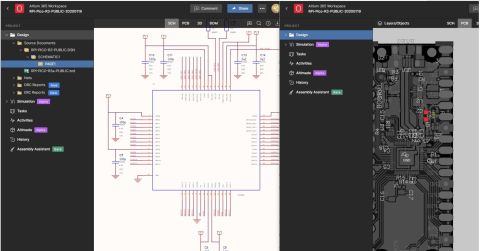
Altium Agile Teams is built around shared work rather than isolated files. It pairs Altium Designer with an Altium 365 workspace and adds the structure teams need to keep projects moving. Designers can co-author a PCB without conflicts, review schematics and layouts live, and work from the same design data and project status. Workflow templates, live component intelligence, role-based access, and event logs help keep that work organized and accountable as the team grows.
- Design: Split complex boards across designers and review live schematics and layouts.
- Team management: Keep tasks, reviews, project data, and change history in one workspace.
- Supply chain: Give engineering and procurement access to current BOM and lifecycle context.
- Manufacturing: Share controlled release packages instead of relying on email attachments.
- Data control: Use lifecycle states, revision history, visual comparison, and permissions.
- Security: Use SSO, groups, event logs, and controlled guest access where configured.
For a deeper look, the Agile Teams whitepaper covers real-time collaboration, central data, standardized workflows, and governance at scale.
A Practical Path From One Seat To A Team System
The move to multi-seat ECAD works best as an operating change, not a license event.
- Map the queue: List where work waits today: file access, reviews, library fixes, BOM checks, approvals, or releases.
- Choose one shared project: Use a real project with clear scope and enough team interaction to test the model.
- Set simple roles: Define the design owner, contributors, reviewers, approvers, and release owner.
- Move common data first: Centralize the project, approved library content, and the review record.
- Add concurrency with boundaries: Divide the work by region or function and agree how changes will be checked.
- Standardize the repeatable steps: Create light templates for project setup, part requests, reviews, and release.
- Review the operating result: Look for reduced waiting, fewer duplicate checks, clearer ownership, and cleaner release evidence.
Scale The System, Not The Heroics
The benefit of multi-seat ECAD is not that every person edits every board, but that the organization can place the right people around shared design data without losing control. Work can proceed in parallel where it makes sense. Reviews happen on current data. Decisions, parts, changes, and releases remain connected.
For a growing hardware team, Altium Agile Teams provides a practical path from individual tool use to a shared engineering operating model. The shift is simple to state: design speed should come from clear context and repeatable teamwork, not from one expert carrying the whole system.
Learn more about Altium Agile Teams →
Frequently Asked Questions About Multi-Seat ECAD
What is multi-seat ECAD?
Multi-seat ECAD is an electronics design setup in which several users work through a shared design environment, with common project data, collaboration, access, and control.
When should a team move beyond a single-user workflow?
Move when file access creates queues, reviews depend on exports, libraries drift, releases vary by person, or one designer must explain the project to everyone else.
Does multi-seat ECAD mean everyone edits the same board?
No. Teams can divide work by role, function, region, or project. Some users may review or manage data without editing the layout.
Can concurrent design create conflicts?
It can if work has no boundaries. Clear ownership, work regions, live presence, change tracking, and review rules help control overlap.
What is the main business benefit of multi-seat ECAD?
The main benefit is repeatability. More people and projects can move through a shared system without adding the same amount of manual coordination.

About Author
Related Resources
Related Technical Documentation
Table of Contents
- Key Takeaways
- When Single-User Tools Stop Working
- What Multi-Seat ECAD Changes
- Concurrent Design Removes Avoidable Queues
- Shared Data Keeps Each Discipline In Context
- Governance Turns More Seats Into A Stronger System
- How Multi-Seat ECAD Supports Predictable Scaling
- How Altium Agile Teams Fits A Growing Organization
- A Practical Path From One Seat To A Team System
- Scale The System, Not The Heroics
- Frequently Asked Questions About Multi-Seat ECAD
Speed at Scale. Structured Repeatability. Secure Flexibility.
- Start up fast with out‑of‑the‑box workflows
- Collaborate using ECAD‑MCAD codesign tools
- Manage BOMs with live supply chain part data
- Manage access and security as teams scale
Contact Us
Thank you, you are now subscribed to updates.