









How to Accelerate Purchasing with Octopart BOM Tool

At a Glance
Accelerate component purchasing with Octopart BOM Tool. Share BOMs, add overage, and auto-build distributor carts via Octocart. Faster, error-free buys in one place.


In the final part of Octopart’s Expert Insights on Sourcing BOMs series, Joel Austin and Zach Peterson show how to simplify and speed up the purchasing stage of your component sourcing process.
If you’ve already built and optimized your bill of materials (BOM), it’s time to see how the Octopart BOM Tool helps you share, review, and execute purchases with ease.
Didn’t catch the previous episodes? Click here to learn:
- How to Simplify Component Sourcing
- How to Source Alternate Parts
- How to Get the Best Component Pricing
How does Octopart BOM Tool help streamline purchasing?
Once your BOM is ready, with part costs, selected distributors, and batch sizes finalized, Octopart makes it simple to share your data with others for review or approval.
There are two main ways to share your BOM:
- Download as Excel: Click Download BOM to get a spreadsheet you can send to your engineering or finance teams for detailed review.

- Share Link: Use the Share button to generate a temporary link (active for 48 hours) that lets collaborators view and comment on your BOM online.
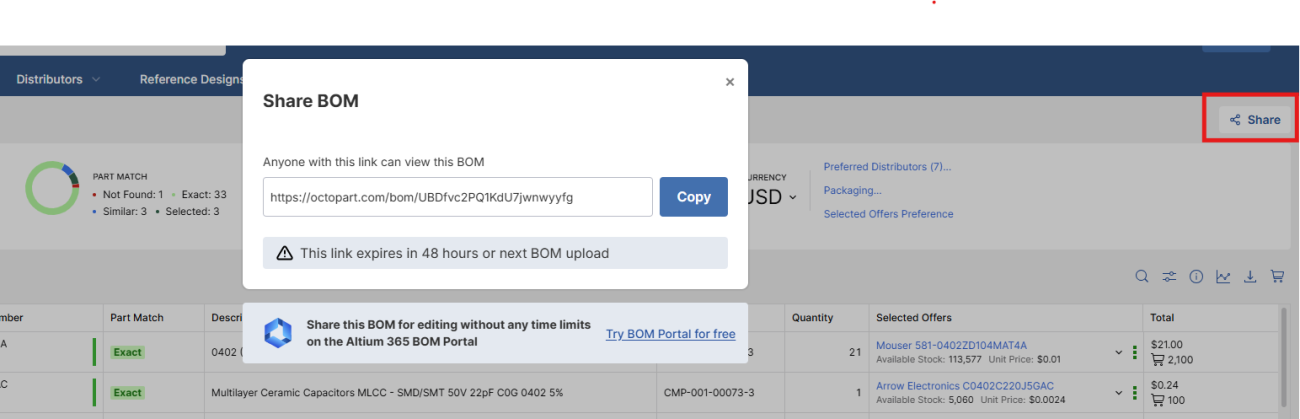
Both options allow reviewers to confirm batch sizes, cost goals, or sourcing decisions before purchase.
What would the purchasing process look like without the Octopart BOM Tool?
Without Octopart, this step becomes tedious and error-prone. You’d need to:
- Export your BOM manually.
- Split it into multiple Excel files (one for each distributor).
- Upload those files to various distributor websites.
- Compare pricing and availability one by one.
With Octopart BOM Tool, all of that happens automatically in one place. You don’t need copy-pasting or manual reconciliation.
How can I account for assembler attrition requirements?
Before purchasing, it’s important to account for attrition, which is the small percentage of extra parts needed by assemblers to handle process losses (like components dropped or damaged during assembly).
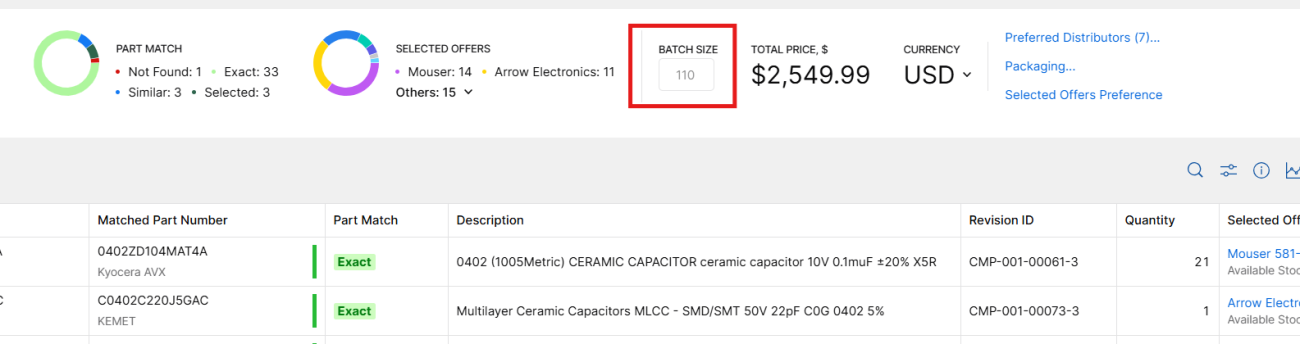
You can easily build this into your BOM by adjusting your batch size directly in the tool.
For example, if your build requires 100 boards and you want to add a 10% overage, simply change the batch size to 110. The total cost updates instantly, allowing you to budget accurately before ordering.
How can I buy parts directly from distributors?
Here’s where the magic happens with Octocart.
Inside the BOM Tool, click the Buy with Octocart button (shopping cart icon), which automatically creates shopping carts on distributor websites based on your finalized BOM.

For example, selecting Buy with Mouser will open a new browser window showing a pre-filled shopping cart with all your chosen components and quantities.
From there, you can:
- Review and verify items (check for backorders or availability).
- Confirm your batch size and pricing.
- Complete the purchase directly through the distributor’s site.
The tool even separates parts by distributor, so you can handle each purchase efficiently without exporting or re-uploading anything.
How do I get started with the BOM Tool?
Getting started takes just a few minutes:
- Create a free account on Octopart.com.
- Open the BOM Tool and upload one of your existing BOM files or try the sample BOM to explore the features.
- Experiment with sharing, editing, pricing, and purchasing features to see how much time it can save.
For more information and useful tips, you can also visit our step-by-step guide: Getting Started with the Octopart BOM Tool.
Once you’ve tried it, you’ll quickly see how the Octopart BOM Tool transforms a multi-step sourcing and purchasing workflow into a single, connected process.
Wrapping Up
With the Octopart BOM Tool, purchasing becomes fast, transparent, and collaborative. You can share BOMs, account for overages, auto-populate distributor carts, and complete purchases, all without manual uploads or spreadsheets.
This marks the end of the Expert Insights on Sourcing BOMs series. If you haven’t watched the previous episodes, check them out to see how to:
Subscribe to our newsletter for tutorials, product tips, and sourcing best practices. And of course, try the Octopart BOM Tool today!

About Author
Related Resources
Related Technical Documentation
Table of Contents
Solutions for Every Role and Team
- Discover and evaluate design options earlier
- Develop in one shared workspace
- Scale with control and compliance
- Connect every stage of hardware development
Learn More
Thank you, you are now subscribed to updates.