












Real-Time BOM Decision-Making Made Simple

At a Glance
Improve real-time BOM decision-making using up-to-date inventory and lifecycle insights. Avoid obsolete parts and production delays.


If you’ve ever struggled with a Bill-of-Materials (BOM) the week before production, you know the pain. A part shows “in stock” in your spreadsheet, the purchase order goes out, and the supplier tells you the part is out of stock or discontinued. That late surprise in electronics development can lead to project delays, high premiums, or last-minute redesigns. The best way to stay agile is by having the latest information.
In this article, we’ll explore how the latest data supports smarter BOM decisions and why the Octopart BOM Tool is a game-changer in this space.
Key Takeaways
- Outdated BOM data is one of the biggest reasons for redesigns, delays, and overspending in electronics.
- Up-to-date visibility into pricing, stock, lead times, and lifecycle status improves sourcing decisions.
- Semiconductor lead-time swings since 2020 show why manual spreadsheets aren’t enough.
- The Octopart BOM Tool gives up-to-date inventory, pricing, and lifecycle data so teams can make faster, well-aligned decisions.
Why Latest BOM Data Matters
Managing your BOM without the latest data is like flying a plane with the cockpit lights off. You’re moving fast, but you can’t see what’s ahead. That’s what BOM management without the latest data feels like. A BOM is not just a list of parts, but a living set of decisions that affect your timeline, cost, and product’s reliability.
Industry data indicates:
- About 80% of PCB design timelines get extended due to sourcing issues and last-minute part changes, often caused by outdated BOM data.
- Roughly 75% of companies report significant challenges in getting timely alerts from suppliers when component changes occur.
- Around 43% of organizations face project delays due to obsolete or unavailable components in their BOM, and each incident costs them an average of $500,000.
The table below highlights the key challenges in PCB BOM management along with the best practices.
|
Critical PCB BOM Management Challenges |
|||
|
Challenges |
Root Causes |
Product Impact |
Best Practice to Avoid |
|
Component Obsolescence |
Parts discontinued mid-design |
6-12 week delays |
Lifecycle monitoring |
|
Pricing Volatility |
Material costs fluctuate 20-50% |
Budget overruns |
Dynamic pricing feeds |
|
Supply Chain Disruption |
Components unavailable |
Production stops |
Multi-supplier strategy |
|
Version Control Errors |
Outdated BOMs in production |
Quality issues |
Automated synchronization |
|
Manual Data Entry |
Human errors in part specs |
Rework costs |
Database integration |
|
Lack of Standardization |
Inconsistent part libraries |
Design inefficiency |
Component libraries |
Source: PCB BOM Management: Incorporating Resilience
What Happens When BOM Data Is Outdated
- Obsolescence surprises: A part might look fine in your Excel export, but the manufacturer has already declared it “NRND” (Not Recommended for New Designs) or “EOL” (End-of-Life), a risk you only discover when the PO is rejected.
- Stock & lead-time surprises: What looked like “in-stock” yesterday might be gone today, or the lead-time may have jumped from 4 weeks to 16 weeks without warning.
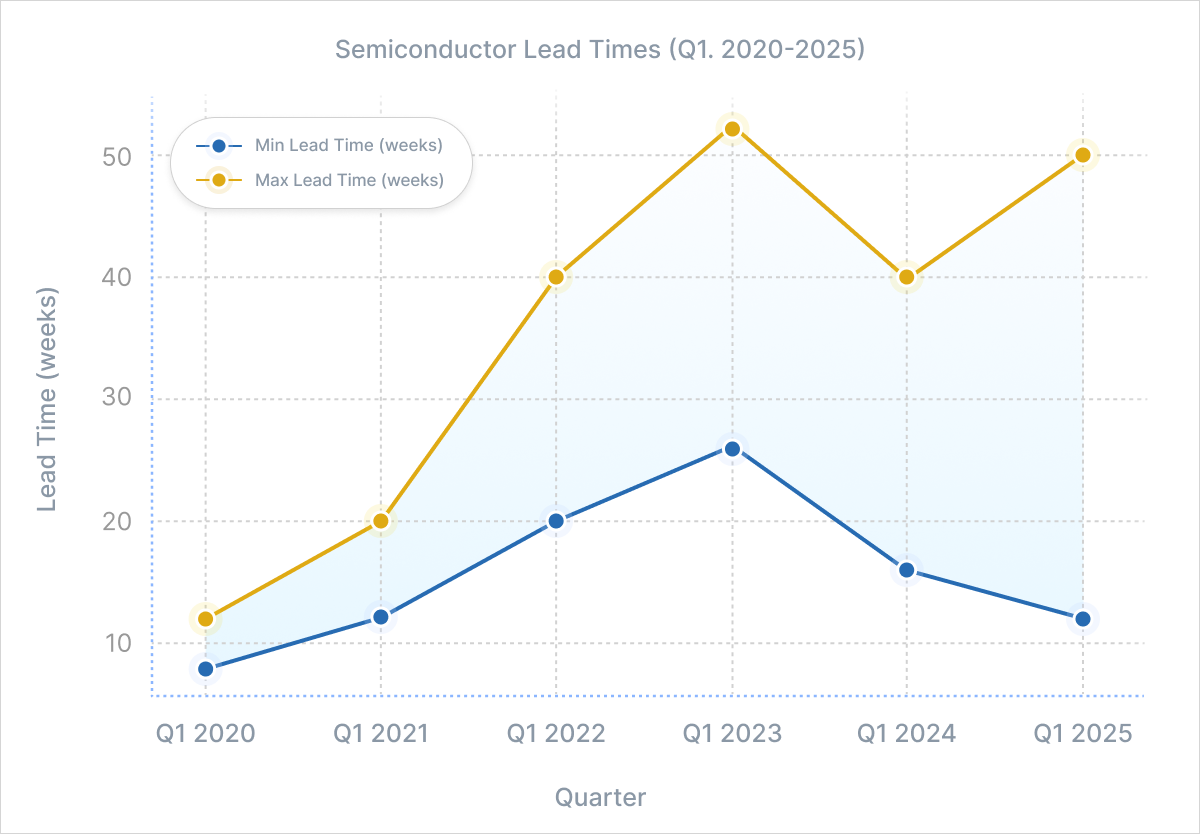
Semiconductor lead times have been unpredictable since 2020. The chart above shows how they kept shifting from 2020 to 2025. Minimum lead times increased until 2023 and further improved in 2025. But the maximum lead times dropped in early 2024 and climbed again in 2025 due to increasing AI demand.
- Pricing surprises: Component prices fluctuate continuously based on supply, demand, and market conditions. Relying on historical price data means you might miss recent price increases or discounts, which make it easy to misjudge your spend.
- Disparate spreadsheets: When engineering and procurement each manage their own BOM files, the data rarely stays in sync. Part numbers get updated in one sheet but not the other, quantities don’t match, and version control becomes messy.
How Outdated BOM Data Causes Supply Chain Disruptions
As someone who has been a part of procurement and engineering teams long enough, you’ve probably seen how fast things can go sideways.
In early 2022, NXP publicly said that more than 80% of its components were being quoted at lead times of 52 weeks or longer, and that distributors were sitting on barely 6 weeks of inventory, which was far lower than their usual levels.
Many automotive manufacturers didn’t catch this shift quickly enough because their BOMs were exported a few weeks earlier. Those spreadsheets still showed certain NXP MCUs as available or carrying normal lead times. But by the time they placed purchase orders, distributors had already allocated the remaining stock, and the new deliveries were a year away.
Several manufacturers suddenly found themselves stuck. The POs they relied on were rejected, alternates were sold out worldwide, and existing production plans collapsed overnight. Engineering teams were pushed into emergency redesigns, qualification cycles had to be reopened, and program schedules were delayed. The financial impact wasn’t small either. Expedited freight, redesign work, missed delivery commitments, and even line stoppages added up to a major cost impact.
Supply chain disruption is a clear indicator: if your BOM data is outdated, you won’t spot problems until they’ve already done damage.
How Octopart Enables Real-Time BOM Decision Making
If you want to avoid getting caught in situations like these, you need a BOM that doesn’t freeze in time. This is where Octopart steps in. The Octopart BOM Tool connects your BOM directly to the latest supplier data, so you always see current pricing, stock levels, lead times, and lifecycle status across millions of parts, all in one place. With this view, teams can spot risks early, compare options quickly, and choose components with far more confidence during sourcing.
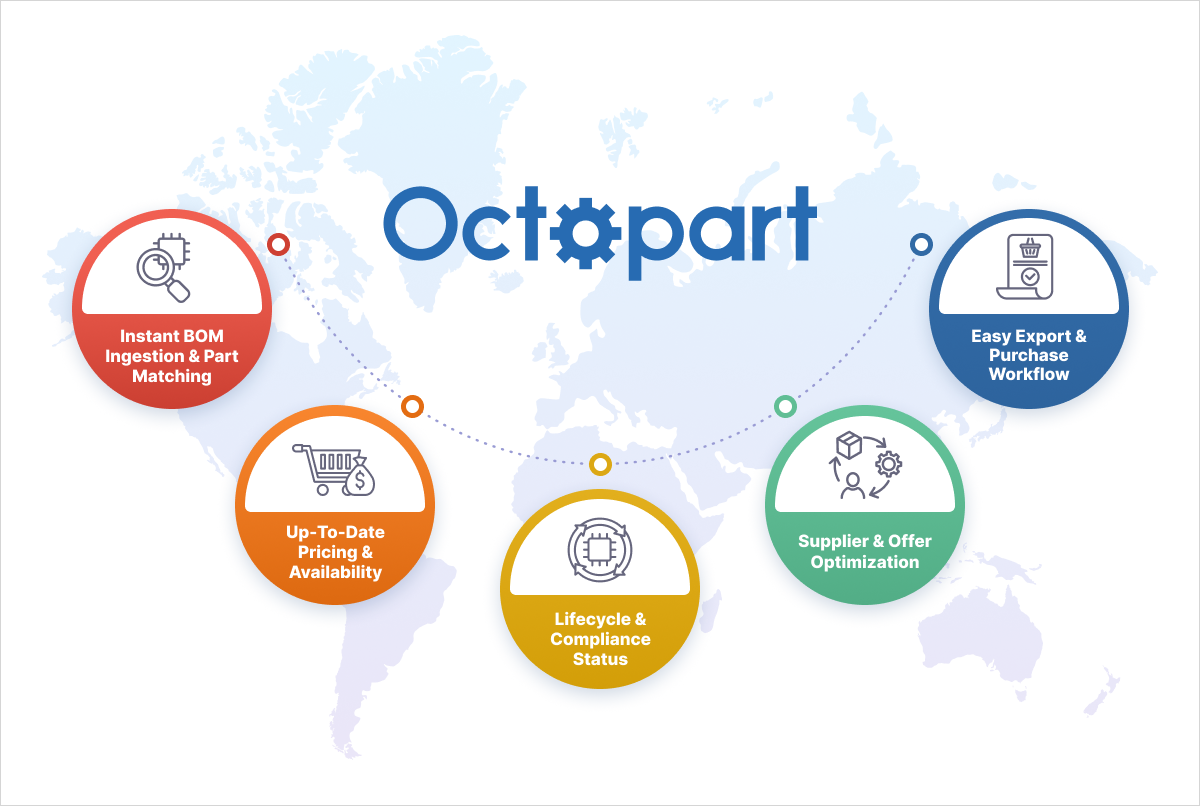
Here’s how it helps:
- Powered by one of the largest electronic component databases: 95M+ indexed electronic parts, 1.3M+ CAD models, 670+ distributors worldwide, 11K+ manufacturers, 208M+ offers processed daily, and 173K+ BOMs processed in a single year. The Octopart BOM Tool ensures that engineers and procurement teams always work with current, verified data. It helps them identify the right parts faster, avoid sourcing issues, and protect budgets from last-minute redesigns, sudden price increases, and premium orders.
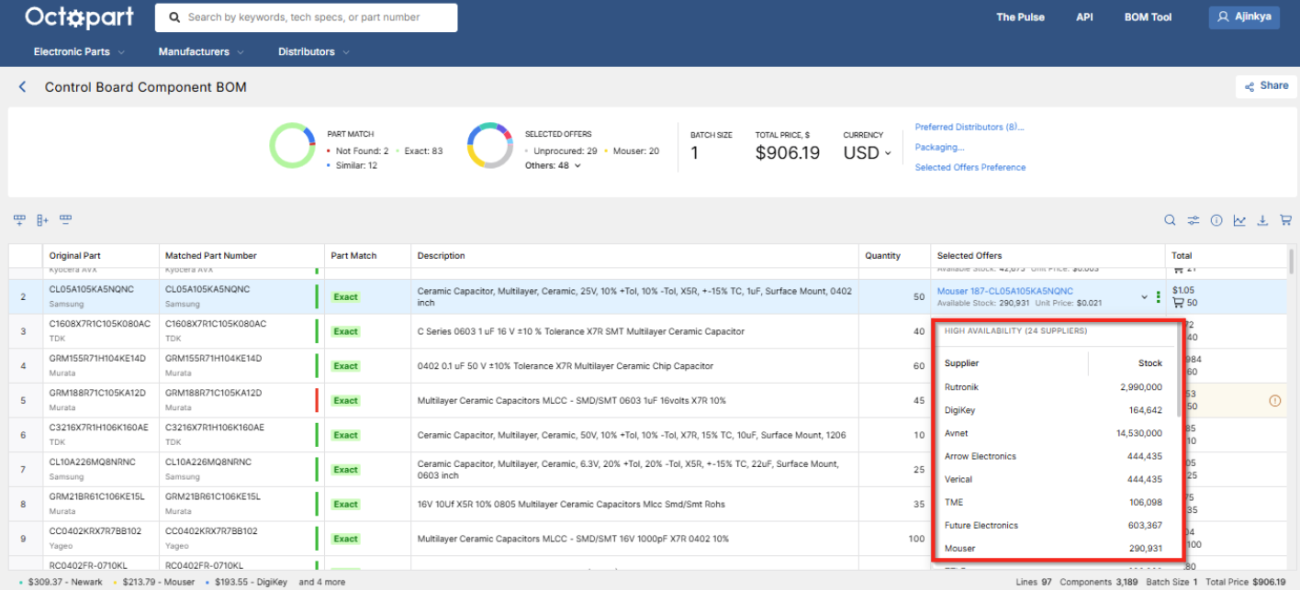
- Intelligent part matching and data normalization: Upload your BOM (Excel/CSV/JSON) and the tool matches your parts to the latest manufacturer and distributor data. Minimize manual errors and accelerate BOM validation by automatically filtering out invalid entries and aligning data with Octopart’s extensive component database, providing an accurate starting point with standardized fields. Avoid wrong part orders, prevent qualification delays, and cut the extra costs that usually come from issues not caught early.
- Lifecycle insights: Octopart highlights lifecycle status with simple color-coded alerts for parts that are discontinued, approaching end-of-life, or not recommended for new designs, along with their RoHS/REACH compliance status. It gives engineers a quick view of which components are safe to keep in the design and which should be replaced early, reducing the risk of costly redesigns, late validation issues, and production delays.
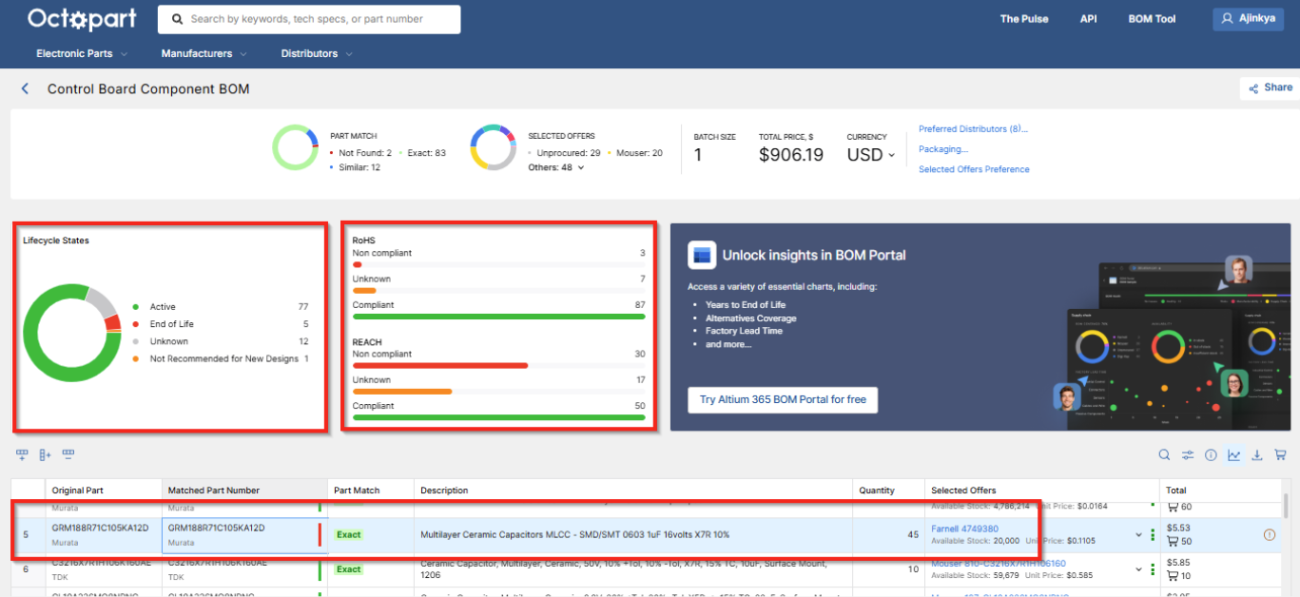
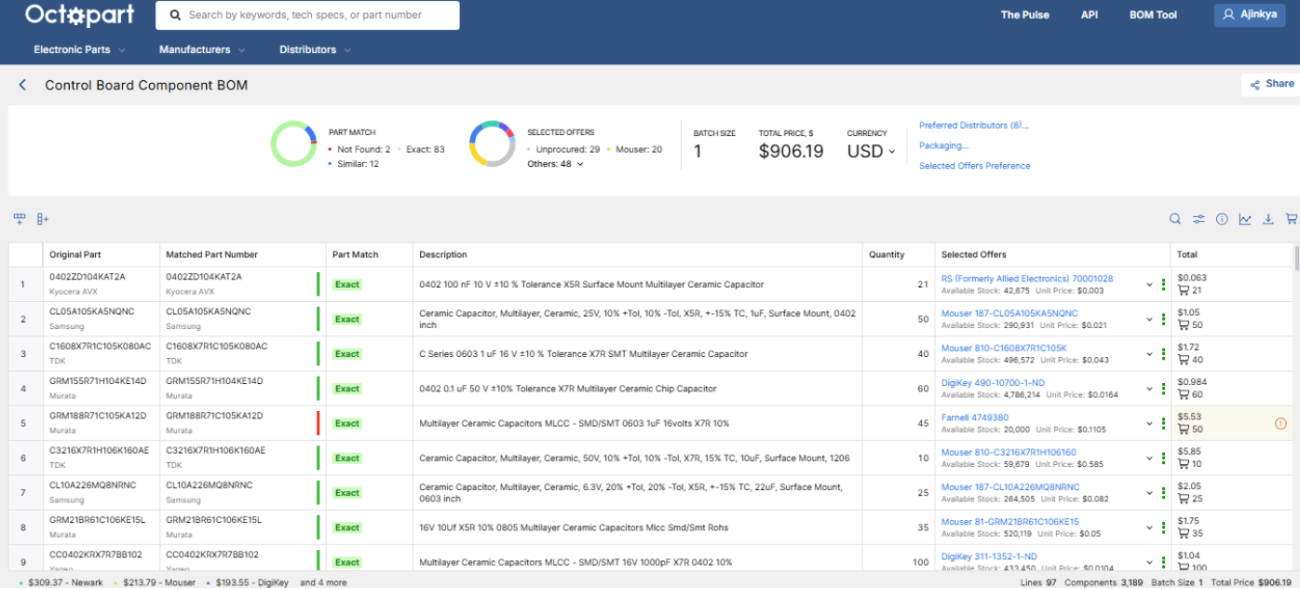
- Inventory visibility: Octopart gives you a clear view of current and historical stock across hundreds of distributors. You can track 12-month trends and get alerts when inventory drops or replenishes, which helps you stay ahead and avoid last-minute buys at premium prices.
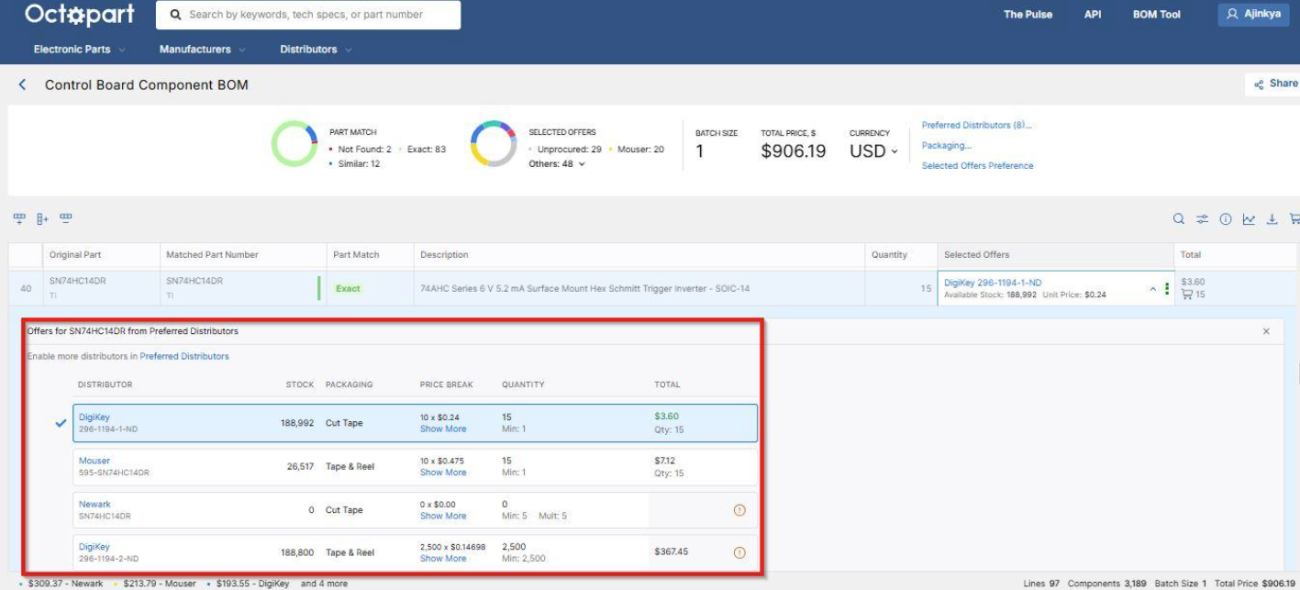
- Preferred distributor selection and offer optimization: The tool can compare offers from hundreds of distributors, set preferred vendors, and filter based on region, packaging format (tape-and-reel, bulk, cut-tape), and currency. The tool can automatically surface the lowest-price offers for a given quantity so that you don’t pay more than you need to.
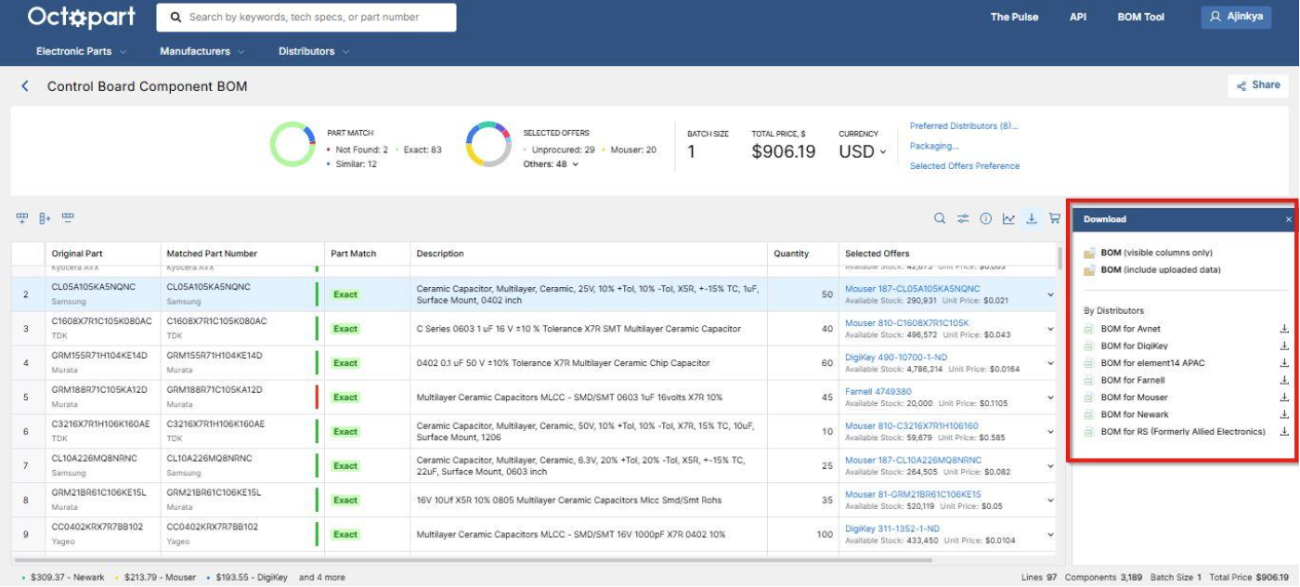
- Export readiness: Large BOMs that used to take hours of manual work can be processed in minutes. When everything is validated, you can export a fully costed BOM ready for your ERP integration. The process reduces rework, speeds up procurement, and reduces the risk of manual mistakes.
Conclusion
In the end, staying ahead in electronics today depends on how quickly you respond to changes. Parts go obsolete without notice, lead times change overnight, and prices move faster than most teams can track. If your BOM is running on outdated data, you’ll only find out the problem when it’s too late to fix it without damage.
What you need is clear, current information to rely on. The Octopart BOM Tool brings that clarity by keeping every part of your BOM connected to the up-to-date inventory, pricing, and lifecycle data. With everything updated in one place, teams don’t have to chase spreadsheets or guess what’s changed. Engineers and procurement can work from the same latest view and make decisions that reduce risk, protect budgets, and keep projects on schedule. Start using Octopart BOM Tool today!

About Author
Related Resources
Related Technical Documentation
Table of Contents
Solutions for Every Role and Team
- Discover and evaluate design options earlier
- Develop in one shared workspace
- Scale with control and compliance
- Connect every stage of hardware development
Learn More
Thank you, you are now subscribed to updates.