












Who Needs Integrated Electronic Component Search

At a Glance
Electronic components shouldn't be difficult to locate, select, and purchase. Get the visibility you need inside your schematics as you create your design.


Everyone has different methodologies for finding electronic components they need in a design. Many designers start from an application circuit in a datasheet, evaluation board schematics, a reference design, or an application note. Some designers grit it out and, thanks to their years of experience, will build everything from scratch. No matter how you determine which electronic components you need, real parts data needs to be located and used to select the right components for a PCB design.
All this must happen during the schematic capture phase of a new design. Schematic capture is where the BOM needs to be locked in, and we can't simply rely on generic components for every product. This is why so many designers need aggregated parts data to quickly find the components they need, as well as import the relevant CAD data into their schematics/PCB layout. Fortunately, today's ECAD software has come a long way, giving PCB designers quick ways to find part numbers for a design and even import the required CAD data into a PCB project.
What a Useful Part Search Result Actually Returns
A part number by itself is nearly useless during schematic capture. It tells you what the component is called, but it tells you nothing about whether it fits your electrical requirements, whether it can be assembled on your board, or whether you can actually place it in your design without additional manual steps. A useful part search result needs to return enough data to answer all of those questions in one pass.
At minimum, the result should include the full manufacturer part number, manufacturer name, package type, and a complete set of electrical specifications relevant to the component category. Beyond the electrical specifications, the result should also return the schematic symbol, PCB footprint, and 3D model, because without those, the designer still has to source or build the CAD data before the part can be used. Supplier availability, pricing, and lifecycle status round out the data set and make the result actionable for both prototype and production planning.
To make this concrete, consider a search for a low-dropout linear regulator. A result that actually supports design decisions would look something like this:
- Manufacturer: Texas Instruments
- Part Number: TPS7A4701RGWR
- Package: VQFN-20
- Input Voltage: 1.4 V to 36 V
- Output Voltage: 1.19 V to 33 V
- Output Current: 1 A
- Dropout Voltage: 425 mV at 1 A
With that level of data returned in a single query, a designer can verify the part meets system requirements, confirm it is sourceable, check that CAD data is ready to use, and place the component into the schematic without switching tools or hunting through a separate library. That is what a part search result should accomplish.
Searching for In-Stock Components Across Multiple Distributors
Real-time distributor inventory data is one of the most practically valuable features a part search tool can provide. Lead time and stock availability are not static, and a component that is readily available today may be on allocation or backordered by the time production begins. Searching across multiple distributors simultaneously gives designers a much more complete picture of actual sourcing options than any single distributor catalog can provide.
The features that matter most in a multi-distributor search tool include:
- Aggregated inventory data
- Real-time stock levels
- Price breaks at different order quantities
- Ability to filter by authorized distributors
Parametric filtering is equally important, allowing searches to be scoped by electrical specifications, package type, operating temperature range, or any other attribute before distributor data is evaluated. This prevents the common mistake of selecting a part based on distributor availability first and then discovering it does not meet the electrical requirements.
Inside Altium's Schematic Editor, the Manufacturer Part Search Panel is the primary tool for this workflow. The panel aggregates component data and distributor inventory from multiple sources and presents it directly within the design environment, eliminating the need to context-switch to a browser or external catalog. Designers can apply parametric filters, review real-time stock and pricing, inspect CAD data, and place the selected component into the schematic without leaving the tool.
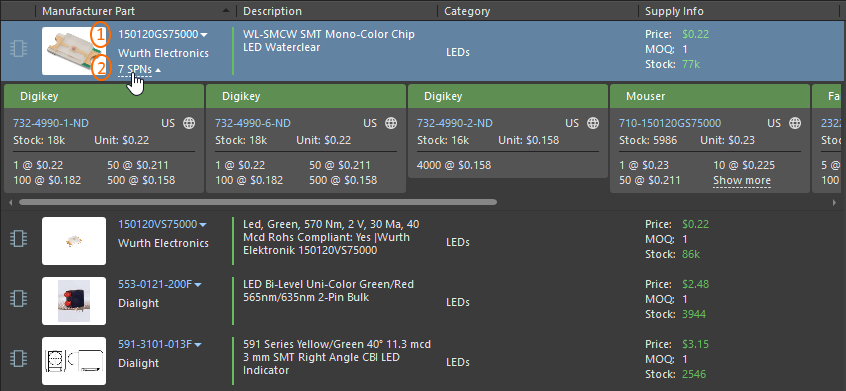
Prices, inventories, and price breaks from multiple distributors visible inside the Manufacturer Part Search Panel
Filtering Part Search Results by Lifecycle Status
Electronic components move through a predictable set of lifecycle states over their production lifetime, and selecting a part that is approaching or past end-of-life creates real downstream risk. The common lifecycle statuses used across the industry are:
- Active: in full production and available for new designs
- Not Recommended for New Designs (NRND): still manufactured but the supplier discourages new design-ins
- Last Time to Buy (LTTB): Occasionally used by some manufacturers as a final warning before production of a part officially ends
- End-of-Life (EOL): the manufacturer has announced a last-time-buy date or production has already stopped
- Obsolete: no longer manufactured and available only through secondary market channels
The Manufacturer Part Search Panel in Altium Designer eliminates that delay by displaying lifecycle status alongside every search result. A simple filter applied to the results lets the designer immediately exclude NRND, EOL, and Obsolete parts from the candidate list, so only Active components appear in the working set. This is a front-of-process check rather than a back-end correction, which is the right place to catch it. The cost of a lifecycle-driven redesign late in a project is always higher than the few seconds it takes to apply a status filter during schematic capture.

Lifecycle status is immediately visible in the Manufacturer Part Search Panel
Integrated Part Search in the Design Environment
The combination of rich part data, multi-distributor inventory search, and lifecycle filtering represents the minimum viable feature set for component selection inside a modern ECAD tool. When those capabilities are accessible from within the schematic editor rather than requiring a browser, a spreadsheet, and a series of distributor catalog lookups, the component selection process becomes faster, more consistent, and far less likely to produce sourcing problems in production.
Whether you need to build reliable power electronics or advanced digital systems, use Altium’s complete set of PCB design features and world-class CAD tools. Altium provides the world’s premier electronic product development platform, complete with the industry’s best PCB design tools and cross-disciplinary collaboration features for advanced design teams. Contact an expert at Altium today!
Frequenty Asked Questions
Why should PCB designers check distributor inventory before selecting parts?
PCB designers should check distributor inventory before selecting parts because stock levels, lead times, and pricing can change before a design reaches production. Multi-distributor search gives the designer a better view of actual sourcing options and helps prevent selecting a part that later becomes difficult to buy.
Why is lifecycle status important when selecting electronic components?
Lifecycle status shows whether a component is active, not recommended for new designs, nearing end-of-life, obsolete, or only available through secondary channels. Checking this during schematic capture helps avoid late-stage redesigns caused by parts that are no longer suitable for new products.
How can designers avoid choosing NRND, EOL, or obsolete parts?
Designers can avoid NRND, EOL, or obsolete parts by filtering component search results by lifecycle status during schematic capture. This keeps active components in the candidate list and removes risky parts before they enter the BOM.

About Author
Related Resources
Related Technical Documentation
Table of Contents
Solutions for Every Role and Team
- Discover and evaluate design options earlier
- Develop in one shared workspace
- Scale with control and compliance
- Connect every stage of hardware development
Learn More
Thank you, you are now subscribed to updates.