

Simple Sync in Altium Designer lets you mirror a project in an Altium 365 Workspace for sharing, viewing, and commenting while keeping the original files in place, with or without external version control. This article explains how to set up mirroring, understand synchronization states, and address unsynchronized changes or conflicts. Keep reading to learn how to share your design while retaining…
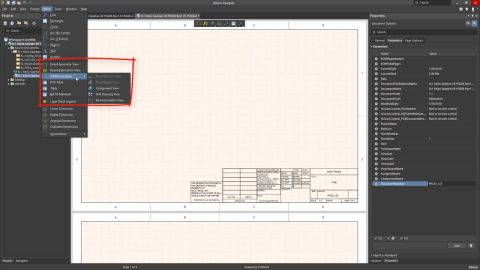
Learn how to navigate graphical documents in Altium Designer using zoom, pan, and jump commands. This article covers shortcuts and menu options for adjusting your view, locating specific design objects, and returning to marked positions in schematic and PCB documents. Keep reading to take control of your view and find your way around your designs with confidence. - Use mouse shortcuts and View…
Altium MCAD CoDesigner connects electrical and mechanical design teams, allowing engineers to exchange PCB and component data through a shared Altium Workspace while working independently. This article provides concise overviews of improvements included in subsequent updates to CoDesigner and provides compatibility details for supported ECAD and MCAD software, along with guidance on checking…
Learn how Company Account Administrators can use the Altium Company Dashboard to configure SAML Single Sign-On (SSO), allowing users to access Altium software and services with their company credentials. This article covers exchanging configuration details with an Identity Provider and introduces SCIM provisioning for managing users and groups, with integration examples for various providers,…
What does the end of SOLIDWORKS PCB and SOLIDWORKS PCB Connector mean for your designs and workflow? This FAQ explains the end-of-life timeline, addresses file compatibility and migration questions, and outlines the options for moving to Altium Designer and Altium MCAD CoDesigner. Keep reading to understand your options and take your next step with confidence. - Learn how end-of-life affects…
Explore how Altium MCAD CoDesigner connects electronic and mechanical design through video tutorials covering setup, design transfers, and collaboration. From shaping PCBs and importing enclosures to editing rigid-flex boards and fixing component models, this collection demonstrates practical workflows for exchanging designs between Altium Designer and MCAD tools. Keep reading to find the…
Explore how Altium MCAD CoDesigner synchronizes harness designs between ECAD and MCAD, from using ECAD layout data to generate an initial physical model to transferring harness element lengths back to ECAD. This advanced guide explains key differences between SOLIDWORKS and Creo, the objects included in synchronization, and the modeling requirements and limitations that shape the exchange. Keep…
Learn how Altium MCAD CoDesigner synchronizes harness designs between Altium Designer and supported versions of PTC Creo and SOLIDWORKS. This article explains how connectivity, connectors, splices, and wire and cable properties transfer to MCAD for 3D routing, and how physical lengths return to the ECAD Harness Layout Drawing. It also covers software requirements, property settings, and connector…
Learn how Altium MCAD CoDesigner synchronizes a multi-board assembly between ECAD and MCAD so electrical and mechanical engineers can review PCB placement and enclosure fit. This article covers software and Workspace requirements, transferring individual boards, linking assemblies, and sharing PCB positions, orientations, and enclosure geometry. Keep reading to follow the workflow and bring your…
Synchronizing a rigid-flex PCB between ECAD and MCAD requires careful attention to board geometry, bend definitions, and platform compatibility. This article explains how Altium MCAD CoDesigner transfers standard and advanced rigid-flex designs, how flexible regions are represented as MCAD sheet-metal parts, and which board outline and bending requirements must be met for synchronization. Keep…
Learn More