






What is the Best Cloud PCB Design Software?

At a Glance
Learn about the leading cloud PCB design software platforms and providers, including hybrid cloud+desktop platforms.


Over the past decade, many applications have moved some or all of their capabilities and services into the cloud, and the same is true for PCB design software. Cloud PCB design platforms can be very convenient for hobbyists or students who do not work on complex products. So it's no surprise that new designers tend to gravitate towards these tools to gain early design experience.
As designs get more complex, the cloud only offers a limited set of capabilities that actually matter for PCB design. This is because complex designs quickly become compute intensive, and that means some activities need to be performed on your desktop. This is why we think a cloud+desktop hybrid approach is the best option for designers who want cloud collaboration and sharing capabilities. Let's examine some of these options in this article.
Fully Cloud-Based PCB Platforms for New Designers
Cloud PCB design software can be divided into two categories: cloud-native and hybrid with a desktop application. There are free cloud PCB design offerings in both categories. First, let's take a look at the fully online cloud PCB design software options.
Upverter Classic Circuit Editor and Upverter Modular
The Upverter tool started as a fully browser-based schematic capture and PCB layout tool. It also includes sharing features, which allow users to make their projects publicly available for free use. Upverter also enables component creation and manufacturing file exports to a user's desktop. It was one of the first commercially available cloud PCB design software platforms, later expanded to include a pro tier with access to simulation and collaborative PCB design features.

Web browser view of the Upverter Classic Circuit Editor
Today, the classic circuit editor and PCB layout tool is still available, but there is a new offering on the Upverter platform: Upverter Modular (formerly known as Geppetto). The Upverter Modular platform is a drag-and-drop platform for designing single-board computers from predefined hardware modules. Supported COM/SOM options include Raspberry Pi CM4 and others.
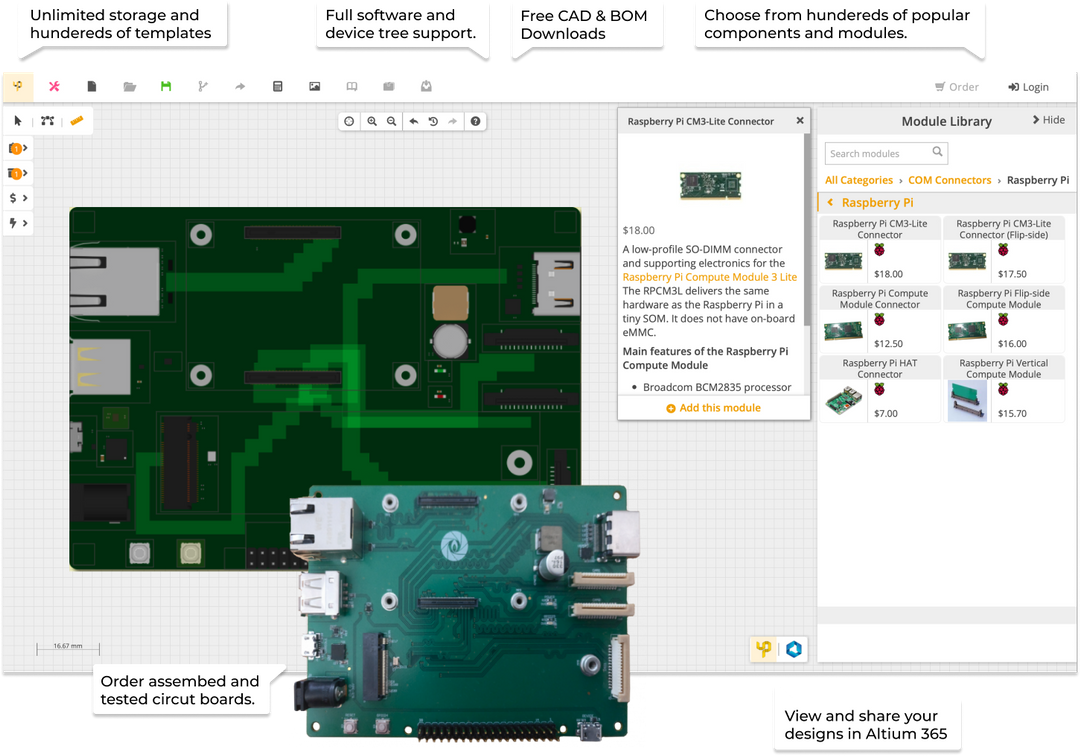
While the legacy Upverter design tool is for hobbyists and students, the Upverter Modular tool gives designers professional-grade hardware without requiring in-depth knowledge of PCB design.
EasyEDA
EasyEDA is a cloud PCB design platform developed and owned by LCSC, a Chinese electronic components distributor. The online interface contains component models for common packages that are available through the LCSC catalog. Users have access to a basic schematic editor and PCB layout tool, and they can export and download their manufacturing files after completing the design.
Like most other cloud-based electrical or mechanical design platforms, EasyEDA does not scale to complex, high-layer-count designs. For example:
- EasyEDA is only usable on simple rigid PCB designs
- Only through-hole vias can be used
- There is no support for rigid-flex, flex printed circuits, or metal-core boards
- Parts data access is limited to LCSC part numbers
This eliminates its use as a design tool for a huge range of commercial products. In addition, the restriction to using only LCSC part numbers does not align with the basic supply chain and procurement practices of every professional electronics business on the planet.
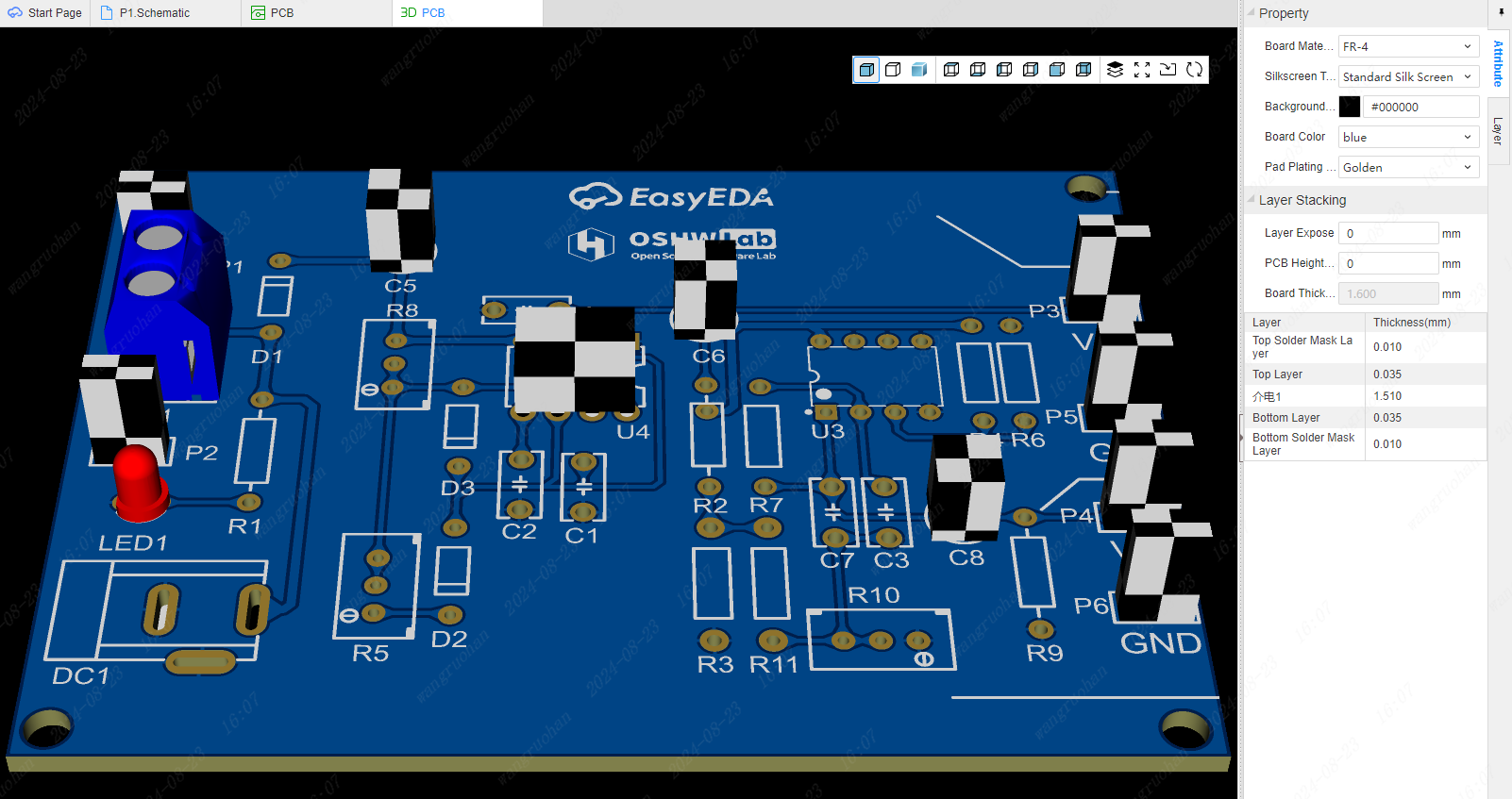
3D preview of a simple PCB in EasyEDA [Source: easyeda.com]
Flux.ai
As a newer cloud platform, Flux.ai combines many of the features found in Upverter and EasyEDA with a built-in AI copilot. The copilot can perform simple tasks in the schematic and answer technical questions when needed. The platform focuses primarily on design reuse with the ability to reuse open-source projects and circuits, similar to Upverter. Some parts of the PCB layout are automated in a unique way, where rules are defined by the user and used to fill in certain copper features.

PCB layout view in Flux.ai [Source: flux.ai]
Despite the platform being newer, and although it provides supply chain data across multiple distributors, the platform contains the same scalability problems as EasyEDA. Currently, it can only support rigid PCBs and becomes extremely slow at high layer counts. While the AI feature is innovative, as of 2026 its capability pales in comparison to other AI-centric tools which generate reference schematics.
Comparison of Cloud-Based Platforms
|
Feature Category |
Upverter Classic Circuit Editor |
EasyEDA |
Flux.ai |
|
Browser-based schematic capture |
X |
X |
X |
|
Browser-based PCB layout |
X |
X |
X |
|
Multi-sheet, hierarchical schematics |
X |
||
|
Design rules / DRC |
X |
X |
X |
|
Differential pair routing |
X |
||
|
3D PCB view |
X |
X |
|
|
Integrated BOM tools |
X |
X |
X |
|
Built-in component libraries |
X |
X |
X |
|
Manufacturer/distributor links (parts availability) |
X |
X |
|
|
CAM outputs (Gerber + NC Drill) |
X |
X |
X |
|
Version control / design history |
X |
||
|
Real-time collaboration (multi-user editing) |
X |
||
|
Share link for viewing/comments |
X |
X |
X |
|
SPICE simulation |
X |
||
|
Direct-to-fab integration |
X |
||
|
Enterprise permissions / access controls |
X |
Hybrid Cloud+Desktop PCB Design Software
When application performance up to high part count, high net count, and high-layer-count design is critical, a portion of the design features need to move to the desktop. This is where hybrid cloud+desktop PCB design comes into play. These platforms leave the compute-intensive features running on the desktop to ensure application performance with fast response time. Meanwhile, data management and collaboration features are available through a dedicated cloud platform.
Currently, there are three hybrid cloud+desktop platforms, and only two of these platforms are dedicated purely to PCB design and manufacturing. These are CircuitMaker and Altium Designer, with the cloud collaboration and data management features running in Altium 365.
Autodesk Fusion
Autodesk Fusion (formerly Fusion 360) is primarily a mechanical CAD platform, integrating CAD, CAM, and CAE to streamline the design-to-manufacturing workflow for mechanical parts. Its cloud-native architecture facilitates collaboration and ensures project data is accessible from anywhere, making it a strong choice for startups and SMEs focused on product design and 3D modeling.
While Fusion includes PCB design tools, they are largely derived from an older product (Autodesk EAGLE) and do not operate at the same caliber as other cloud PCB design software platforms. Despite the ability to view 3D models of the enclosure and PCB, the platform lacks basic PCB design features like library management, which has largely eliminated its use by professional electronics engineers.
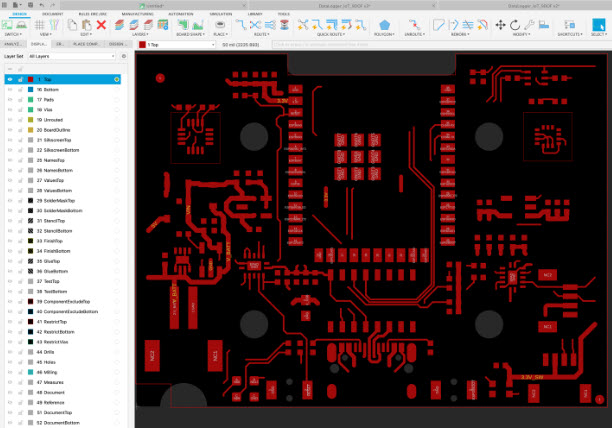
PCB layout view in Autodesk Fusion [Source: autodesk.com]
CircuitMaker + Altium 365
CircuitMaker was designed as a free tool for makers, hobbyists, students, and part-time engineers. CircuitMaker runs on your desktop and includes all of the basic features you would find in other free PCB design software, such as KiCad. In addition to running the basic design tools on your desktop to ensure a smooth experience and fast response, users can store their projects in an Altium 365 personal workspace. Storing projects on the cloud makes sharing extremely easy, allowing collaborators to view and access your designs in a web interface or inside CircuitMaker.

CircuitMaker was intended for use by students and hobbyists, and its free price point makes it an attractive option for this group of designers. CircuitMaker includes many of the same features as Altium Designer with the same workflow, keyboard shortcuts, and operating modes. This means CircuitMaker users are essentially getting free practice on how to use the more advanced tools in Altium Designer.
Finally, CircuitMaker also offers a unique capability not found in programs like EasyEDA or KiCad. There is an available connector for transferring your design into Autodesk Fusion for MCAD collaboration. This allows users to design mechanical enclosures, place key components, design mounting or fixation interfaces, and much more.

Altium Designer + Altium 365
The leading hybrid cloud+desktop PCB design platform is Altium Designer and Altium 365, which are available together as the Altium Develop platform. Altium Designer runs on a user’s desktop and provides the primary placement, routing, and schematic capture features needed to create a PCB. Inside the cloud, Altium 365 handles data management with integrated version control, library management features, an industry-wide sourcing tool for BOMs, and much more.

With Altium 365 now being standard in an Altium Develop bundle, the available features in the cloud bring a new set of features to designers, even if you do not use the cloud for collaboration. For example, library management and BOM costing are two areas where users can be more efficient and effective when completing project documentation and ensuring consistent component data across projects.
Comparison of Cloud+Desktop PCB Design Software
|
Feature Category |
Autodesk Fusion |
CircuitMaker |
Altium Designer |
|
Multi-sheet, hierarchical schematic capture |
X |
X |
X |
|
PCB layout with 3D PCB view + clearance checking |
X |
X |
X |
|
Interactive routing, interactive tuning, autorouting |
X |
X |
X |
|
Differential pair routing |
X |
X |
X |
|
Design rules / DRC |
X |
X |
X |
|
CAM outputs (Gerber + NC Drill, ODB++) |
X |
X |
X |
|
“Release” style output workflow |
X |
X |
|
|
SmartPDF outputs |
X |
X |
|
|
Component library backed by Octopart data |
X |
X |
|
|
Cloud-hosted projects (Altium 365) |
X |
X |
X |
|
Share projects for viewing/comments |
X |
X |
X |
|
Find PCB components supplied by parts manufacturers |
X |
||
|
SPICE simulation in the schematic editor |
X |
X |
|
|
Automated drawing creation |
X |
||
|
HDI PCB design features |
X |
||
|
Rigid-flex PCB design |
X |
||
|
Multi-board system design |
X |
The Verdict?
Most cloud PCB design platforms are only useful for simpler projects due to the bandwidth required to run a proper PCB design environment. The exception is Upverter Modular, which is a drag-and-drop interface that does not use a standard PCB layout and routing environment, so it does not require compute resources.
This is why the cloud+hybrid approach exists for more advanced designs: the compute-intensive portions are done on the desktop, while collaboration and data management happen through the cloud. Think of it as adding Google Drive to your PCB design system, but with an access link integrated directly into your PCB design software.
So if you know you will work on advanced design and need the cloud for collaboration and sharing, the best bet is a hybrid cloud+desktop platform like CircuitMaker or Altium Develop.
Frequently Asked Questions
Which cloud PCB platform is best for students and hobbyists?
If you can’t justify the cost of an Altium Designer license, the best option is CircuitMaker. It’s a free schematic + PCB layout tool built on Altium Designer’s core technology, with online collaboration and project storage through an Altium 365 Personal Space. CircuitMaker features function much the same as Altium Designer tools, which will give users a skills and experience advantage when they start looking for an electrical engineering job.
What is Upverter Modular and how is it different from traditional PCB design software?
Upverter Modular uses a drag-and-drop approach to PCB design, where users add off-the-shelf modules into a new design. Users then need to specify the connections they want between modules, and the tool fills in the rest of the information. It’s a great option for students and non-technical users because they do not need to have PCB design training in order to produce a working product.
Do I need to pay for cloud storage with hybrid platforms like CircuitMaker?
No. CircuitMaker users can access a personal workspace with limited storage for their design projects. To access the workspace storage, download and install CircuitMaker, and then create an Altium account when you first run the software.
Why do cloud-based PCB platforms like EasyEDA struggle with complex designs?
Cloud platforms process everything on remote servers, so more complex require more processor and network bandwidth when using the design tool. This creates noticeable lag during design. This is why the hybrid cloud+desktop model was introduced; the tasks requiring low latency are done on the desktop and tasks are performed in the cloud.
Can I transfer my CircuitMaker design to Altium Designer if I need more advanced features?
Yes. CircuitMaker and Altium Designer share the same file format, so you can open CircuitMaker projects directly in Altium Designer without recreating your work. This makes CircuitMaker an excellent platform for learning for free, then users can upgrade when advanced features are needed.
Do I need an internet connection to use hybrid cloud+desktop PCB design tools?
Typically, no. The main design tools run on your local computer, not on the cloud, so basic design tasks don’t require an internet connection. However, accessing design files, saving them to your repository, and certain other features will require an internet connection.

About Author
Related Resources
Related Technical Documentation
Table of Contents
- Fully Cloud-Based PCB Platforms for New Designers
- Hybrid Cloud+Desktop PCB Design Software
- The Verdict?
- Frequently Asked Questions
- Which cloud PCB platform is best for students and hobbyists?
- What is Upverter Modular and how is it different from traditional PCB design software?
- Do I need to pay for cloud storage with hybrid platforms like CircuitMaker?
- Why do cloud-based PCB platforms like EasyEDA struggle with complex designs?
- Can I transfer my CircuitMaker design to Altium Designer if I need more advanced features?
- Do I need an internet connection to use hybrid cloud+desktop PCB design tools?
Solutions for Every Role and Team
- Discover and evaluate design options earlier
- Develop in one shared workspace
- Scale with control and compliance
- Connect every stage of hardware development
Learn More
Thank you, you are now subscribed to updates.



