








What is the Best PCB Design Tool For Students?

At a Glance
There are a few common packages that are used by students for PCB design.


Today’s engineering students continue to recognize the importance of PCB design and manufacturing as part of a modern engineering curriculum. That means interested students will need some software to help hone their design skills. There are several options for PCB design software, which run natively on a desktop/laptop or in the cloud. We will look at some of these options in this article.
What Students Look For in PCB Design Software
Students need a CAD platform that helps them start designing from day one, without the extraneous data management features or integrations that are often seen as “enterprise-level.” They want tools that allow them to start designing circuits, running simulations, and making PCB layouts with the standard CAD features.
Most often, students will select PCB design software with these characteristics:
Low cost, or preferably free software - Every student lives on a budget, so it’s no surprise that students will pick software that does not carry a licensing cost.
Ease-of-use - Most students do not have formal training or classroom experience designing PCBs, so they want a platform with intuitive basic features and easy-to-learn advanced features.
Vendor or community support - The tool vendor or the open-source community should provide support for users through example projects, component libraries, and design tutorials.
Access to CAD models - Before users can do anything in a PCB layout, they will need access to CAD models for their schematic symbols, PCB footprints, and 3D component packages.
Career growth opportunities - Will learning a PCB design application translate into a highly-paid position at a company? Can users build advanced hardware in these tools?
Let’s look at four popular PCB design software options for students: EasyEDA, KiCad, Altium Designer, and CircuitMaker.
EasyEDA
The EasyEDA platform is based in the cloud and is popular among hobbyists looking for free PCB design software. It includes all the basic schematic capture, PCB placement, simple routing, and manufacturing file creation features one would expect in PCB design software.
Key Highlights of EasyEDA:
- Access LCSC’s component inventory
- Create low layer count boards
- Rigid board support only
- Download the manufacturing files and take them anywhere
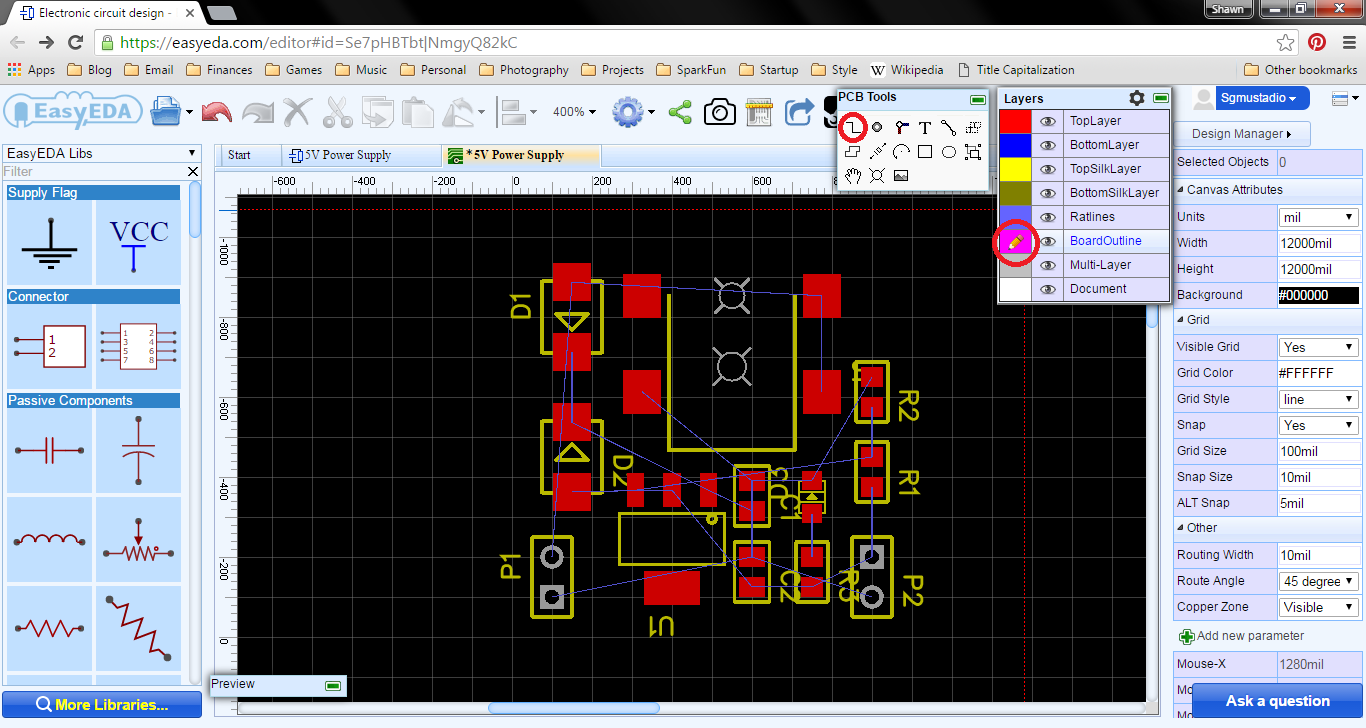
Image credit: Shawn Hymel
While it is a convenient PCB design application for new users, it has major drawbacks that prevent it from being used in professional settings. Lack of advanced routing features that are standard in other tools, no access to industry-wide supply chain and component information, and a slow user interface are just a few of the reasons EasyEDA is not used professionally. These factors eliminate any real career opportunities for students who only learn to use EasyEDA; you won’t find any job descriptions requiring EasyEDA!
Simply put, EasyEDA is not sufficient for professional-grade hardware, it is purely a learning tool for hobbyists and students. The restrictions listed above and the lack of many basic features do not align with the real design practices of companies that design and manufacture real products.
KiCad EDA
KiCad is one of the most popular free PCB software programs due to its wide-spread support from the open-source community and dedicated group of developers. Many KiCad users also use paid design platforms, giving them exposure to more advanced features, and these features have slowly made their way into KiCad.
Key Highlights of KiCad:
- Schematic capture and PCB layout in a single application
- More placement and routing tools than EasyEDA
- Users can build some custom features with scripts
- Access a component library to help start new projects
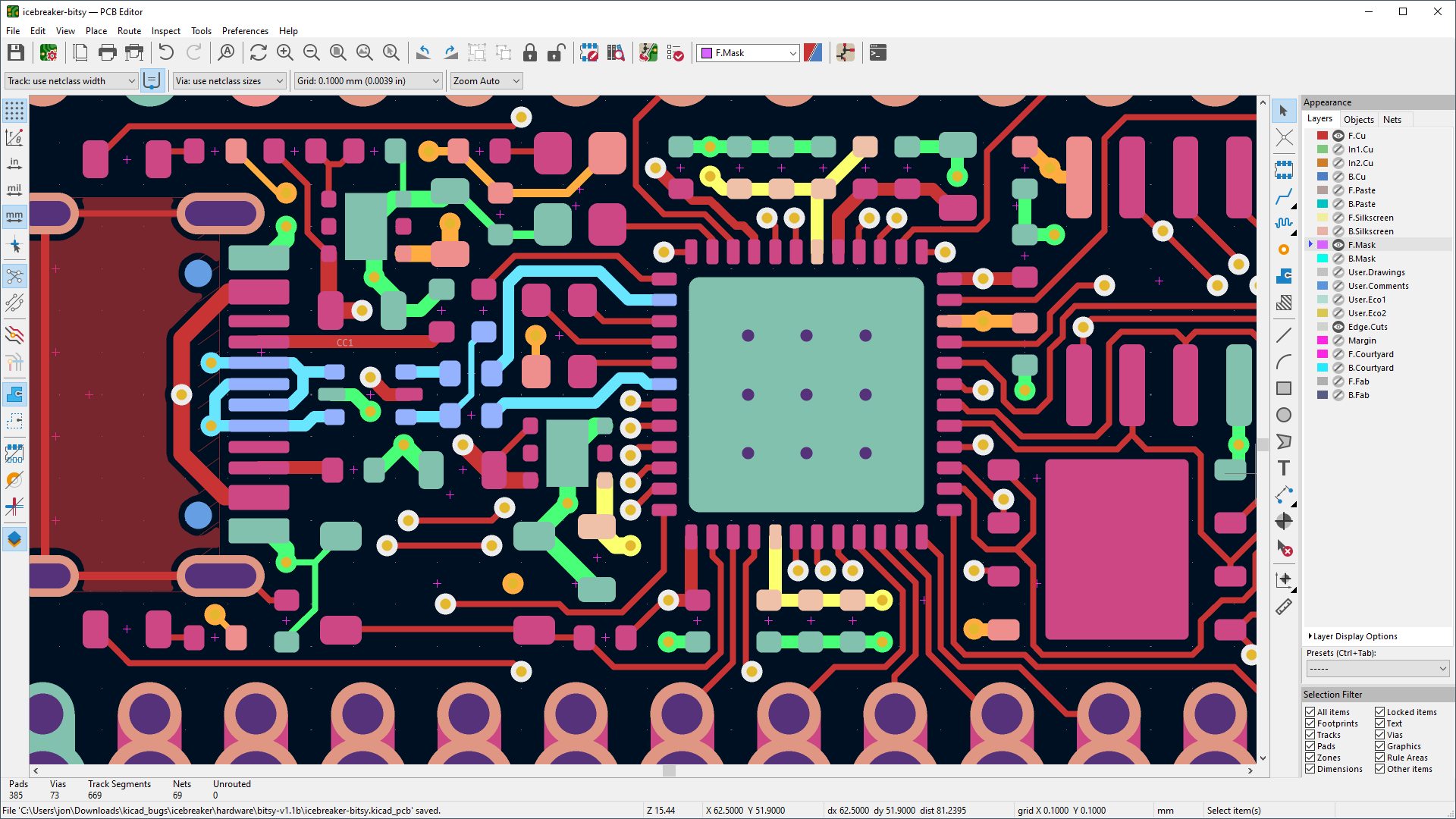
Although KiCad has come a long way over the years, the biggest drawback to using KiCad is that it is not used professionally for advanced, high-value projects, which limits career opportunities. Professional PCB design and electrical engineering positions overwhelmingly list a paid design platform as a requirement for a position, with Altium Designer being the most popular.
Missing features include rigid-flex support, automated high-speed digital design support tools, high layer count designs, and features supporting and automating manufacturing release creation. This is where engineers start to look to a platform like Altium Designer to support more advanced projects.
Altium Designer
Students often work with Altium Designer by gaining license access through their educational institution or as part of a research group. Altium Designer is a professional-level PCB design software application with the largest number of users among the paid design software platforms. Users can design literally any type of PCB that can be commercially manufactured, including rigid-flex, fully flexible designs, printed circuits, molded interconnect devices (MIDs), and multi-PCB systems.
Key Highlights of Altium Designer:
- Supports high-sheet count, high-layout count, high component count designs by default
- High-speed digital design features that automate routing and analysis
- Fully configurable rules engine
- Built-in support for rigid-flex, flex, multi-PCB systems, and HDI PCBs
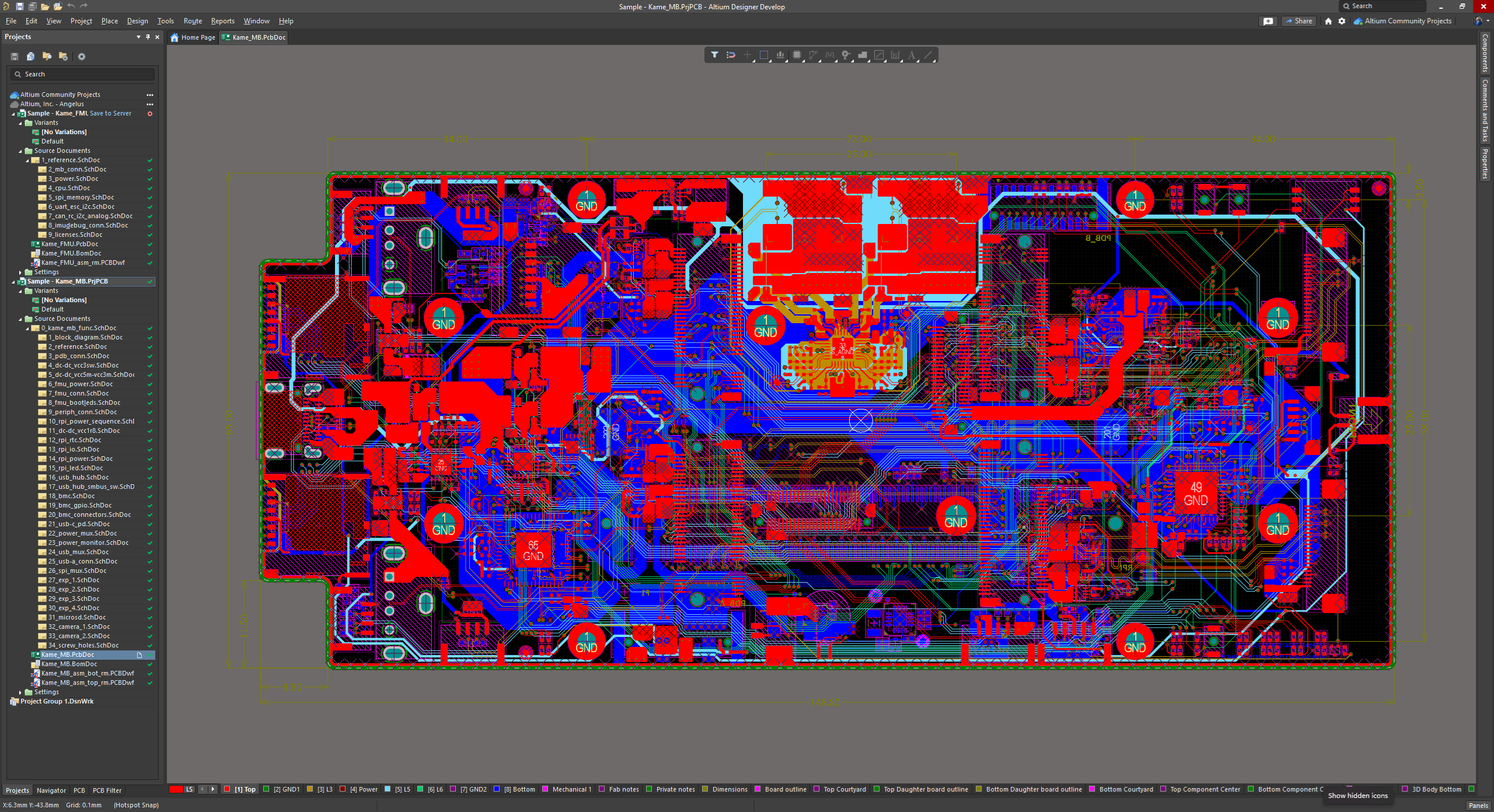
This feature list only scratches the surface and does not include the enterprise-level features available in the program on a standard license option. These basic features bring Altium Designer into alignment with the needs of engineering firms and OEMs building advanced products. This means students can get a major career boost when they learn to use Altium Designer while in school.
Although Altium Designer was built for professional designers, it is used by many students who want to improve their skills and prepare themselves for careers in the electronics industry. It is also a huge productivity booster compared to KiCad; many of the built-in features in Altium Designer work immediately when you start designing, whereas KiCad requires users to write a custom script to get the same capability.
CircuitMaker
CircuitMaker is a free PCB design application that implements many of the same features found in Altium Designer. It removes many of the higher-end, enterprise-level features that are needed by larger organizations and instead focuses on giving users a streamlined design experience with powerful routing tools. It focuses on rigid PCBs with moderate layer counts, which would typically be designed by students, hobbyists, and new designers.
Key Highlights of CircuitMaker:
- Similar professional toolset as found in Altium Designer
- Fast placement, routing, and component creation
- Multi-sheet schematic design and high-layer count PCB support
- Co-Design into Fusion 360 for mechanical design

The table below gives a full feature comparison between CircuitMaker and Altium Designer. The overlapping features are essentially the same in terms of menu/panel access, effectiveness, and keyboard shortcuts. The tools also implement the exact same workflow and have a similar data format.
|
Feature Category |
CircuitMaker |
Altium Designer |
|
Multi-sheet, hierarchical schematic capture |
X |
X |
|
PCB layout with 3D PCB view + clearance checking |
X |
X |
|
Interactive routing, interactive tuning, autorouting |
X |
X |
|
Differential pair routing |
X |
X |
|
Design rules / DRC |
X |
X |
|
CAM outputs (Gerber + NC Drill, ODB++) |
X |
X |
|
Component library backed by Octopart data |
X |
X |
|
Cloud-hosted projects (Altium 365) |
X |
X |
|
Share projects for viewing/comments |
X |
X |
|
Find PCB components supplied by parts manufacturers |
X |
|
|
SPICE simulation in the schematic editor |
X |
|
|
Automated drawing creation |
X |
|
|
HDI PCB design features |
X |
|
|
Rigid-flex PCB design |
X |
|
|
Multi-board system design |
X |
Due to the similarity and overlap between some features, CircuitMaker offers excellent career prospects for students who want to work professionally as PCB designers or electrical engineers. The tool functions and workflow in CircuitMaker closely match the capabilities in Altium Designer, making the transition into Altium Designer’s professional features quick and seamless.
Start Learning With CircuitMaker
CircuitMaker was originally produced by Altium as a PCB design tool for the maker community. However, it is also an excellent design application for students who want to learn PCB design. The thing that makes CircuitMaker really great is that it is essentially an “Altium Designer Lite” application with many of the same features. Some of the advanced features have been removed, but the core schematics, placement, routing, and libraries features are all included.
Once you’re ready to start working in Altium Designer, it’s incredibly easy to move your CircuitMaker designs into Altium Designer. Altium Designer can open and modify CircuitMaker files directly. Unlike conversions between CAD tools from different vendors, your converted designs never require corrections or updates. You can immediately start working on the imported design in Altium Designer.
Build Your Career With an Altium Designer Student License
Students understandably love free PCB design software, but all high-salary professional positions require the design capabilities only found in paid software. With Altium Designer being the most in-demand PCB design platform across the electronics industry, it pays to learn this powerful software.
Thankfully, students with a valid educational institution email can obtain a free student license at Altium Education and get immediate access to the software for non-commercial usage. Altium Designer gives students access to the next level of PCB design software that is demanded by small engineering firms, large enterprises, and successful entrepreneurs.
- Integrated SPICE simulation in the schematic editor
- Import support for LTspice and PSpice projects
- Automated signal integrity features for standard computing interfaces (DDR, MIPI, Ethernet, etc.)
- Advanced semi-automated and fully automated routing features
- Direct view of component inventory and lifecycle in multiple locations
- Automate your manufacturing file export process
- Automated drawing creation in Altium Draftsman
- Automated IPC-compliant footprint creation
Readers will notice the word “automated” many times in the above list; this is because many of the simpler tasks can be semi-automated or fully-automated, but without removing a human from the verification loop.
These features also enable more advanced tasks that are very difficult or simply not possible in KiCad or EasyEDA. The next section shows an example that is common in commercial projects.
Example of an Advanced Design Task: DDR Routing
To see how Altium Designer provides a major improvement over EasyEDA and KiCad, consider a task that would be needed in a more advanced design: DDR routing. In today’s electronics, DDR routing is not necessarily “advanced,” but rather a necessity in many digital systems and commercial products. This is where Altium Designer sets itself apart from CircuitMaker, EasyEDA, and KiCad: it helps automate rule creation, routing, and timing.
For DDR3 and faster buses, the designer needs to perform three main tasks during routing:
- Define the bus timing constraints
- Automatically enforce the trace impedance during routing
- Delay-match the nets, ideally without manual length tuning
With the xSignals tool and the built-in routing features, a designer can quickly execute these tasks and get a DDR interface, routed, timing-matched, and verified against design rules. These tasks could take hours of manual routing in KiCad, and the same level of tuning and verification is impossible in EasyEDA.
Get Started With an Educational License
Students who get educational license access and learn to use these tools will have a major advantage over other students that only use free software. The complete feature set in Altium Designer is demanded by companies working on today’s advanced electronics. So if you’re a student and you’re searching for a PCB design software package, don’t get seduced by free software. Instead, focus on using a design platform that will improve your skills and your job prospects.
If you want to advance your career as a designer, then you should start learning and using Altium Designer. Whether you need to build reliable power electronics or advanced digital systems, contact Altium Education to get started!
Frequently Asked Questions
I’m a student or hobbyist. What is the best PCB design tool for students?
If you can’t justify the cost of an Altium Designer license, the best option is CircuitMaker. It’s a free schematic + PCB layout tool built on Altium Designer’s core technology, with online collaboration and project storage through an Altium 365 Personal Space. CircuitMaker offers more features than KiCad thanks to its library tools, access to millions of manufacturer-verified components, and instant visibility of distributor inventories inside CircuitMaker.
Can students access an educational license of Altium products?
Yes, students can use their institutional email address to get access to a student license of Altium Designer; visit education.altium.com for more information.
Why should I use CircuitMaker for hobby/student work instead of KiCad?
The great part of using CircuitMaker is that the workflow is very similar to Altium Designer, so it prepares users for a transition to Altium’s higher-level commercial tools.
I want to make sure I’m advancing in my career. What are my job prospects if I learn to use Altium products?
A big advantage of CircuitMaker is that it uses the same workflow and tools found in Altium Designer, so it prepares you to use Altium Designer as part of a regular job. In contrast, KiCad is rarely listed as a required skill at high-paying jobs.
Where can I access open-source PCB projects that will help me learn PCB design?
A great resource for accessing open-source designs is GitHub. Many users make their PCB design projects available for free download under a standard open-source license. There are also many component libraries available on GitHub.
Can I access example projects in CircuitMaker that will help me learn PCB design?
Yes, CircuitMaker gives users access to example projects through the CircuitMaker website. Users can share their projects publicly and make them available for free download.

About Author
Related Resources
Related Technical Documentation
Table of Contents
- What Students Look For in PCB Design Software
- EasyEDA
- Key Highlights of EasyEDA:
- KiCad EDA
- Key Highlights of KiCad:
- Altium Designer
- Key Highlights of Altium Designer:
- CircuitMaker
- Key Highlights of CircuitMaker:
- Start Learning With CircuitMaker
- Build Your Career With an Altium Designer Student License
- Example of an Advanced Design Task: DDR Routing
- Get Started With an Educational License
- Frequently Asked Questions
- I’m a student or hobbyist. What is the best PCB design tool for students?
- Can students access an educational license of Altium products?
- Why should I use CircuitMaker for hobby/student work instead of KiCad?
- I want to make sure I’m advancing in my career. What are my job prospects if I learn to use Altium products?
- Where can I access open-source PCB projects that will help me learn PCB design?
- Can I access example projects in CircuitMaker that will help me learn PCB design?
Solutions for Every Role and Team
- Discover and evaluate design options earlier
- Develop in one shared workspace
- Scale with control and compliance
- Connect every stage of hardware development
Learn More
Thank you, you are now subscribed to updates.