









What to Spec for Channel Integrity: Practical Checklists for High-Speed Links

At a Glance
Learn why channel integrity fails late. Follow an eight-step spec checklist to allocate margin across retimers, connectors, cables, materials, and tests early.


Most teams discover channel integrity problems at bring-up: an eye that looked clean in simulation closes on the bench, a connector that was rated for the data rate fails in the actual topology, or a stackup change propagates a margin hit nobody budgeted for. Each of these is a spec failure that surfaces as a signal integrity (SI) failure. The fix is to define channel integrity as a set of measurable requirements early enough to influence architecture, and then verify those requirements through every phase of the design.
Key Takeaways
- Channel integrity is a requirements problem first. You win or lose margin with topology, stackup, and interconnect choices.
- Retimers, redrivers, connectors, and cables each consume part of your channel budget. Spec them with IL, RL, crosstalk, and jitter numbers that tie directly to your link margin.
- A measurement plan is part of the channel spec. Fixture strategy and de-embedding should be defined before layout is locked.
What Channel Integrity Really Covers
A high-speed channel encompasses the entire electrical path from transmitter pins to receiver pins, including package breakouts, vias, reference plane transitions, traces, connectors, cables, and any active conditioning along the way. Channel integrity is the ability of that path to meet a target bit error rate (BER) across voltage, temperature, process variation, and real-world interconnect conditions. Your topology, components, and validation method all have to hold up, and the results have to be reproducible.
Every element in the path consumes part of the margin budget. When any one of them is underspecified, the problems show up late, and the debug cycle gets expensive. In this article, we present an eight-step process to help you understand what to spec, how to spec it, and what to demand from component vendors so your simulation and lab results converge. In addition, we’re providing practical checklists for each step of the process.
For a closer look at how PCIe 7.0, 800G Ethernet, USB4, and Wi-Fi 7 are driving these requirements upstream, see High-Speed Standards Keep Raising the Bar.
Step 1. Define the Link You Are Actually Building
Start with a short link definition block that’s included in your requirements and in your test plan.
Link Definition Checklist
- Standard and speed target (example: PCIe, Ethernet, USB4, or a proprietary SerDes).
- Lane count and lane bonding expectations.
- Reach and topology. On-board only, board-to-board, cabled, or flyover.
- Latency budget (especially if you might add retimers).
- Power and thermal constraints at likely conditioning locations.
- Environmental and mechanical constraints (vibration, service access).
These decisions form the requirements baseline for every downstream choice. Lock them in early and keep them in your test plan.
Step 2. Build a Budget Before Layout Starts
A channel budget is the spec backbone. It turns wishful thinking into hard numbers that your stackup, connector choices, and conditioning plan can actually satisfy.
Budget Items to Include
- Insertion loss (IL) versus frequency.
- Return loss (RL) versus frequency.
- Crosstalk targets: NEXT, FEXT, and mixed-mode metrics (if you use them).
- Skew budget: including glass weave and connector contributions.
- Mode conversion targets because common-mode energy often shows up as EMI.
- Jitter budget assumptions and how much you expect equalization to recover.
If you can't express a requirement as a budget line and a reference plane, you won't be able to validate it cleanly.
Step 3. Retimers. What to Spec When You Need CDR
When you need clock and data recovery (CDR), a retimer provides a reset point in a channel. It re-transmits a clean version of the signal, restoring margin that equalization alone cannot recover. That capability comes with design constraints you need to spec up front.
Retimer Spec Checklist
- Supported data rates and protocols.
- Lane count and lane mapping flexibility.
- Latency (typical and worst-case).
- Jitter tolerance and jitter transfer behavior (how the device filters or passes jitter).
- Equalization behavior and controls: Static presets versus adaptive behavior; how you configure and monitor it.
- Power states and thermal characteristics.
- Reference clock requirements, if any.
- Signal path requirements: AC coupling expectations, package escape constraints, and routing guidance.
- Model availability: IBIS-AMI where relevant, plus reference designs and evaluation collateral.
Featured Retimer
Broadcom BCM85667 is a 5 nm, 16-lane PCIe Gen 6 and CXL 3.1 retimer operating at 64 GT/s PAM4. Its product brief documents supported data rates, bifurcation options, EQ controls, and footprint compatibility. That's the level of spec detail you should expect from any retimer you qualify.
Step 4. Redrivers. What to Spec When You Want Linear EQ
A redriver provides linear equalization and output conditioning. It does not do clock recovery. That trade-off typically means lower latency and simpler integration, with less ability to rehabilitate a seriously degraded channel.
Redriver Spec Checklist
- Supported data rate and bandwidth.
- Equalization range and step size.
- Output swing range and flat gain controls.
- Noise and linearity behavior, especially if you may amplify noise along with signal.
- Input sensitivity and common-mode handling.
- Configuration interface and telemetry.
- Package and escape constraints.
- Model availability and reference layout guidance.
Featured Redriver
Diodes’ PI3EQX32908ZRIEX is an 8-channel PCIe 5.0 linear redriver supporting 5 to 32 Gbps with programmable per-channel EQ, output swing, and flat gain controls; it also covers SAS4 and CXL protocols.
Step 5. Connectors as Channel Components
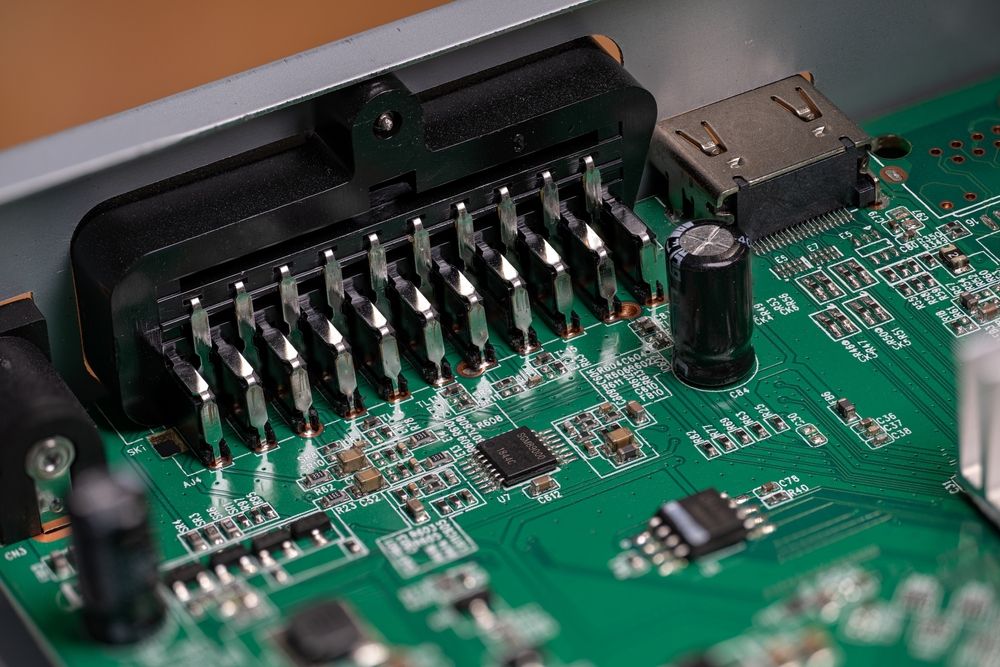
At high speeds, the connector and its launches can consume a disproportionate share of margin, so they deserve the same spec rigor as any other channel component.
Connector Spec Checklist
- Differential impedance target and tolerance.
- IL and RL versus frequency for the mated pair and for the PCB launches.
- Crosstalk behavior and pin-field isolation guidance.
- Stack height options and tolerance stackups.
- Mating cycles and mechanical durability assumptions.
- PCB footprint and breakout constraints.
- Availability of S-parameters and any reference design guidance.
- Second-source plan at the interface level.
Featured Connectors
Molex Mirror Mezz 202828-1506 is a hermaphroditic board-to-board mezzanine connector with 404 circuits, 2.50 mm stack height, and BGA-attach mounting, supporting data rates up to 56 Gbps per differential pair. It uses an OCP-recommended footprint shared across the Mirror Mezz family, which gives you S-parameter data, footprint documentation, and distributor visibility you can attach to your channel model and BOM review.
Step 6. Cables and Flyovers: Spec the Channel Extension
Copper cable assemblies and active optical flyovers both extend channel reach beyond what on-board traces can deliver, but they solve different problems. Copper cables behave as transmission lines with impedance, shielding, and bend radius constraints. Optical flyovers sidestep dielectric loss entirely but introduce electro-optical conversion, power, thermal, and latency considerations. Spec whichever approach your link budget requires, and define what equivalent performance means for any alternates you consider.
Cable Spec Checklist
- Differential impedance and skew.
- IL and RL versus frequency, including transitions at each end.
- Shielding effectiveness and grounding approach.
- Bend radius and strain relief constraints.
- Mating cycle requirements and service access.
- Passive versus active behavior, if applicable. For optical flyovers, specify wavelength, optical power budget, latency, and power consumption per lane.
- Qualification requirements and approved cable list.
Featured Active Optical Flyover Assembly
Samtec ECUO-B04-14-015-0-2-1-2-01 (the FireFly ECUO) is an active optical flyover assembly available as a 4-channel full-duplex transceiver at 28 Gbps per channel, or a 12-channel transmitter or receiver at 16 Gbps per channel. With OM3 multimode fiber, they can reach up to 100 meters. It bypasses PCB trace loss entirely and uses the same micro-connector system as Samtec's copper flyover assemblies, so the footprint stays the same if you switch between optical and copper.
Step 7. Low-Loss Materials and Copper: Put Stackup in the Spec
Higher-bandwidth links require the stackup to be a controlled design input. Your channel spec should include material targets and acceptable ranges, and it should call out what you are assuming about copper roughness and process capability.
Material and Stackup Spec Checklist
- Dk and Df targets at relevant frequencies, plus allowable variation.
- Copper foil profile assumptions when conductor loss is the limiting factor.
- Glass weave and skew risk controls for long differential runs.
- Tg, Td, and Z-axis CTE if your environment or assembly profile is demanding.
- Fabricator capability assumptions: Drill aspect ratios, registration, via fill, and lamination cycles.
- Lock the laminate system and require explicit review before any substitutions.
Featured Low-Loss Laminates
Panasonic’s MEGTRON 7 and Isola’s I-Tera MT40 are representative ultra-low-loss and very-low-loss laminate families used in high-speed digital channels. Use these products as reference points for what you want from any laminate you select: stable electrical data, process guidance, and a clear product identity you can lock in the build notes.
Step 8. Measurement Plan. Make Correlation the Goal
Your measurement plan needs defined reference planes, fixtures, calibration, and de-embedding, so you can compare simulation results to bench data without ambiguity. IEEE 370-2020 is a practical anchor for this work, covering data quality, fixture considerations, and de-embedding for PCB and interconnect characterization up to 50 GHz.
Measurement Plan Checklist
- What you will measure: TDR for impedance profile, VNA S-parameters for interconnect segments, and eye or jitter at defined points.
- Where you will measure: Define the reference planes and name them.
- How you will calibrate: State the calibration method and the traceability.
- How you will de-embed: Choose methods you can execute with your fixtures and tools.
- How you will correlate: Define acceptance criteria for sim-to-measurement alignment.
Featured Measurement Platform
Keysight PNA-X Network Analyzers cover frequency ranges from 900 Hz up to 67 GHz (model dependent), with multiple internal sources, S-parameter and noise receivers, and compatibility with Keysight's PLTS software for interconnect characterization and de-embedding.
Where Octopart Fits in the Workflow
Channel integrity parts often have fewer true alternates. Connector families, specialty conditioning ICs, and certain cable assemblies can become the parts that hold up a build. Use Octopart and the BOM Tool to keep three things connected while the design is still flexible:
- The part number and up-to-date lifecycle status.
- The supporting collateral: Datasheets, models, and reference designs.
- Alternate products and supplier options before footprints and interfaces harden.
The earlier you attach real part data to your channel model, the fewer assumptions survive into layout. A connector S-parameter file, a retimer product brief, or a laminate Dk/Df table is worth more than a placeholder and a plan to finalize things later. Octopart gives you one convenient place to check availability, pull datasheets, and confirm lifecycle status while the design is still flexible enough to absorb what you find.
The Discipline That Prevents Re-Spins
Channel integrity is built through a set of decisions you make during architecture, stackup, and interconnect selection, and then verified through simulation, measurement, and correlation before and after layout. The through line across all of it is the same: define what you need, specify it in numbers, pick parts that come with data to back those numbers, and write the measurement plan before layout locks. The teams that do this consistently are the ones that skip the re-spin.

About Author
Related Resources
Related Technical Documentation
Table of Contents
- Key Takeaways
- What Channel Integrity Really Covers
- Step 1. Define the Link You Are Actually Building
- Link Definition Checklist
- Step 2. Build a Budget Before Layout Starts
- Budget Items to Include
- Step 3. Retimers. What to Spec When You Need CDR
- Retimer Spec Checklist
- Featured Retimer
- Step 4. Redrivers. What to Spec When You Want Linear EQ
- Redriver Spec Checklist
- Featured Redriver
- Step 5. Connectors as Channel Components
- Connector Spec Checklist
- Featured Connectors
- Step 6. Cables and Flyovers: Spec the Channel Extension
- Cable Spec Checklist
- Featured Active Optical Flyover Assembly
- Step 7. Low-Loss Materials and Copper: Put Stackup in the Spec
- Material and Stackup Spec Checklist
- Featured Low-Loss Laminates
- Step 8. Measurement Plan. Make Correlation the Goal
- Measurement Plan Checklist
- Featured Measurement Platform
- Where Octopart Fits in the Workflow
- The Discipline That Prevents Re-Spins
Solutions for Every Role and Team
- Discover and evaluate design options earlier
- Develop in one shared workspace
- Scale with control and compliance
- Connect every stage of hardware development
Learn More
Thank you, you are now subscribed to updates.