











How to Choose the Right Components for Your BOM

At a Glance
Learn choosing BOM components that stay available. Check lifecycle, stock, compliance, and real build pricing before you commit.


Selecting components means making choices that ship on time, scale to production, and remain supportable next quarter and next year, while balancing electrical fit with availability, lifecycle, and compliance considerations. A shared BOM workspace facilitates these complex decisions by aligning design and sourcing teams and connecting working prototypes to predictable builds.
The following guide outlines a practical workflow you can use with the Octopart BOM Tool as you design. It starts with better input data, brings lifecycle and compliance forward, and encourages you to price the way production buys.
Key Takeaways
- Design for availability and lifecycle longevity so the parts you select can be built today and supported through production.
- Price with production-level rigor by modeling batch sizes, MOQs, and packaging to get credible totals before you buy.
- Keep compliance and approved vendor lists (AVL) aligned so engineering choices move cleanly into purchasing.
Prepare the BOM
BOM preparation covers three areas: structuring your upload, processing the data, and capturing context for the team.
Start with clean data. A well-structured upload accelerates matching and reduces downstream cleanup. For the strongest first-pass match, include:
- Manufacturer part number (MPN)
- Manufacturer name
- Quantity
The Octopart BOM Tool handles partial or missing data with alternates, which are especially useful for generic passives when exact MPNs aren't specified. However, complete MPNs deliver the fastest matching and cleanest results.
Create a repeatable upload process:
- Upload your spreadsheet or CSV and confirm the column mapping
- Use the BOM Tool to normalize your data and automatically match components
- Clean up any remaining typos, spacing, or formatting inconsistencies
Treat the BOM as shared memory. Capture essential notes directly in the BOM:
- Preferred packages
- Derating guidance
- Thermal considerations
- Assembly constraints
- Procurement preferences
Example: You're designing a motor-control board with two electrically interchangeable gate drivers. One comes in a package that your assembly house rarely runs. Add that note now, and you'll avoid a last-minute scramble when procurement asks why the "cheaper" option is slowing placement.
Screen Lifecycle Risk Early
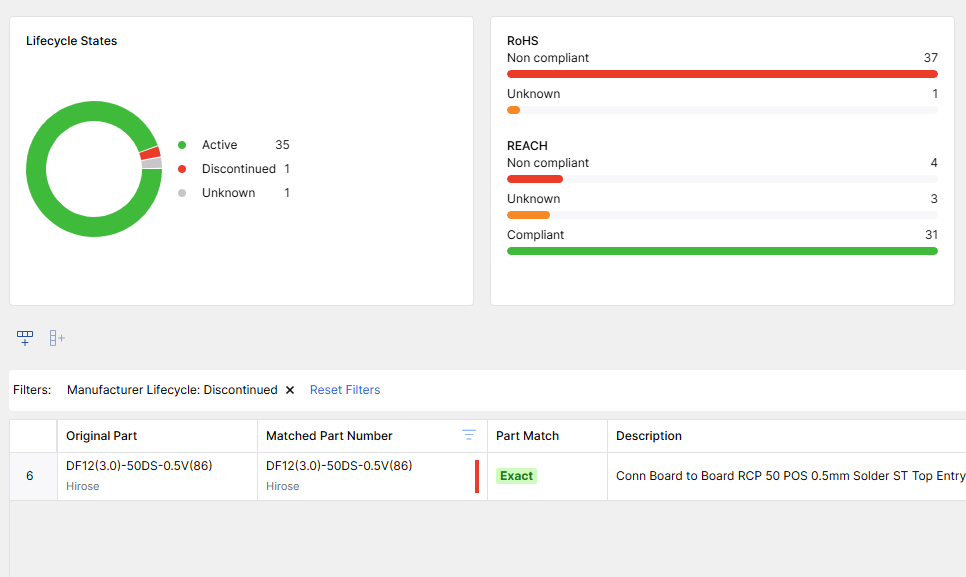
Don’t wait for a buy to find out a part is on the way out. Use lifecycle indicators (Active, NRND, EOL) as a fast filter and treat the results as a gate. If a part is risky, swap it now while the layout is flexible. The Octopart BOM Tool's Analytics tab is your spotlight, where unknown or ambiguous lines pop to the surface, and you can decide whether to research, replace, or annotate.
This single move – front-loading lifecycle – changes the whole project tempo. When risky parts never enter the layout, you don’t pay the tax of rework, emergency alternates, and schedule resets.
Check Availability and Policy
Availability is part of the spec. Review the current stock context against your AVL. Set preferred distributors and review BOM coverage to see how much of your list is obtainable under policy. When procurement policies don't align with market conditions, engineering and procurement should decide together and document the decision in the BOM.
Documenting policy exceptions in the BOM prevents future buyers from relitigating past choices, reducing email threads and delays.
Model Real Costs
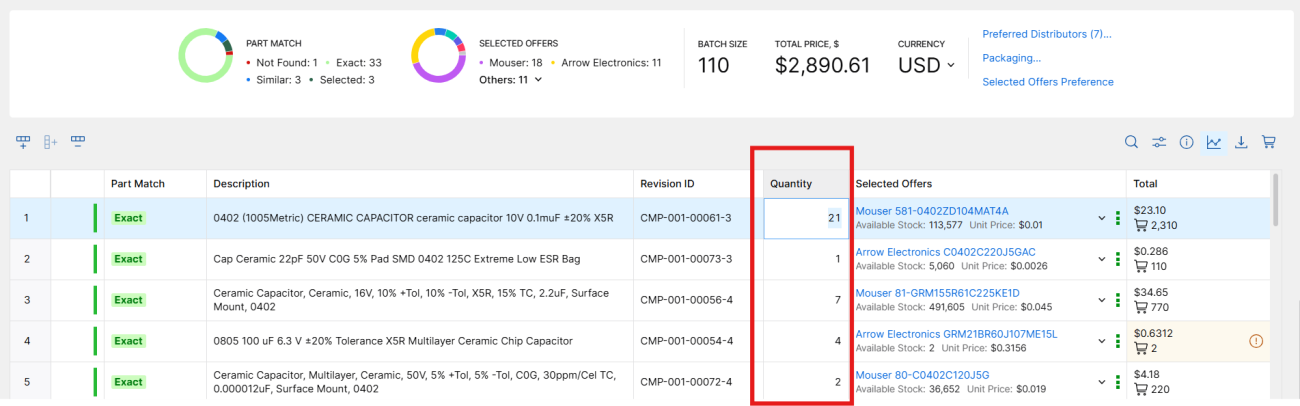
Price components the way you intend to buy them. Adjust batch sizes to match actual build lots, factor in minimum order quantities, and consider price breaks. Next, choose packaging that fits your assembly plan – for example, tape-and-reel for automated lines, cut tape or trays for small runs – and confirm that a low unit price doesn’t hide handling costs or placement risk. Watch how minor packaging differences change the math when a board has dozens of passives and multiple ICs with break points.
When you model realistic batches with the Octopart BOM Tool, you see true cost horizons. You also see which parts dominate the bill and deserve extra scrutiny. Maybe the switching regulator is perfect electrically, but it drives a packaging constraint. Maybe the connector family has a new series with better availability at common break points. Modeling reveals those tradeoffs while you still have choices.
Verify Compliance
Compliance becomes simple when it’s not a separate process. Use the BOM Tool's Analytics tab to confirm RoHS, REACH, and AEC-Q status for each line, then collect the documentation you’ll need for audit trails. If a part has uncertain status, escalate while you still have time to find alternates. The goal is to arrive at purchasing with proof in hand, not a to-do list.
Example: A Chinese connector fails REACH screening for SVHC content. The team finds a compliant equivalent from the same family, validates mechanical fit, and documents the swap – all before the RFQ goes out.
Select Smart Alternates
Alternates protect schedules by providing backup options when primary components face constraints or carry lifecycle risk. Start by using close-match suggestions to explore viable replacements. Next, go beyond only validating headline specifications like voltage or tolerance and get the complete picture by examining form, fit, and function.
Check pinout and footprint compatibility, as well as examin thermal performance and derating curves. Additionally, look at supplier track records and lifecycle history to avoid future problems. A short note like “OK for builds under 500 units” or “Requires footprint variant” prevents the wrong choice six months from now.
Scenario: A precision op-amp becomes constrained. A close-match candidate has a slightly different offset spec but a stable lifecycle record. You record the tradeoff, validate it in your test plan, and mark the alternate as approved. Procurement can move with confidence because the engineering decision is visible and bounded.
For more details on this topic, see How to Source Alternate Parts with Octopart BOM Tool.
Finalize and Handoff
Once your BOM is finalized, make it easy for purchasing to place orders. Export a hyperlinked BOM so buyers can trace each part to its context, or generate pre-built carts for preferred distributors. If your organization splits buys by vendor, export per-distributor files. That one step removes hours of manual re-entry and reduces order errors. Be sure to also include a brief change log summarizing lifecycle-driven swaps and approved alternates, so the “why” travels with the “what.”
A purchase-ready BOM demonstrates that your selections account for availability, lifecycle, and policy. It’s a tool for the future you. When the next revision starts, your past decisions – and the reasons behind them – are right where you need them.
Recap of Pro BOM Workflow Tips
Beyond the core workflow, these techniques help teams working with complex BOMs or high-mix production:
- Triage fast with filters. When dealing with large BOMs, filter by lifecycle status, compliance flags, or distributor coverage to zero in on problem areas first. Address red flags before refining green zones.
- Test pricing scenarios with inline edits. Click directly into the Quantity column to model different build sizes on the fly. Watch how totals shift without rebuilding your source file, ideal for design reviews where "what if we build 500 instead of 100?" questions come up.
- Lock in vendor preferences once. Set your preferred distributors and region settings early, then those preferences carry forward across all projects. A one-time setup ensures consistency across the team.
- Tag parts with procurement-critical context. Add custom columns for lead-time constraints, assembly house requirements, or internal risk ratings. When these details live on the part line, buyers don't need to hunt through email threads or design reviews.
- Refresh Analytics after each edit round. Swapping parts can reintroduce lifecycle or compliance issues you just resolved. A quick refresh on the BOM Tool’s Analytics tab catches regressions before they reach purchasing.
- Build qualification shortcuts for complex parts. For high-stakes components – MCUs, power management ICs, RF modules – document your non-negotiable parameters once. Future alternate evaluations become faster and less error-prone.
A Short Story: From Prototype to Purchase Order
Picture a design lead walking into a Tuesday review with a first-pass BOM. In fifteen minutes, the team uploads the list, fixes identifiers, and opens the BOM Tool’s Analytics tab. Three parts flag red for lifecycle. Two have close-match alternates that swap cleanly. The third, a connector, gets marked for a footprint variant on the next revision.
They model batches and spot a meaningful price break that matches the pilot run. A few passives flip to tape-and-reel. Compliance clears. The team exports per-distributor files and a brief change log. By Thursday, purchasing converts the carts and places the order without any surprises. The next week's meeting is about firmware, not BOM triage.
Build Confidence Into Your BOM
The workflow is simple: prepare clean data, screen lifecycle early, check policy and availability, model real costs, verify compliance, and qualify alternates. The Octopart BOM Tool brings this workflow into one place so engineers can choose confidently and procurement can purchase without friction.
For more hands-on details, see:

About Author
Related Resources
Related Technical Documentation
Table of Contents
Solutions for Every Role and Team
- Discover and evaluate design options earlier
- Develop in one shared workspace
- Scale with control and compliance
- Connect every stage of hardware development
Learn More
Thank you, you are now subscribed to updates.